Job Posting Group Setup
Search for “Job Posting Groups” from search tab and click on the one coming under Administration section.
Job posting groups are used to post the transactions for all Jobs which belong to a certain posting group. Job posting groups are very important for accurately recognizing revenues.
When resources are used on Jobs, the Job posting groups can point out general ledger work in progress (WIP) accounts for the resources.
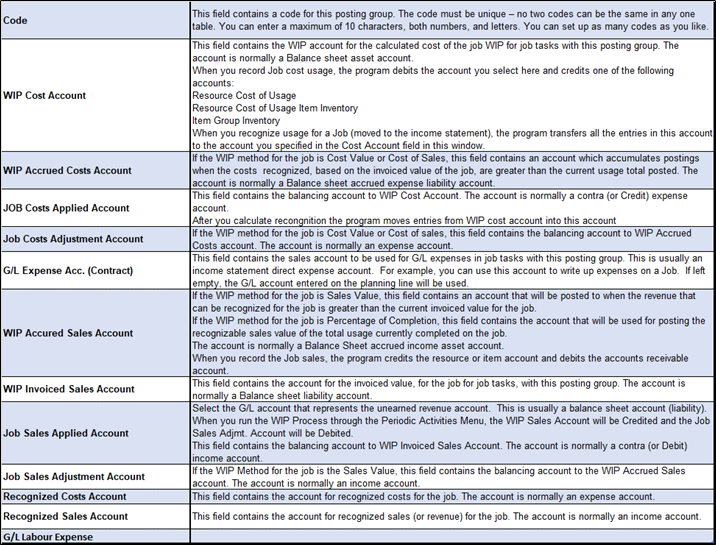
A Job posting group lets you define the following accounts:
- WIP cost accounts
- WIP sales accounts
- Cost accounts
- Sales accounts
- General ledger expense sales accounts
Make sure you have decided what accounts you need to handle recognition of revenues. Be sure to read “Using the WIP/Recognition” options before setting up Job posting groups. These options calculate and post cost valuation and recognition to the general ledger.

Make entries into the various fields. Skip fields you do not need. Be sure to enter the following fields to properly record transactions. To see a list of the account number fields, click the Assist Button for the field. When the Chart of Accounts window appears, select the account you want, and then click OK.
Fields in the Job Cost Posting Groups Window: