
Working With Job Registers
This section describes how to work with transaction registers. Transaction registers are records of postings, i.e.,it tells you about who updated the ledger and when. The Registers option in the Jobs application area lets you view more detailed information on transaction registers in the Job ledger areas.
Follow these steps to view Job transaction registers:
- Using the Search icon, search for Job Registers and select the related link
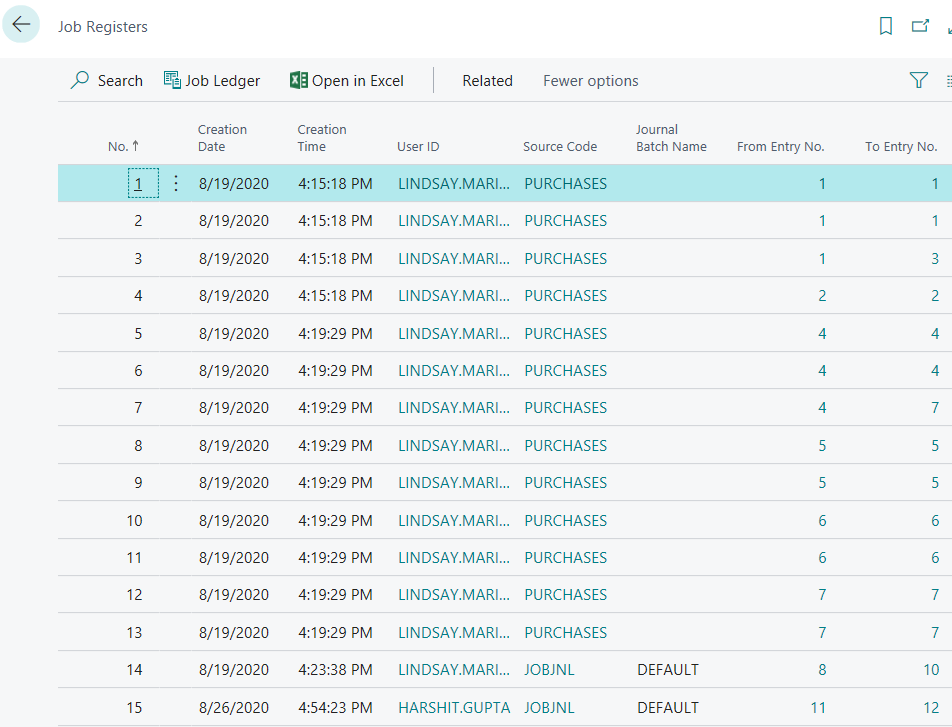
- Select the information you would like to view or print.
- To look at information filtered by a particular field, click the field you want to view.
- The Job Registers option lets you select a specific Job Ledger to view.
- From the Job Registers window, click Job Ledger to see individual entries.

- This will open the job ledger entries for the selected register entry, see below.

If you had a problem with balancing an account or getting the correct amounts on a report or document, and you looked at a transaction register to help you find the problem, you can now correct the error.
To print a resource ledger, search for Job Ledger using search icon and click related link under Reports and Analysis section. You can print one or more ledgers by specifying their numbers in a filter.