
Progress Billing with Retention Reduction & Job Sub-Level Billing
1. Retention Reduction Over-view with user story
• On 1st January 2022, Palmer & Sons agreed to start a construction project worth $150,000.
• The construction company decided to break the Project into a Master Job worth $90,000 and a Sub Job worth $60,000.
• On 31st January, The customer authorized to raise a sales invoice of 20% of master job total billing value with 10% retention and the sub job to be billed at 30% value with 12% retention.
• In the month of February a new change order to Master job of $30,000 and a reduction worth ($5,000) to the Sub job.
• For the stored material some additional equipment were purchased and customer agreed to bill them.
• On 28th Feb, the customer agreed to raise a sales invoice for 40% for all the lines.
• On 31st March, another change order to change order Master Job worth ($10,000) was introduced and a change order to Sub job for value $4,000 (Special Scenario).
• On 31st March it was mutually agreed between both the parties to reduce the retention% to 5% for all the contracts and bill 50% for all the lines and adjust all the stored material.
• In March some stored material was utilized and for the new change order $500 worth of stored materials were billed.
• On 30th April, the customer approved 100% billing of all the lines.
• On 31st May, all the retention amount was billed.
2. Tickets covered
| Issue key | Summary |
|---|---|
| PRJ-1624 | Sales Line level Multiple Retainage Calculations with different percentage on a Progress Billing |
| PE-13 | Change order with Job Sub-level inclusion in Progress Billing. This will include sub-level in Master Job. |
| PE-15 | Creation of two invoices i.e. Retention Reduction invoice and Sales Billing Invoice in the Same Progress Bill included for the Stored material and Work Amount combinations |
3. Master Job & Sub-Job Billing with Multiple retention percentage.
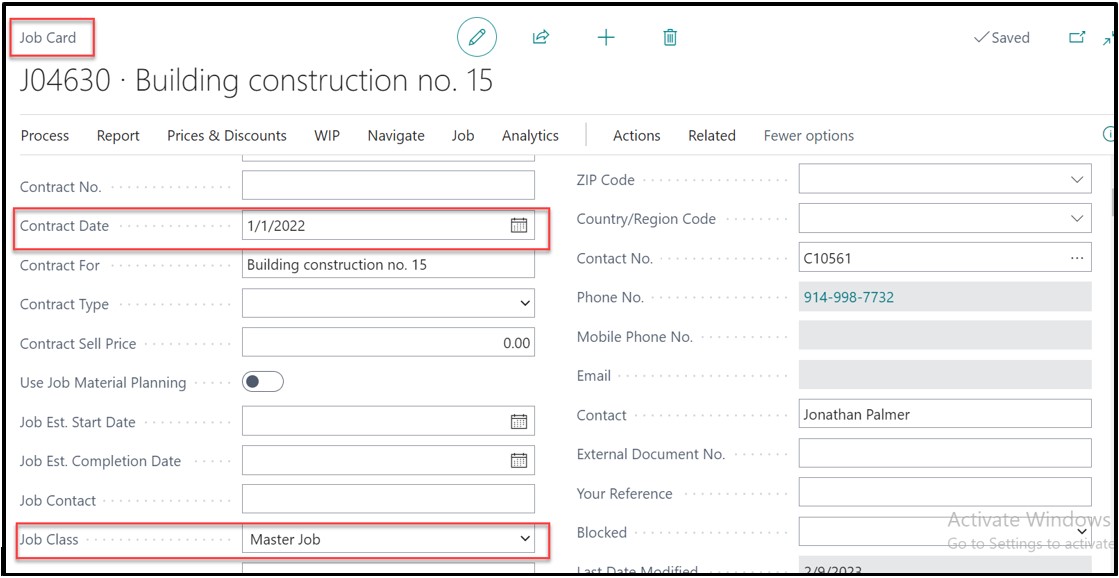
Job card it’s mandatory to enter the “Contract Date” as it required for running the report “Combined CO AIA G702 and AIA G703”.
To process the billing, open Progress Billing page. Customer gave approval to raise billing request for Master job and Sub job. User can import planning lines of Master Job and Sub Job in the same progress bill using “Get Billings” function.
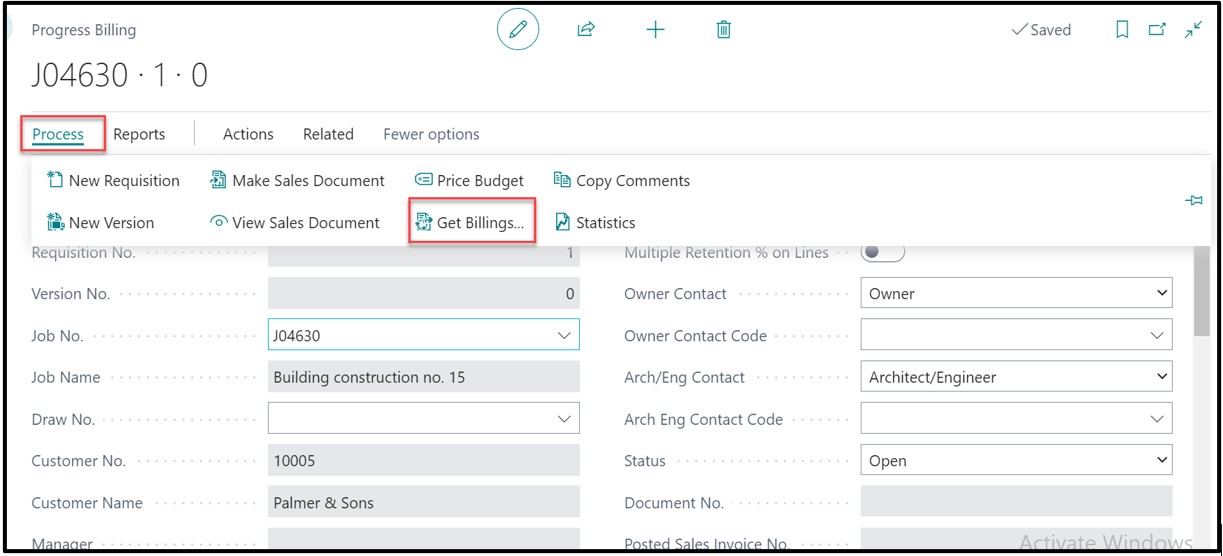
While importing the lines, the system will display a message “Should the Job J04630 card be updated to show that it is part of progress bill J04630?”, for master job and sub-job and user can click on “Yes” for both Master Job & Sub-Job.
Second message shall display “Is job J04630 a change order for Progress bill J04630?” where user opt to click on “No” as the Master Job and the Sub Job cannot be considered as a Change Order.
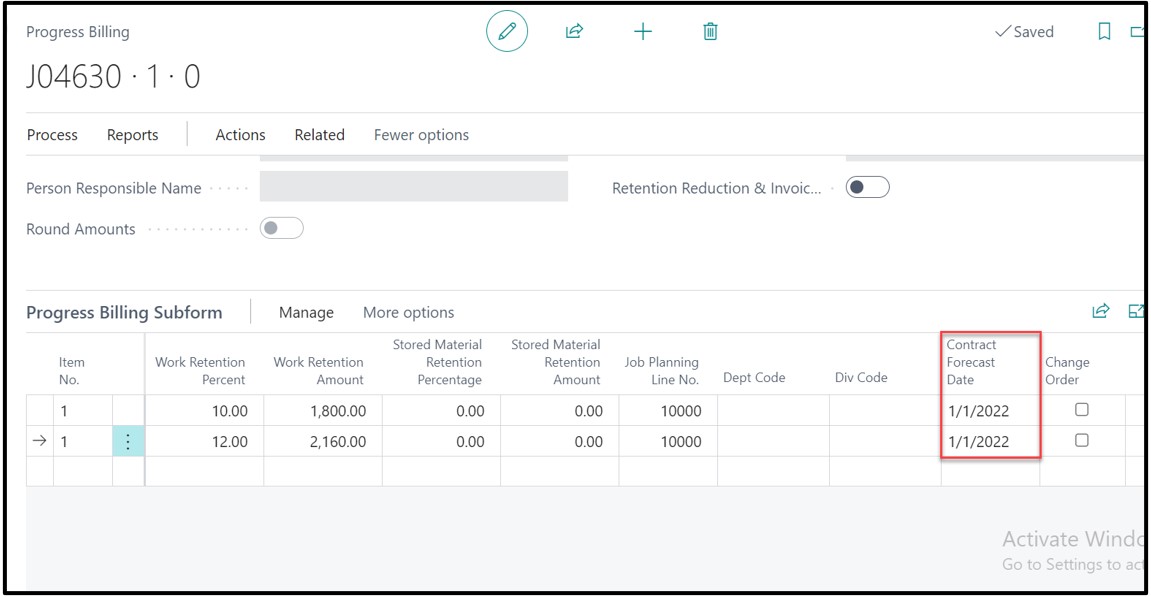
Once lines are imported it will automatically populate the field “Contract Forecast Date” as user has mentioned “Contract Date” on Job card.
Note1: It’s Mandatory to enter the Contract Date on the Master Job Card to run the AIA report.
Note2: The sublevels (Change Order, Sub Job) contract date can be entered on Progress Billing page before creating the sales invoice and the report will consider the same.
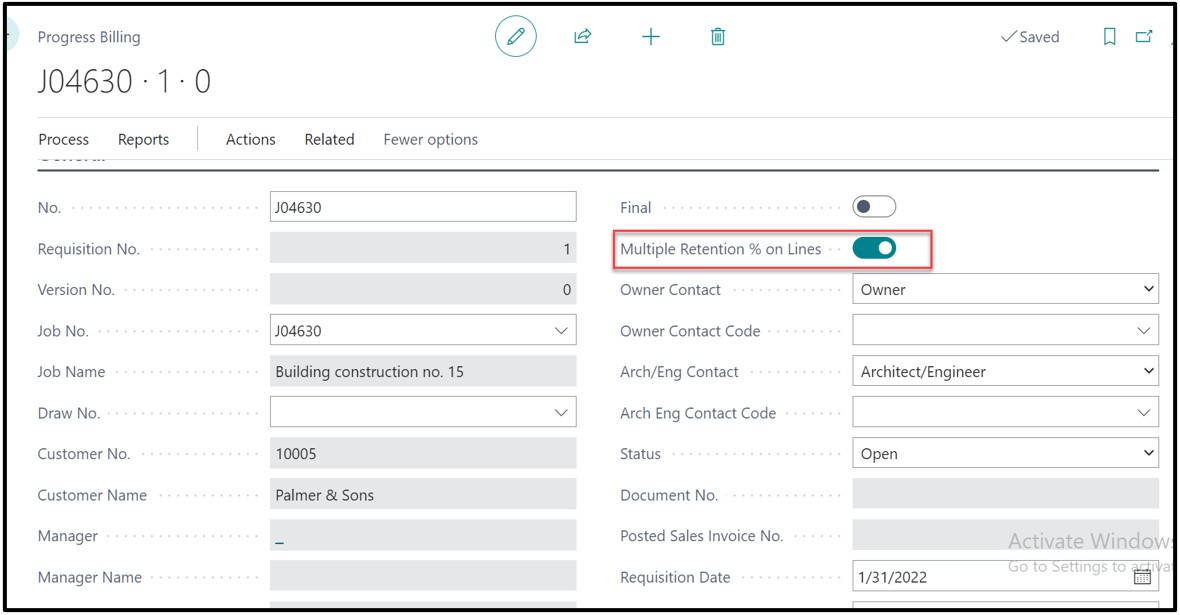
Since the retention % is different for Master Job (10% Retention) and for Sub Job (12% Retention), need to enable the Boolean of “Multiple Retention % on Lines”.
As the customer approved 20% billing of the Master Job and 30% billing of the Sub-Job, we would enter the percentage on the “Quantity” column.
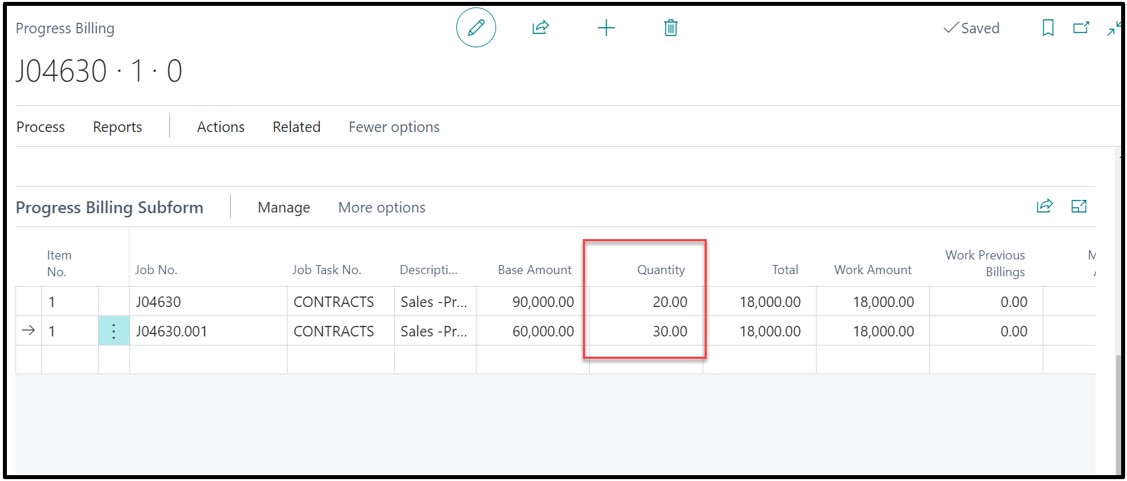
After getting the lines and enabling the Boolean “Multiple Retention % on Lines”, enter the Work Retention % on both the lines for retention calculation. In this case, the Master Job Retention is 10% and for the Sub-Job it 12%.
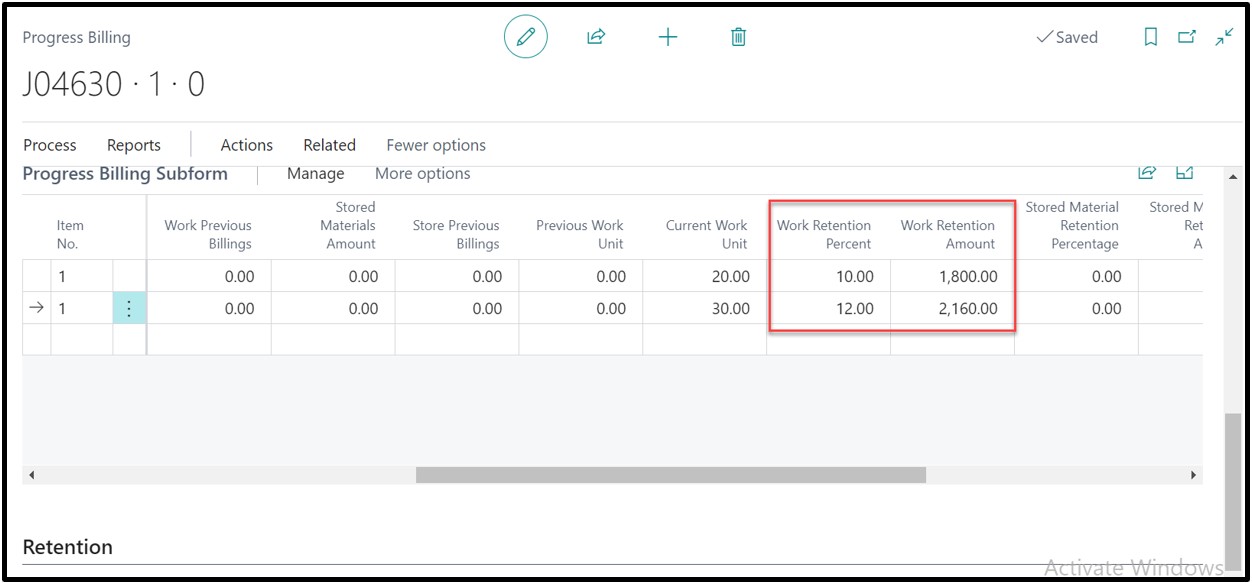
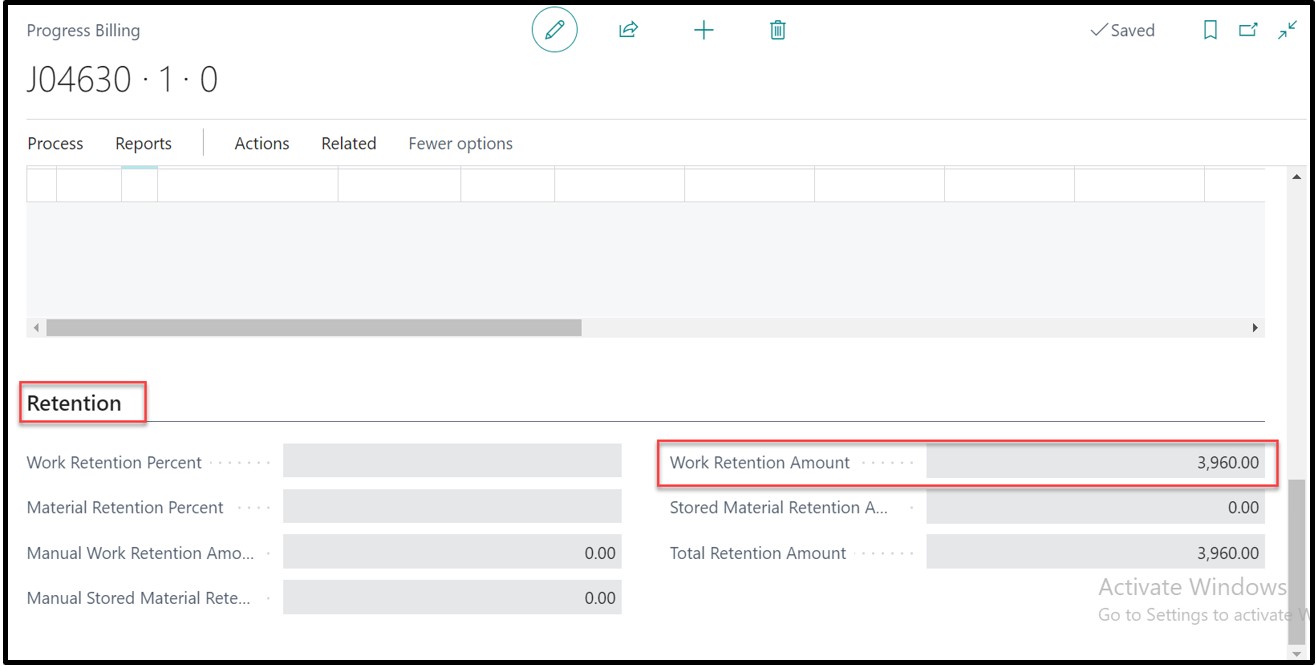
Under the Retention tab, The field “Work Retention Amount” will show the total of Work Retention for all the lines.
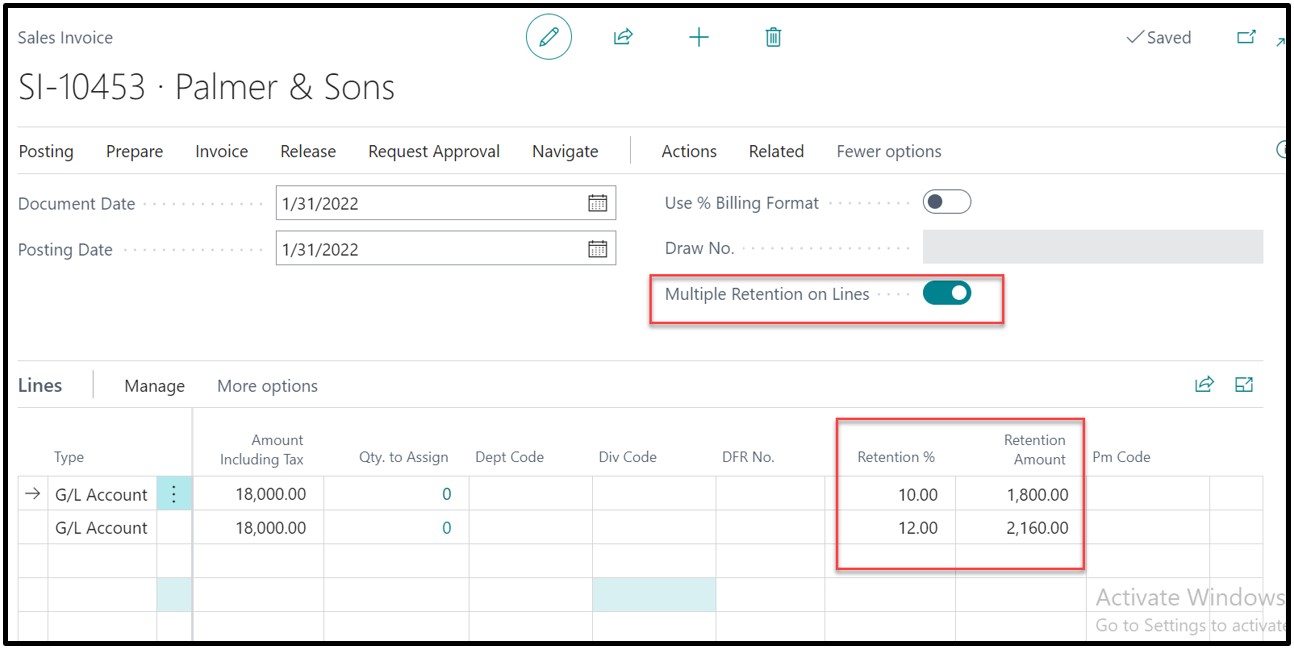
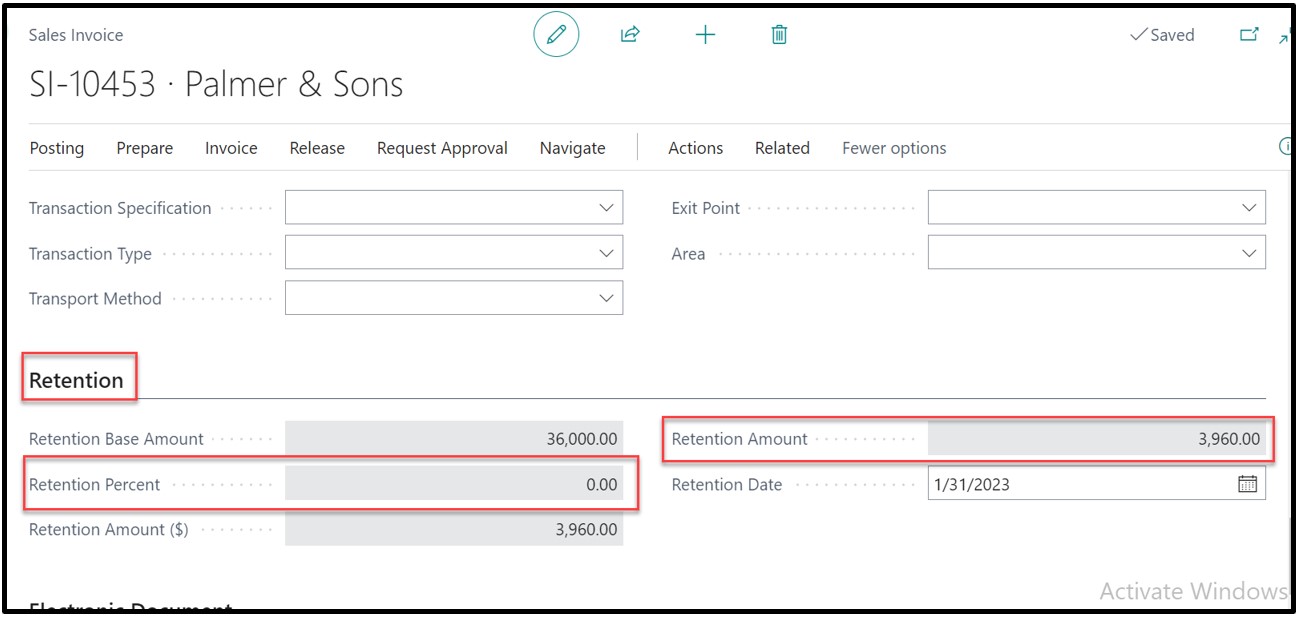
On a sales invoice, the Boolean “Multiple Retention on Lines” will become true. On the sales invoice lines the “Retention %” and “Retention Amount” will flow from the Progress Billing page to the sales invoice page for each line.
On Retention Tab. In case of Multiple retention % is enabled, there would not be any retention % mentioned on field “Retention Percent”. All the retention amount for each line will be added and be shown in field “Retention Amount”.
On Progress Bill page, click on Report-> Combined CO AIA G702 and AIA G703 to view the report
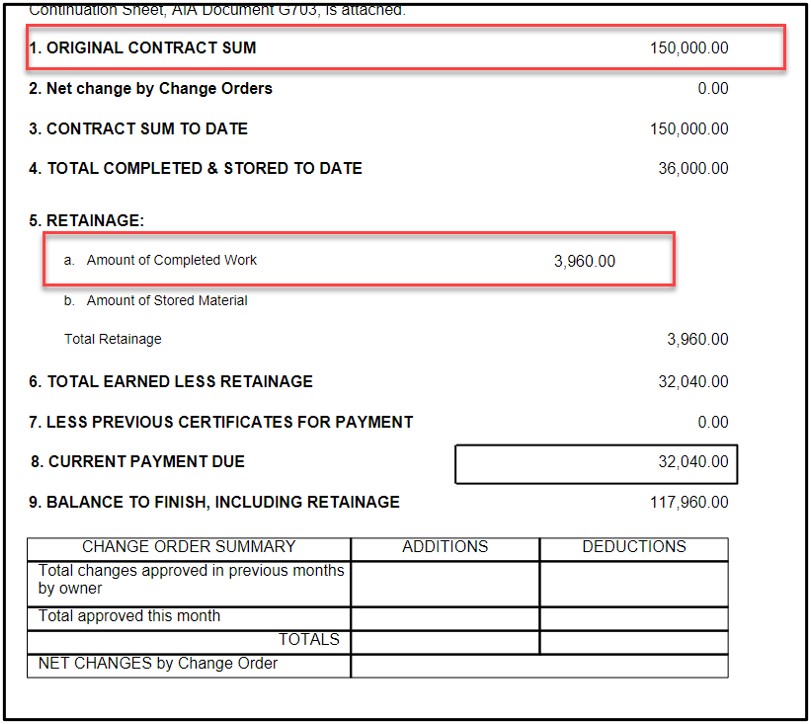
On heading “Original Contract Sum” calculated as $150,000 by combining the value of Master Job which is $90,000 and Sub Job $60,000
Under the head of “Retainage”, all the Work Amount is added and shown under “Amount of Completed Work”
4. Change Order Inclusion in Master Job and Impact on Combined CO AIA G702 and AIA G703
In February 2022, two new change orders need to be included in the New Requisition.
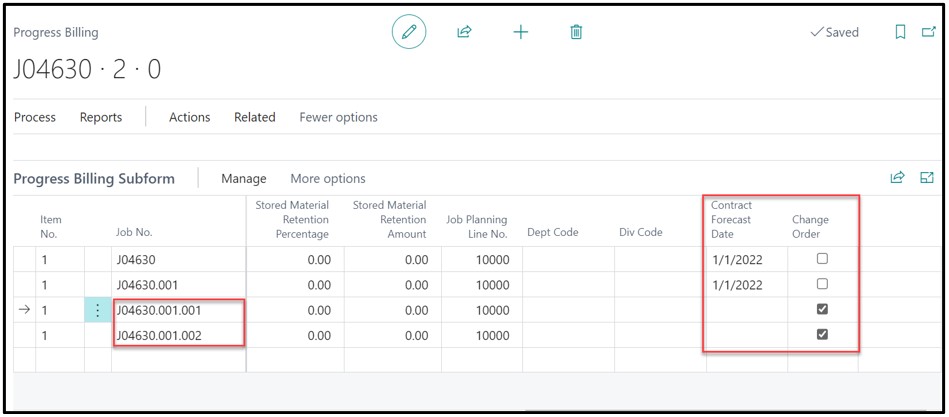
When including the change-orders the system displays the message “Should the Job J04630.001.001 card be updated to show that it is part of progress bill J04630?” click on Yes.
Another message will appear “Is job J04630.001.001 a change order for Progress bill J04630?”, the user shall opt to click ‘Yes’.
On the change order card, the “Contract Date” was not mentioned by the user, that is why the field “Contract Forecast Date” is blank. On Progress Bill user can manually enter the “Contract Forecast Date”. It’s necessary to enter the date for each line so that the system can show on which Change Orders are current and which ones are the previous on Combined CO AIA G702 and AIA G703.
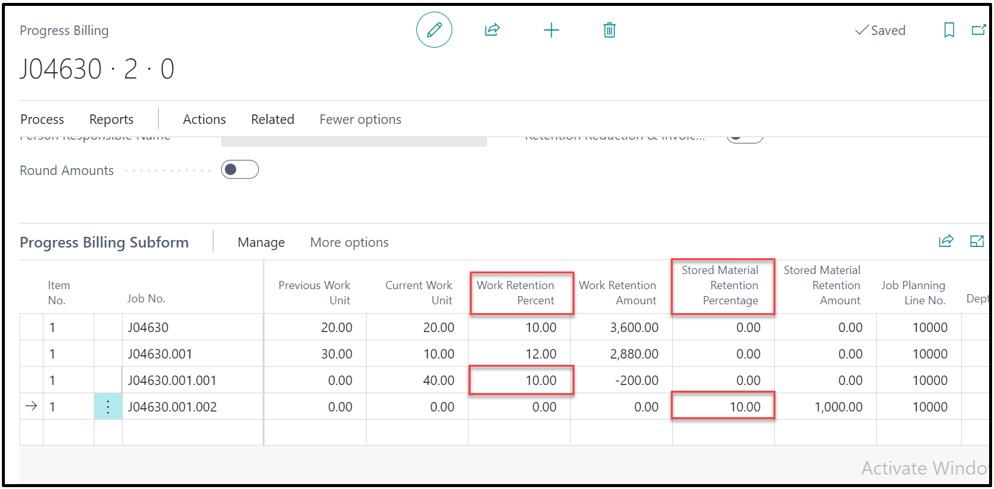
It was agreed that 40% will be billed for all lines till 28th February except for the change order J04630.001.002 in which only $10,000 will be billed in form of stored material.
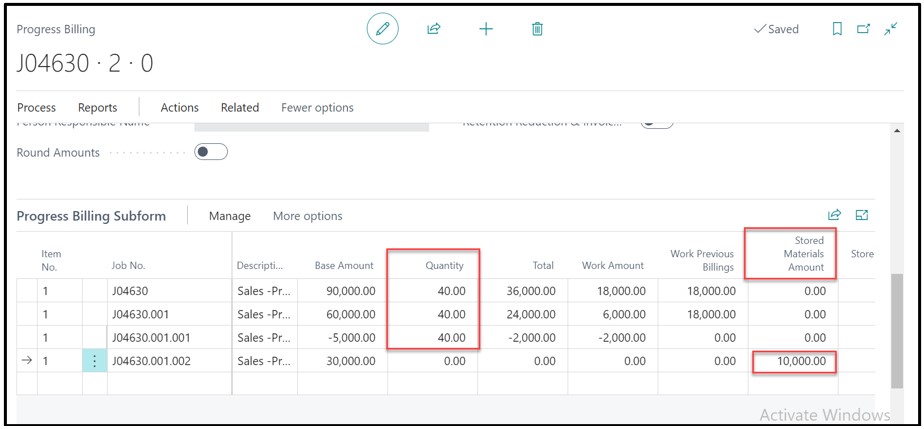
For the change order in which we are billing the Work Amount we must enter the Work Retention Percent for newly added lines. In our case, we have entered 10% in Work retention Amount. The Change Order in which we are billing the Stored Material user must enter “Stored Material Retention Percentage”. In this case user is entering 10% in column “Stored Material Retention Percentage”
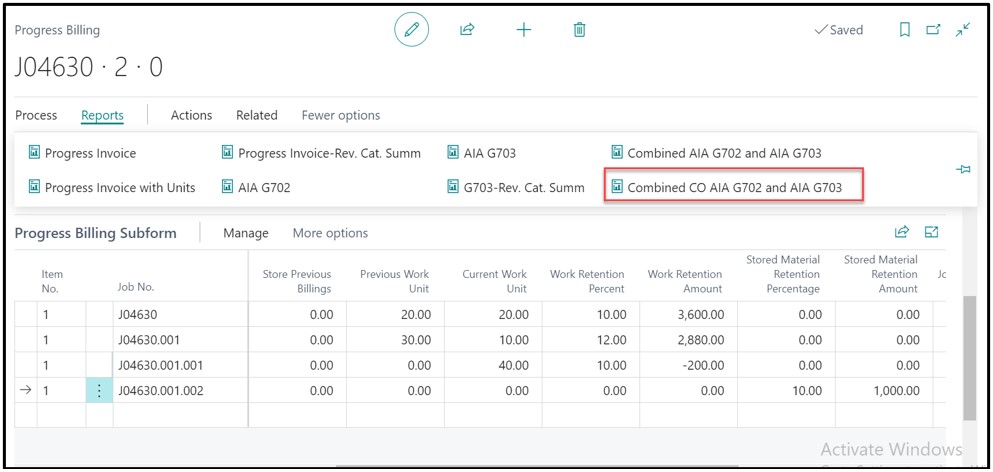
After posting the document we can run the report to see the calculated values. To access the report, click on “Combined CO AIA G702 and AIA G703”
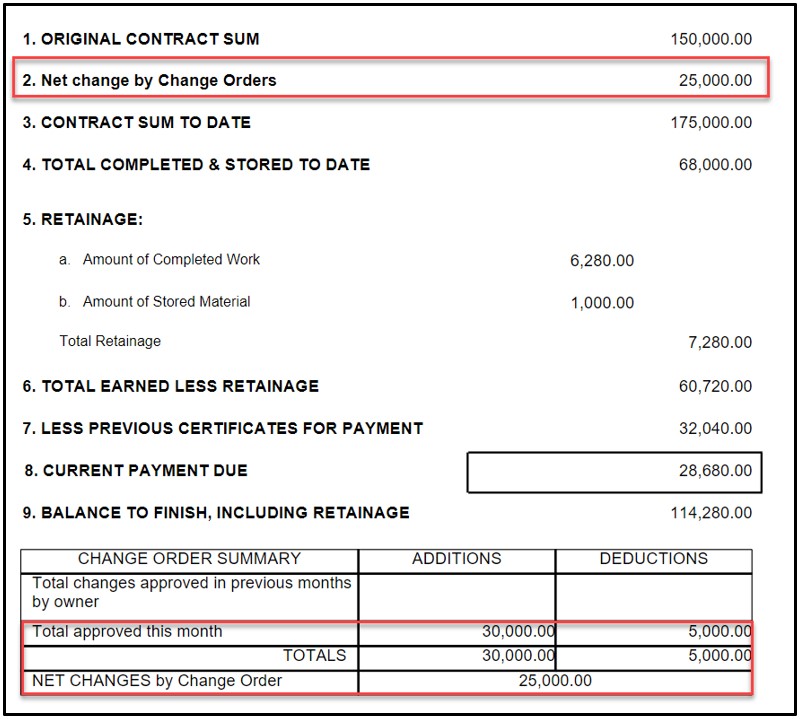
In the AIA report under heading of “Net Change by Change Orders” we see the value of $25,000 (Change Order 1: $30,000 and Change Order: ($5,000).
Under the “Change Order Summary” header, under column “Additions” we see the Change order with positive value. In our case a Change order J04630.001.002 worth $30,000 was shown. Another Change Order “J04630.001.001” is shown with Negative value of ($5,000) under the column “Deductions”.
5. Additional Billings, Retention Reduction and Impact on Combined CO AIA G702 and AIA G703
In Month of March it was agreed that Retention % will be 5% and total 50% work amount will be billed for all the lines.
In the “Quantity” column, the user shall enter 50% value quantity column in all lines.
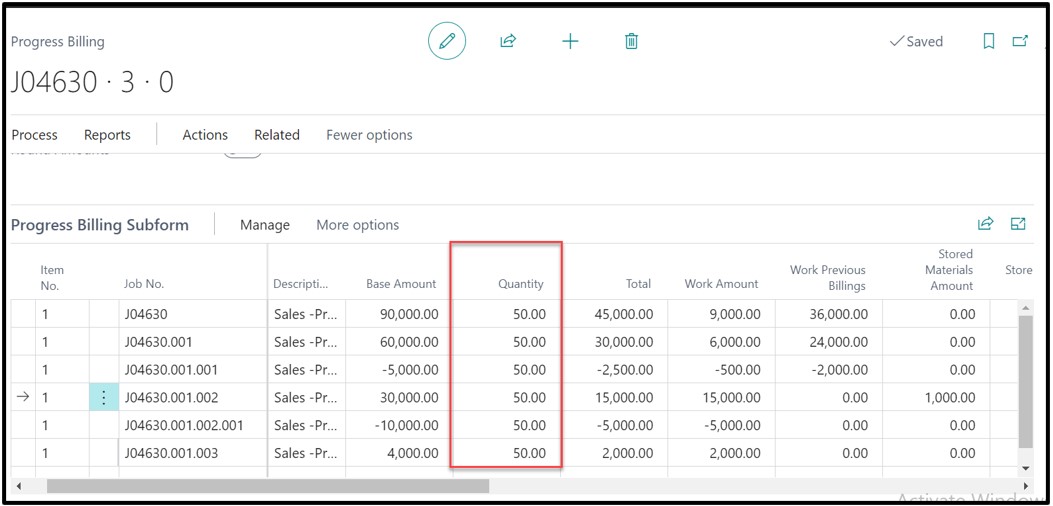
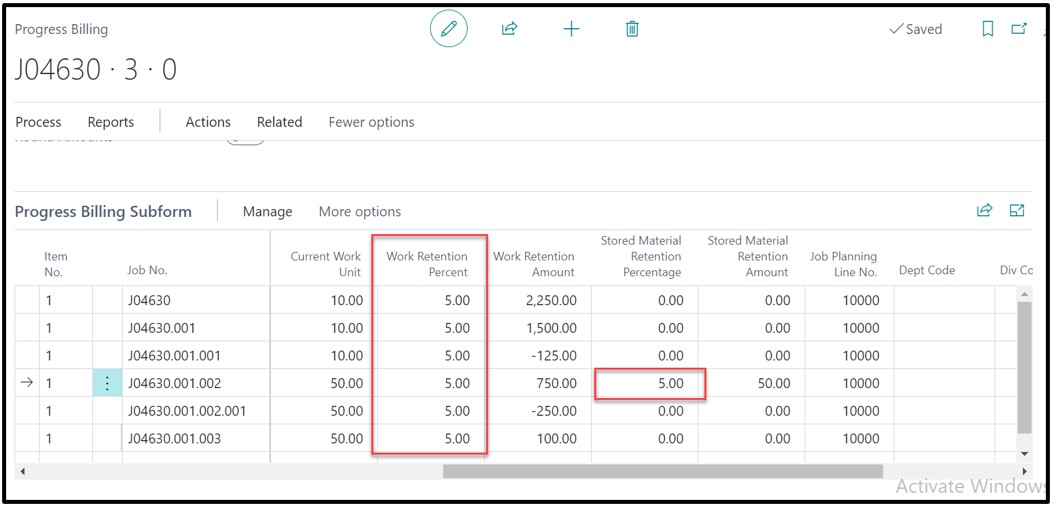
In column of “Work Retention Percent” we must enter 5% for all the lines. For Change-Order J04630.001.002 we have to enter 5% in “Stored Material Retention Percentage”
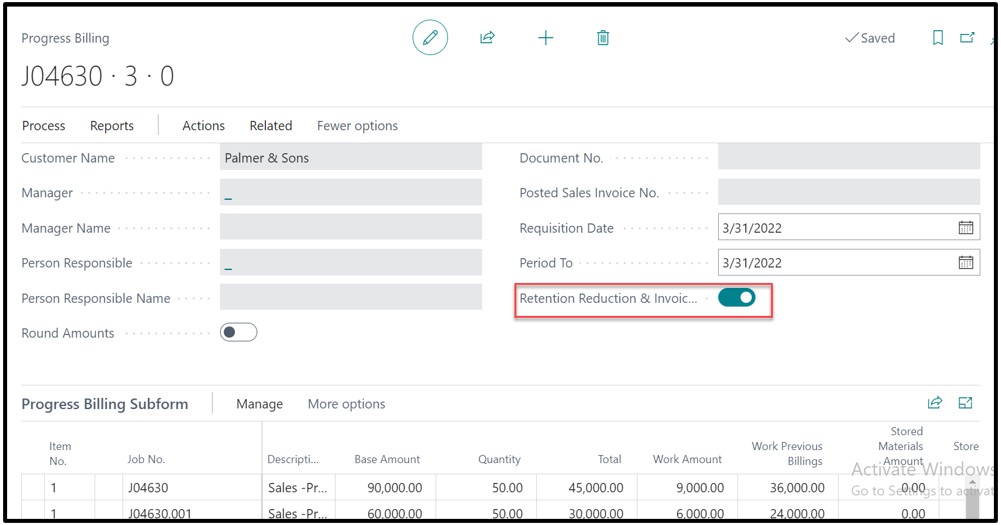
As we are reducing the retention % and doing additional Billing at the same time, user shall enable the Boolean “Retention Reduction & Invoicing”.
Click on Process -> Create Sales Document. The system will create one “Retention Sales Invoice” and second invoice as a “Normal Sales Invoice” because of additional billings.
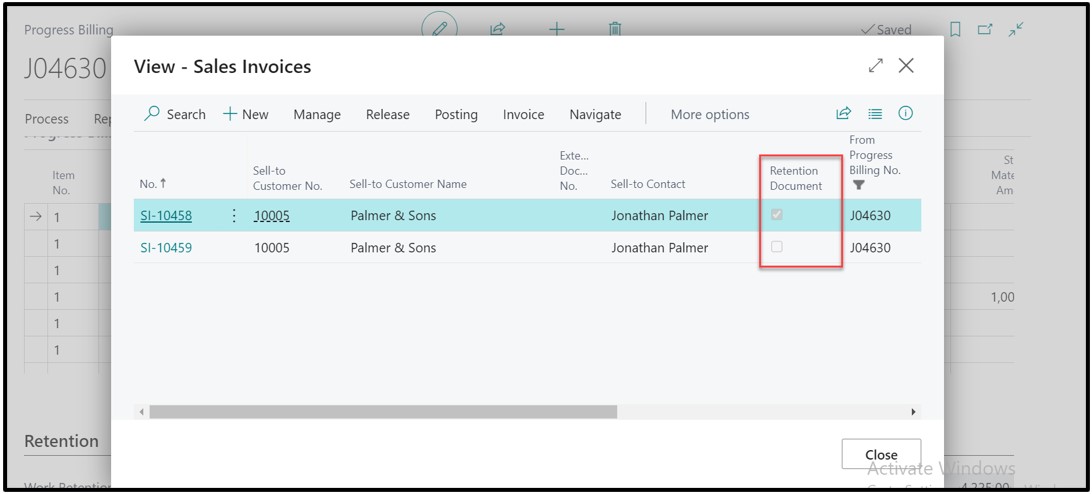
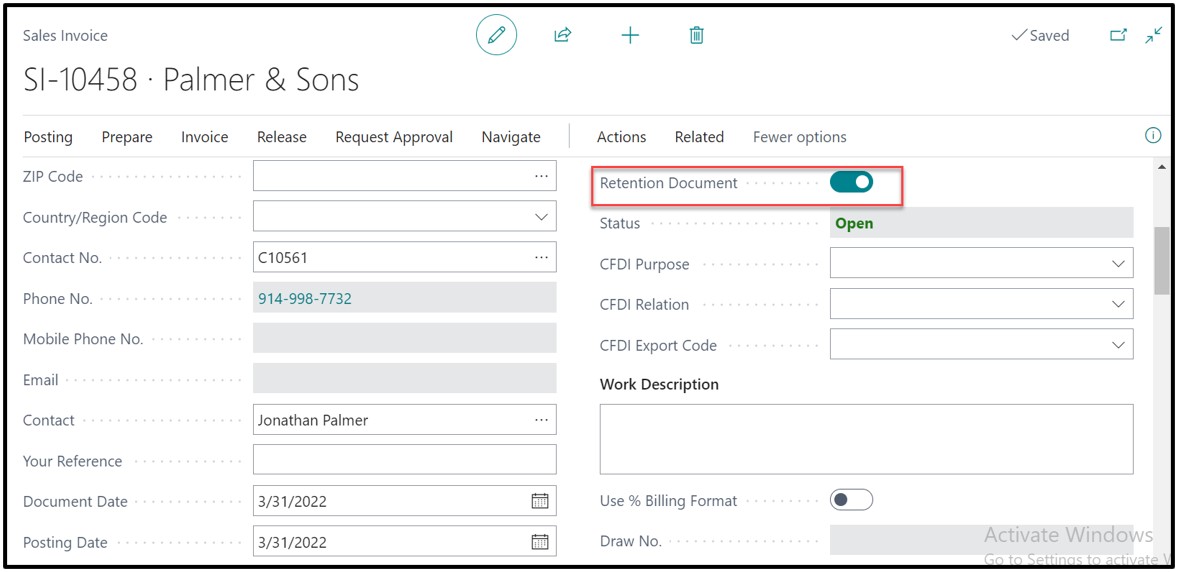
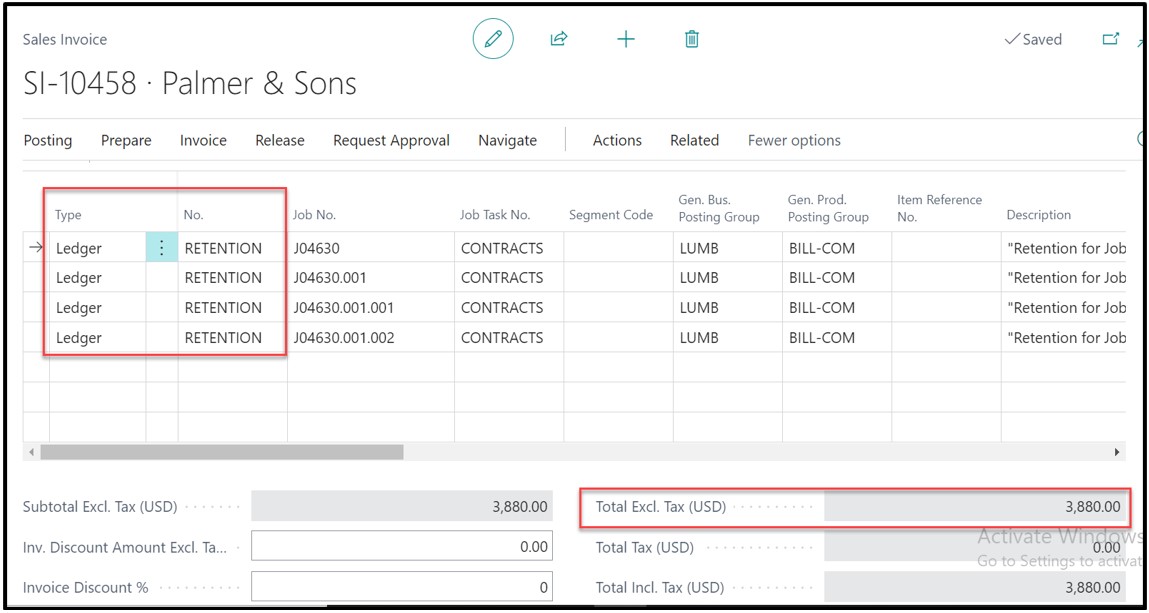
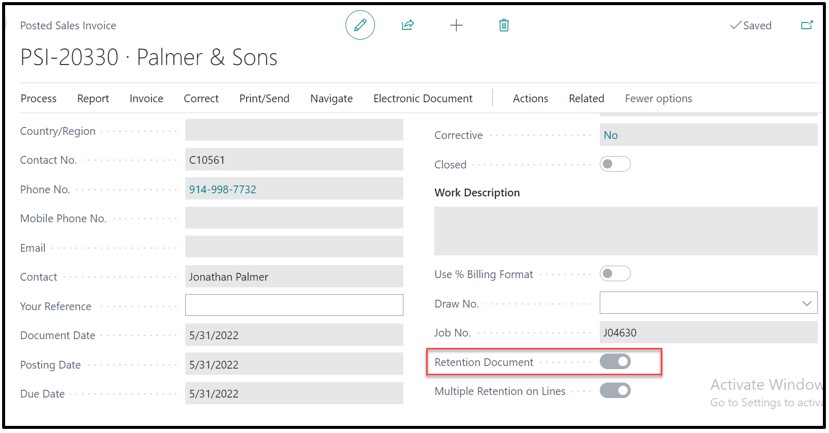
On the retention invoice, the Boolean of “Retention Document” is TRUE.
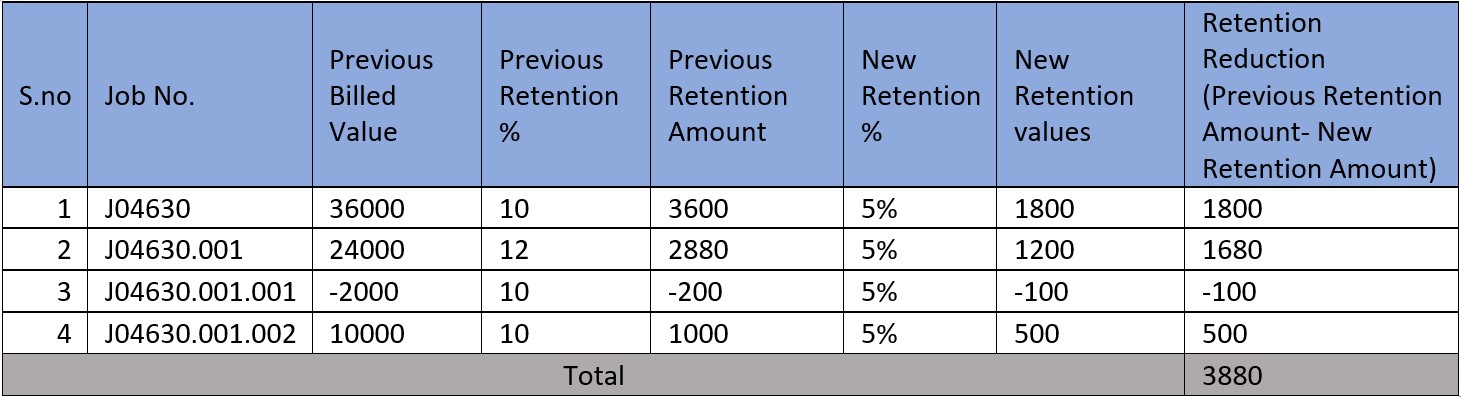
Retention Sales Invoice with value $3,880 is created.
Retention Reduction Calculation for reference:
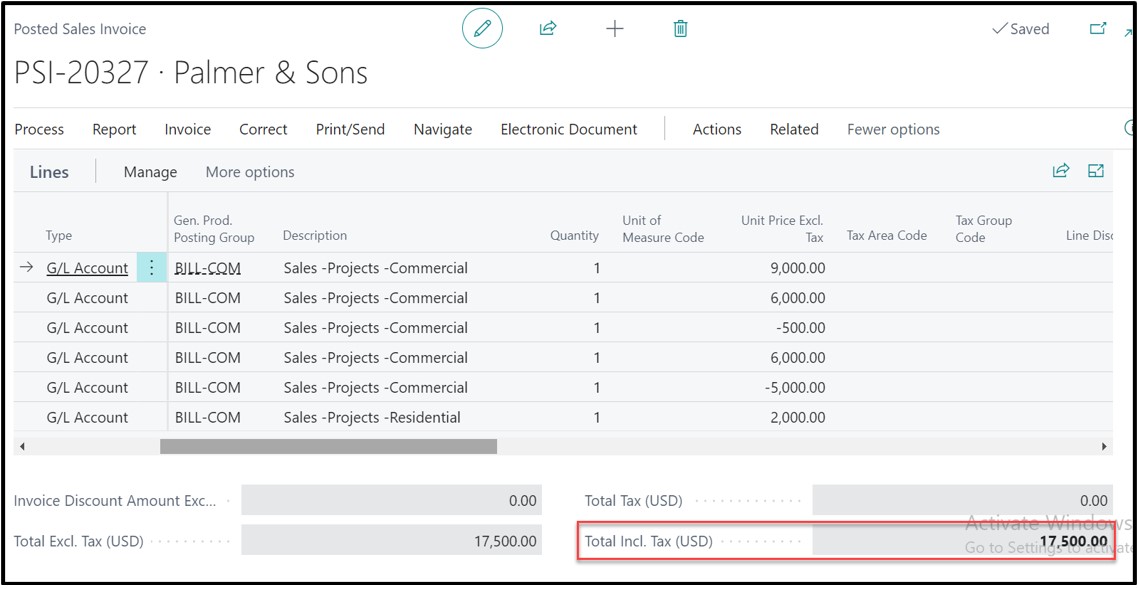
A sales invoice with value $17,500 is generated because of the additional billing.
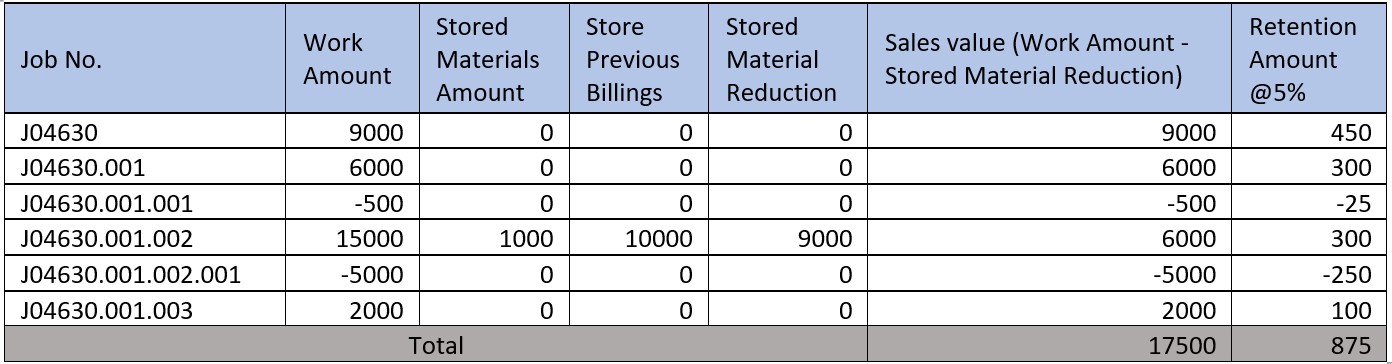
Sales Invoice Calculation
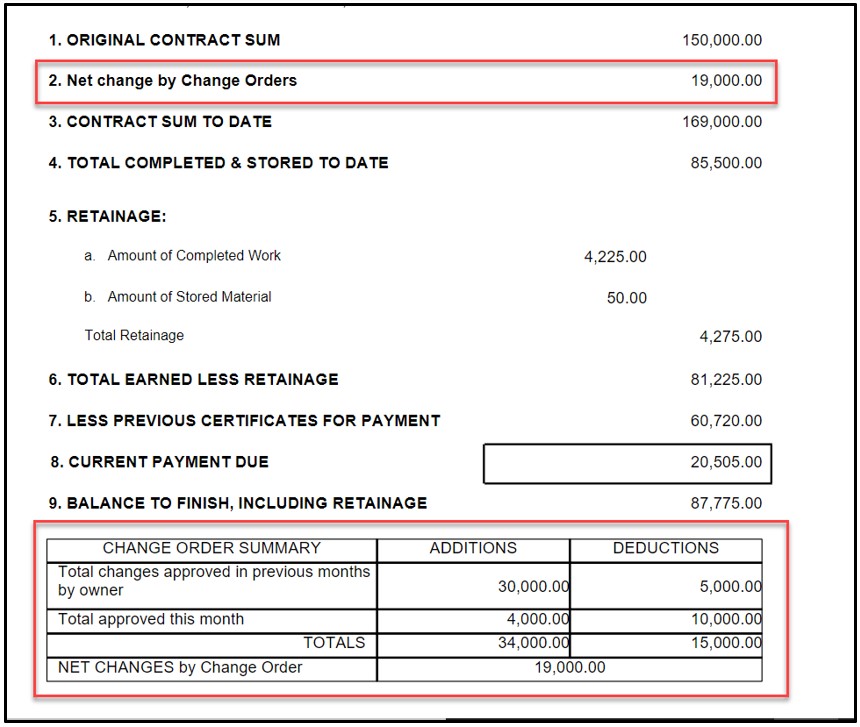
In the Combined CO AIA G702 and AIA G703, Under the heading of “Net Change by Change Orders” after adjusting the positive and negative values of the change orders we get the value of $19,000.
The “Current Payment Due” field will add the value of sales invoice after deducting the retention $17,500-$875 i.e. $16,625 and the Retention reduction Invoice i.e. $3,880. Therefore, Current Payment Due = $16,625 + $3,880 = $20,505
In Change Order Summary, the values $30,000 and ($5,000) were added as change order in the month of February, therefore they will be shown corresponding to “Total Changes Approved in Previous Month by Owner”. As the $30,000 is positive so it will be shown under Additions and ($50,000) is a negative value change order so it will be shown under Deductions.
A positive change order of value $4,000 and ($10,000) were added in the month of March. Therefore, these values will be shown corresponding to “Total Approved this Month”, the $4,000 value will be shown under “Additions” and ($10,000) under “Deductions”.
6. 100% Billing
On 30th April, the construction company was authorized to bill 100% for all the lines and the construction company utilized all the stored material.
On the Progress Bill we will enter 100 in the Quantity column to bill the full value excluding the retention.
In change order J04630.001.002, we will make Stored Material as $0 because the company utilized the whole stored material.
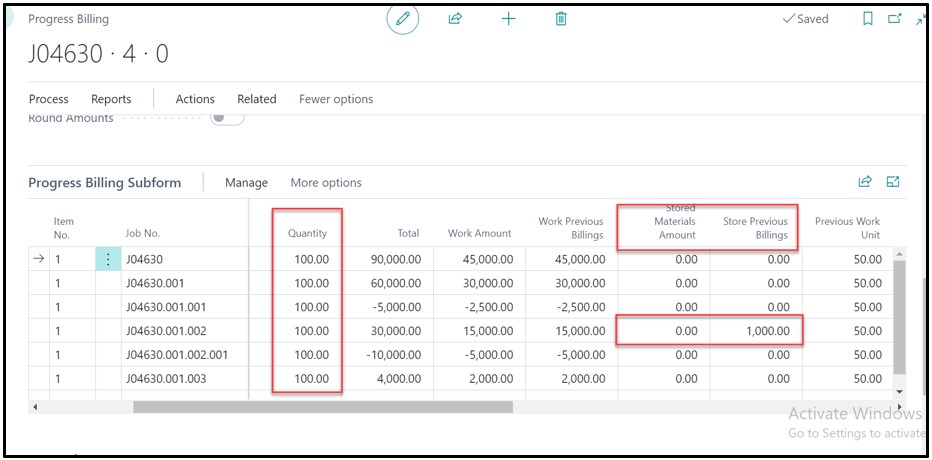
After entering all the details, the sales invoice can be generated and posted.
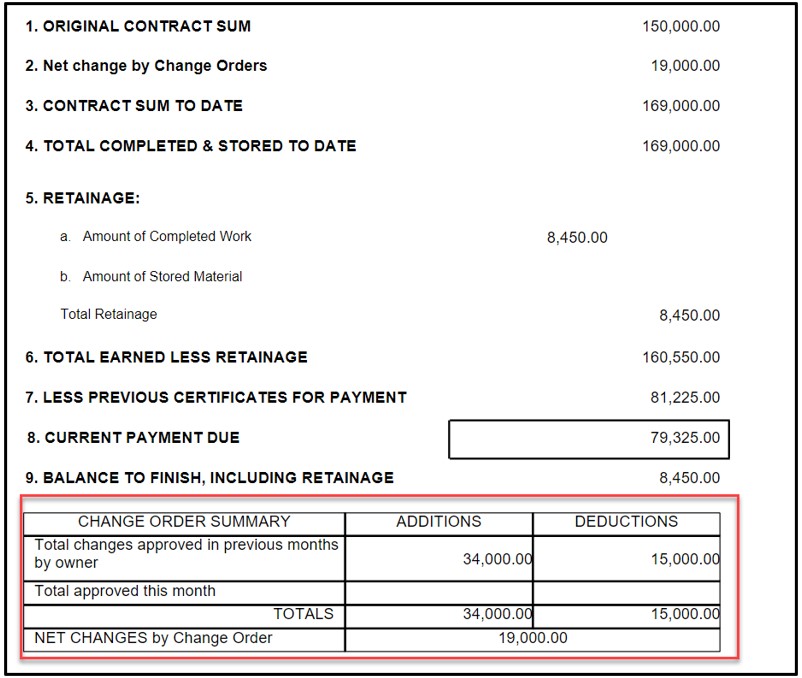
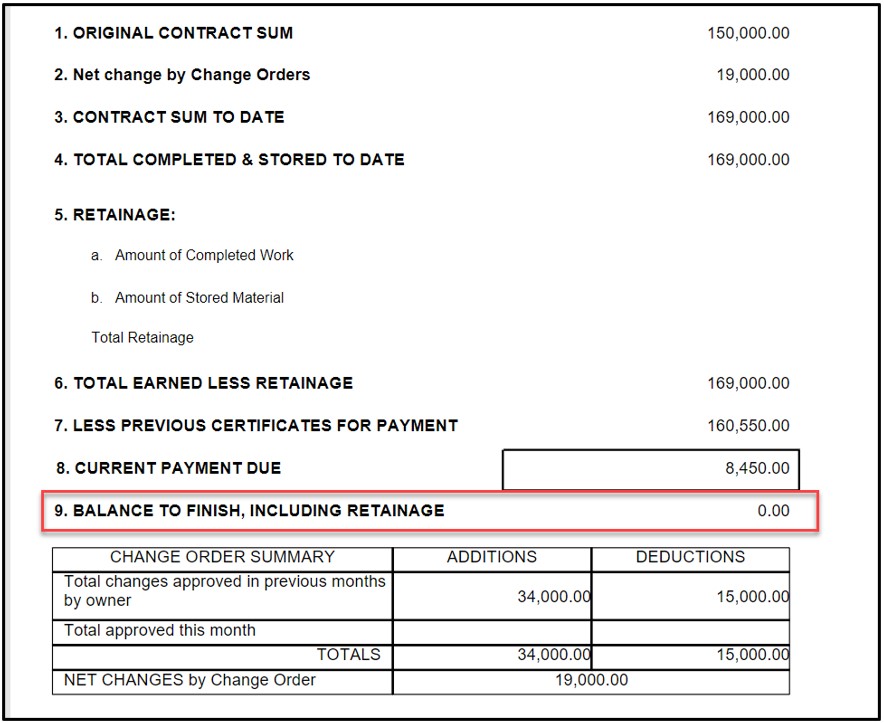
In Combined CO AIA G702 & G703 report, there were no change orders introduced in the month of April, the previous two change orders will be shown corresponding to “Total Changes Approved in Previous months by owner.”
7. Final Retention Billing
On May 31st 2022, Customer approved the whole project so the remaining 5% Retention on all the lines can be billed to the customer.
On Progress Bill we will enter ‘0” in “Work Retention Percent” for all the lines and then create a sales invoice.
The system create a retention document and can be posted.
On the Combined CO AIA G702 and G703 report, the balance will become $0.
Feel free to connect for further details at Projectpro@netsmartz.com