How ProjectPro Deploys Subcontractor Management in 60–120 Days (Without the Usual Implementation Pain)
Most construction firms don’t fail at subcontractor management because they picked the wrong features. They fail because the software took 12 months to implement, the team never fully adopted it, and by the time the system was live, three projects had already gone sideways.
That’s the real implementation problem. And it’s more common than vendors like to admit.
Gartner estimates that 55 to 75% of ERP implementations fail to meet their original business goals. In construction, an industry McKinsey identifies as among the least digitized, the odds are even tougher. Legacy platforms routinely take 6 to 18 months to deploy, and roughly 45% of ERP implementations exceed their original budget.
The problem isn’t subcontractor management itself. It’s the implementation barrier that keeps contractors from getting there.
ProjectPro is built differently. Because it runs natively on Microsoft Dynamics 365 Business Central, most contractors go live with full subcontractor management capability in 60 to 120 days. Teams that already use Microsoft tools, Excel, Teams, or Outlook adapt quickly. There’s no foreign interface to learn, no parallel system to maintain, and no months-long data reconciliation before anyone can do real work.
This guide walks through exactly how that deployment works, what your team gets from day one, and how ProjectPro scales as your subcontractor network grows.
Why Subcontractor Management Implementations Stall
Before getting into how ProjectPro deploys, it’s worth being honest about why most implementations struggle. The issues are predictable, and they show up at the same three points every time.
The data problem
Most firms arrive at implementation with subcontractor data scattered across spreadsheets, email threads, and disconnected accounting systems. Cleaning and migrating that data into a new platform is where timelines slip. Organizations deploying subcontractor management systems typically invest 30 to 50% of total software costs in professional services just to handle integration and data migration alone.
The adoption problem
New interfaces mean retraining. If your project managers, purchasing teams, and job cost accountants all have to learn a completely foreign system, productivity drops during the transition. Resistance is common, especially in firms where crews have used the same spreadsheet workflows for years.
The “it’s not built for us” problem
Many ERP platforms are built for general business operations and then retrofitted for construction. Subcontractor-specific workflows, like lien release waivers, pay-when-paid terms, insurance certificate tracking, and AIA billing, are bolted on rather than native. That creates friction at every step.
The result: Firms that started an ERP implementation expecting to go live in 6 months find themselves 14 months in, still configuring workflows, while their subcontractor network continues to operate on disconnected tools.
ProjectPro addresses all three of these directly, not through better project management, but through a fundamentally different architectural decision: building on a platform your team already knows.
The Microsoft Advantage: Why ProjectPro Deploys Faster
ProjectPro is not a standalone construction app that connects to Microsoft. It is built natively inside Microsoft Dynamics 365 Business Central, the cloud ERP platform used by more than 50,000 organizations worldwide. That distinction matters enormously for implementation speed.
When your team already uses Outlook, Teams, or Excel, they are already inside the same ecosystem. Subcontractor data flows between ProjectPro and the tools your people use daily, without custom integrations, without middleware, and without a separate login.
What this means for deployment
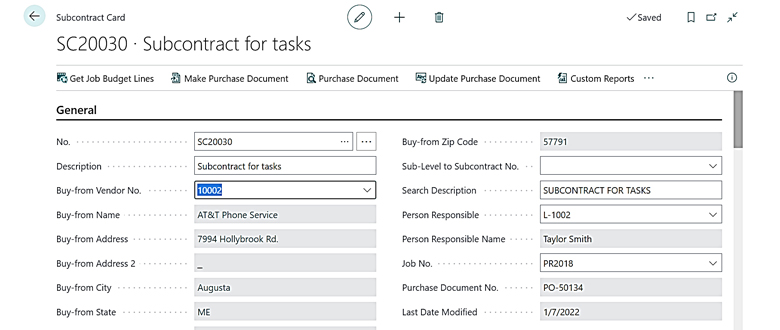
| Factor | Legacy ERP | ProjectPro on Business Central |
|---|---|---|
| Interface familiarity | New system to learn | Microsoft environment teams already know |
| Integration setup | Weeks of custom configuration | Native connections to Office 365, Teams, Power BI |
| Data migration | Complex, often delayed | Structured migration into a familiar framework |
| Typical go-live | 6 to 18 months | 60 to 120 days |
| Ongoing IT overhead | High, dedicated admin often required | Managed via Microsoft cloud infrastructure |
Built for construction from the ground up
ProjectPro adds construction-specific modules directly on top of Business Central, rather than replacing its accounting core. That means subcontractor workflows like contract creation, change orders, lien waivers, insurance certificate tracking, and certified payroll are native, not add-ons.
When a purchasing manager creates a subcontract in ProjectPro, it immediately connects to job costing, procurement, and accounting. There’s no sync required, no export to a separate system. The data is live across the platform from the moment it’s entered.
This is the core reason ProjectPro can commit to a 60 to 120-day go-live window. The heavy lifting of platform architecture is already done by Microsoft. The implementation work is focused entirely on your workflows, your data, and your team.
The ProjectPro Deployment Roadmap: 60 to 120 Days
Here’s what a typical ProjectPro subcontractor management deployment looks like in practice. The phases below reflect a mid-sized contracting firm with 10 to 50 active subcontractors and existing data to migrate.
Phase 1: Discovery and Setup (Days 1 to 30)
The first month is about getting the foundation right. This phase includes:
- Workflow mapping: Documenting how your team currently creates subcontracts, tracks change orders, manages insurance certificates, and processes payments
- Data migration: Importing open subcontracts, vendor records, job cost codes, and historical compliance documents into Business Central
- System configuration: Setting up user roles, approval workflows, and job costing structures specific to your trade and contract types
- Integration connections: Linking ProjectPro to any existing tools in your stack, such as Procore, ADP, Paycor, or Paylocity, through pre-built connectors
The goal at the end of Day 30: clean data in the system and core workflows configured. No live transactions yet, but the architecture is in place.
Phase 2: Training and Parallel Testing (Days 31 to 75)
This is where adoption happens. Rather than training everyone on everything at once, ProjectPro implementations train by role:
- Project managers learn subcontract creation, change order tracking, and progress monitoring
- Job cost accountants learn invoice matching, retention tracking, and payment processing
- Purchasing managers learn procurement workflows, PO creation, and vendor compliance dashboards
- Field leads (if using ProjectPro Field) learn mobile reporting and daily log submission
Parallel testing runs live scenarios against real jobs before go-live, catching configuration issues before they affect actual subcontractor payments.
Phase 3: Go-Live and Stabilization (Days 76 to 120)
The system goes live on active jobs. During this phase:
- Support is closely involved, with dedicated response during the first two to four weeks post-launch
- Teams build confidence on real transactions with a safety net still in place
- Reporting dashboards are refined to match the specific metrics your leadership team tracks
- Any edge cases in subcontractor workflows (unusual contract structures, multi-trade jobs, retention holdback variations) are resolved in real conditions
By Day 120, most ProjectPro customers are fully self-sufficient, running subcontractor management, job costing, compliance tracking, and reporting without implementation support.
What New Subcontractors Get from Day One
One of the questions we hear most often during demos: “What can our team actually do on day one, before the full implementation is complete?”
The answer is more than most firms expect. Because ProjectPro is built on Business Central, the core accounting and financial infrastructure is live immediately. Subcontractor-specific capabilities activate as configuration progresses through the deployment phases.
Here’s what’s operational at different stages:
From go-live (Day 76 onward):
- Create and track subcontract agreements with full scope, value, and payment terms
- Issue and manage subcontract change orders tied to the original contract
- Monitor insurance certificate expiration dates with automated 30-day alerts on your dashboard
- Track open contracts, invoiced amounts, and outstanding balances by vendor and by job
- Process lien release waivers and pay-when-paid terms within the same workflow
Reporting available from day one of go-live:
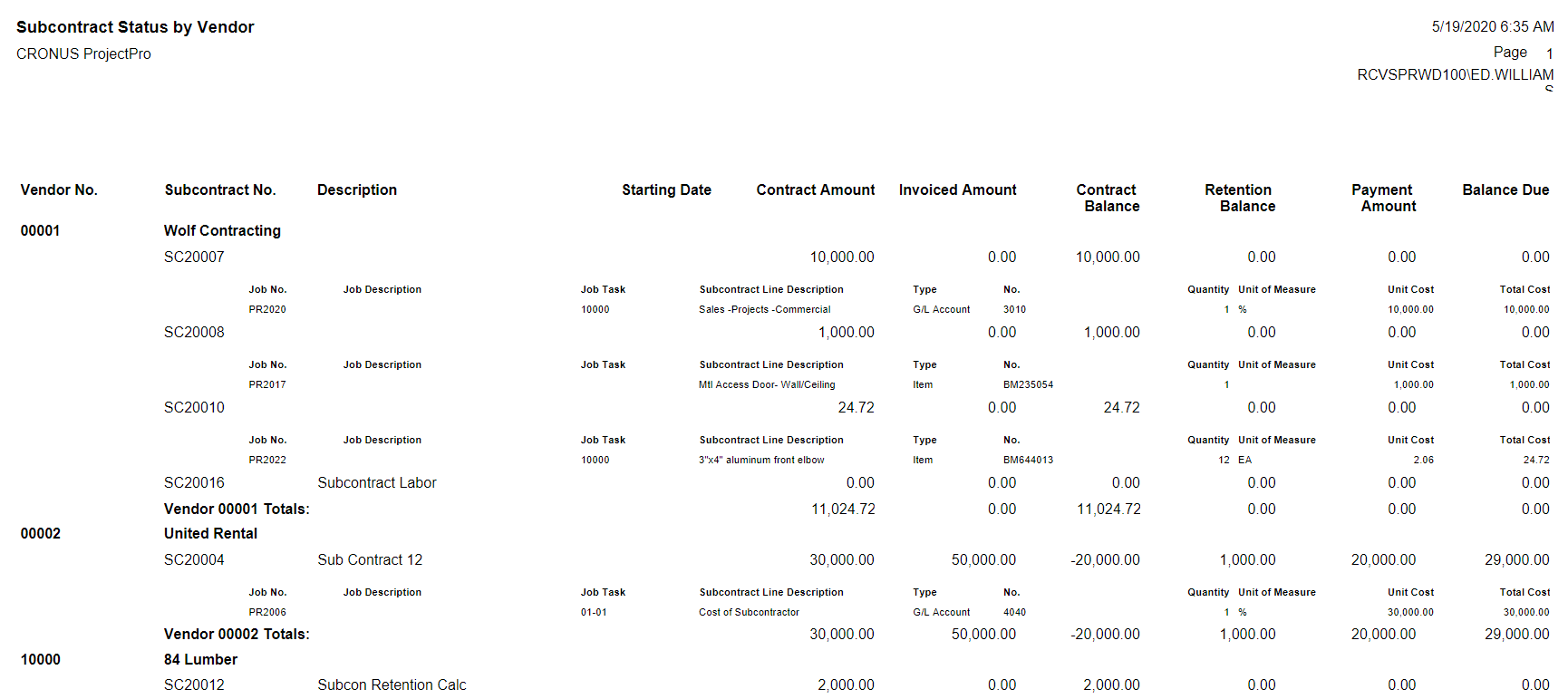
- Subcontractors by Vendor Report: all jobs listed by subcontractor with summary or detail view
- Open balance and retention tracking across your entire subcontractor portfolio
- Real-time job cost visibility showing subcontract commitments against budget
What teams don’t have to wait for: Most construction software requires weeks of post-go-live configuration before reporting is usable. In ProjectPro, Power BI connects natively to your Business Central data, so dashboards can be built and refined during Phase 2, not after go-live.
This matters practically. A job cost accountant on Day 80 can already pull a report showing every active subcontract, its invoiced-to-date amount, outstanding retention, and insurance status, without waiting for a custom report to be built.
Reporting and Analytics Built for Subcontractor Oversight
Reporting is where a lot of subcontractor management platforms disappoint. You get the data in, but getting useful insight out requires custom reports, manual exports, or a separate BI tool that someone has to maintain.
ProjectPro takes a different approach. Because it sits inside the Microsoft ecosystem, reporting connects directly to Power BI and Microsoft Copilot without any additional integration work.
What subcontractor reporting looks like in practice
Project managers and finance leads use ProjectPro to track:
- Subcontract commitment vs. budget: See in real time how each subcontract value compares to the job budget, and get early warning when change orders are pushing a trade over its allocation
- Progress billing status: Know exactly what each subcontractor has billed, what’s been approved, and what’s outstanding, across every active job simultaneously
- Retention and holdback balances: Track retention amounts owed to each subcontractor with automatic calculation against contract terms
- Compliance status: Insurance certificates, lien waivers, and certification expiration dates are tracked in the same system, with automated alerts before anything lapses
- Cash flow forecasting: Because subcontract commitments feed directly into job costing and accounting, finance teams can project subcontractor cash flow requirements weeks in advance
Microsoft Copilot for subcontractor insights
ProjectPro includes access to Microsoft Copilot within the Business Central environment. In practice, this means your team can ask natural language questions against live subcontractor data, such as “which subcontractors are within 10% of their contract ceiling across all active jobs?” or “show me all vendors with insurance expiring in the next 60 days,” and get immediate answers without building a custom report.
This is particularly valuable for operations managers overseeing large subcontractor networks, where manually tracking compliance and cost exposure across 30 or 50 active subcontractors would otherwise require dedicated administrative staff.
Key insight: The construction subcontractor management software market reached $1.512 billion in 2025, driven largely by demand for real-time analytics and compliance visibility. ProjectPro delivers both within the same platform your team already uses for accounting.
How ProjectPro Scales as Your Subcontractor Network Grows
A common concern during software evaluation: “Will this still work when we double our subcontractor count, add more project types, or expand to new markets?”
It’s a fair question. Many platforms that deploy quickly hit a ceiling when complexity grows. ProjectPro is designed to scale in the opposite direction, where the more complex your subcontractor network becomes, the more value the platform delivers.
From a handful of subs to a full network
ProjectPro serves contractors across a wide range of operational scales:
- Specialty trades (electrical, HVAC, plumbing, roofing) managing 5 to 20 subcontractors per project
- General contractors coordinating multi-trade subcontractor networks across multiple simultaneous jobs
- Civil and heavy highway contractors managing equipment subcontractors, material suppliers, and specialty crews across large-scale infrastructure projects
- Mining and industrial contractors with complex subcontractor compliance requirements across remote sites
Because ProjectPro runs on Microsoft’s cloud infrastructure, there’s no on-premises server to upgrade, no capacity ceiling to hit, and no migration required as your business grows. The same platform that manages 10 active subcontractors manages 200, with no architectural change.
Multi-entity and multi-project support
For contractors operating multiple legal entities, joint ventures, or regional divisions, ProjectPro handles intercompany transactions and multi-entity reporting within Business Central. Subcontractor data rolls up across entities, so leadership gets a portfolio-wide view without manually consolidating reports from separate systems.
Licensing that matches your growth
ProjectPro’s tiered licensing model means you don’t pay for capabilities you don’t need at the start:
| Plan | Price | Best for |
|---|---|---|
| Team User | $10/user/month | Field crews, limited access roles |
| Standard | $52/user/month | Core project and accounting users |
| Advanced | $70/user/month | Power users, full module access |
| Enterprise | $80/user/month | Complex operations, full platform |
This structure lets firms start with a focused deployment and expand user access as adoption grows, without re-implementing or migrating to a new platform.
Common Questions from Operations and Finance Teams
Do we need to already be on Microsoft Dynamics 365 Business Central to use ProjectPro?
No. ProjectPro is sold as a combined solution that includes the Business Central license alongside the ProjectPro construction modules. You don’t need to have Business Central already in place. The implementation process sets up both simultaneously.
What if we’re currently using QuickBooks, Sage, or another accounting system?
Most ProjectPro implementations involve migrating from one of these platforms. The migration process focuses on open subcontracts, vendor records, and job cost data. Historical data can be archived in your existing system for reference while ProjectPro handles all active work going forward.
Can subcontractors access the system directly?
ProjectPro manages subcontractor data on your side, meaning your project managers and accounting team are the primary users. Subcontractors submit invoices, lien waivers, and compliance documents through your standard process, which your team then records and tracks in ProjectPro. There is no subcontractor-facing portal requirement.
What integrations are available out of the box?
ProjectPro connects natively with the Microsoft ecosystem (Teams, Outlook, Excel, Power BI) and includes pre-built integrations with Procore, ADP, Paycor, Paylocity, Avalara, HeavyBid, and Concur. Most firms don’t need custom integration work for their core tool stack.
How does the 26-year track record translate to faster implementation?
ProjectPro has been refining construction-specific workflows since 1999. That means the subcontractor management module reflects real-world patterns from general, specialty, and civil contractors across multiple markets. Configuration decisions that would take weeks of discovery on a generic ERP are pre-built into ProjectPro’s default workflows.
Ready to Deploy Subcontractor Management That Works from Day One?
The implementation gap is real. Most firms evaluating subcontractor management software are weighing a 12-month timeline, a significant budget commitment, and the risk of a system their team won’t actually use.
ProjectPro’s 60 to 120-day deployment window exists because of a deliberate architectural decision: build on Microsoft, not alongside it. Your team gets a familiar interface, native reporting, and construction-specific workflows from the moment they go live, not six months after.
If you’re managing subcontractors across multiple jobs and your current system is a combination of spreadsheets, emails, and disconnected accounting software, the cost of waiting is already visible in your margins.
Schedule a demo with the ProjectPro team to see the subcontractor management module in action against real construction scenarios. Bring your current workflow questions. The demo is built around how your business actually operates, not a generic product walkthrough.