All-In-One Construction Accounting Software

Three Entities, One Job: Why Construction CFOs Outgrow QuickBooks Enterprise

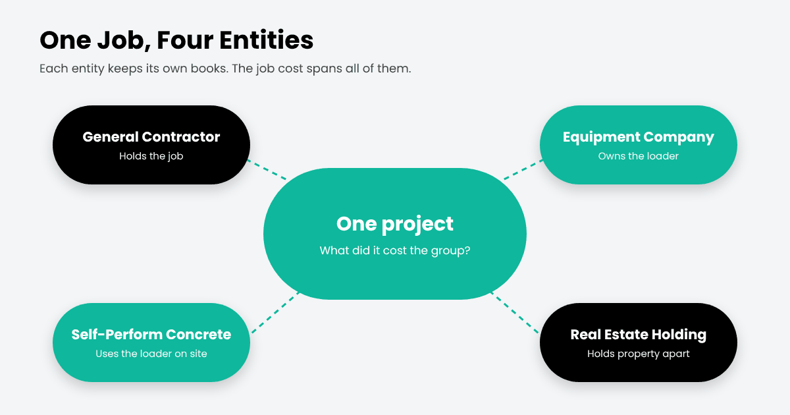
Four entities. One project. The general contractor holds the job. A related equipment company owns the loader. A self-perform concrete company uses it on site.

Now the CFO has a simple question: What did this project cost the group?

In QuickBooks Enterprise, those companies may sit in separate company files. Equipment charges move between entities, while project costs need to stay tied to the job. Across dozens of projects, month-end can become a reconciliation exercise before the CFO sees the full job cost.

QuickBooks Enterprise can combine certain reports across company files. But Intuit’s documentation limits that feature to standard statements and trial balance reports, with matching account names and Excel as the output. Job cost reports aren’t included in Enterprise’s built-in Combine Reports feature.

That’s the real issue. Multi-entity job costing isn’t a month-end consolidation task. The cost needs to stay connected to the job as transactions move across entities.

In short

Multi-entity job costing tracks project costs across several legal entities with shared cost codes and automated intercompany entries. QuickBooks Enterprise keeps each entity in a separate file and combines only summary financial reports, so group-level job costs are usually rebuilt in spreadsheets.

Why Contractors Run Multiple Entities

Few mid-size contractors operate as a single company for long. Common reasons include:

  • Liability separation: keeping risky work or regions in their own entity.
  • Equipment companies: owning fleets separately and renting internally.
  • Self-perform or specialty subsidiaries: concrete, electrical, or site work under their own license.
  • Real estate and development: holding property apart from operations.

Each reason makes sense. Together, they turn one project into several sets of books.
Why Contractors Run Multiple Entities

Where QuickBooks Enterprise Runs Out

QuickBooks Enterprise can handle accounting within each company. The challenge comes when you need to connect those companies around the same construction project:

  • Separate company files: each entity maintains its own company file, with its own jobs and cost codes.
  • Limited combined reporting: selected financial reports can be combined across company files, subject to matching account structures and Excel output.
  • Intercompany transactions: Platinum and Diamond support intercompany transactions between related company files, but each entity still maintains its own company records.
  • No unified cross-entity job view: the key question is not simply whether transactions can move between companies. It is whether the CFO can see the true cost and profitability of a project across the group.

One Loader, Three Sets of Books

Here’s how a single internal rental plays out when each entity keeps its own books :
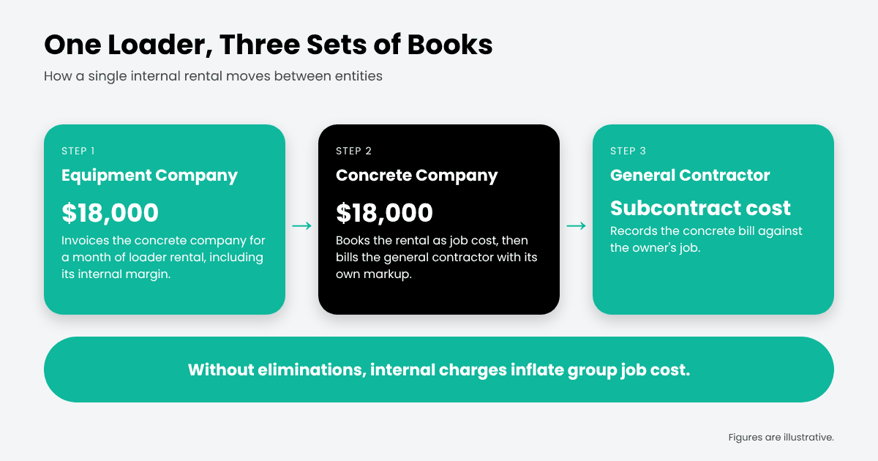
Each company’s books can be correct, but the group-level job view can still be distorted. The equipment company records rental revenue, while the concrete company records the rental as a project cost. Without a clear intercompany trail and elimination process, those internal charges can inflate the group’s apparent job cost and distort project profitability.

What Multi-Entity Job Costing Actually Requires

Before evaluating any system, construction CFOs should check for these five capabilities:

What you need Why it matters to a construction CFO
Intercompany that posts once An equipment rental or labor charge between entities is entered one time and balances both sets of books.
One cost code structure across entities A concrete cost code means the same thing in every company, so job costs roll up cleanly.
A group-level view of each job You can see what a project costs the whole group, not just the entity that holds the contract.
Committed costs and WIP by entity Subcontracts, POs, and WIP are tracked where they belong, ready for lenders and sureties.
Consolidation with traceable intercompany Every intercompany entry is tagged to a partner, so eliminations are easy to find and review.

Modern ERP platforms handle much of the accounting side. In Microsoft Dynamics 365 Business Central, for example, intercompany partners enter information once, and “a corresponding document is created at the other partner.” Microsoft is also candid that consolidation eliminations remain a manual step, which is why tagging every intercompany entry matters.

The Netsmartz View: Design Entities Around the Job

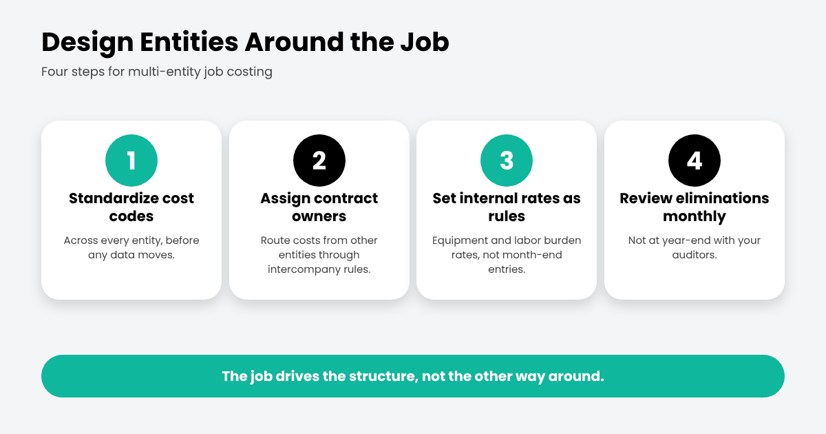
Most multi-entity pain comes from setting up entities for legal reasons and hoping job costing follows. Flip it:
The Netsmartz View: Design Entities Around the Job

Where ProjectPro Comes In

ProjectPro is Netsmartz’s all-in-one, AI-powered construction ERP built on Microsoft Dynamics 365 Business Central. It brings construction job costing and financial management into one platform, with Microsoft 365 Copilot as the intelligence layer.
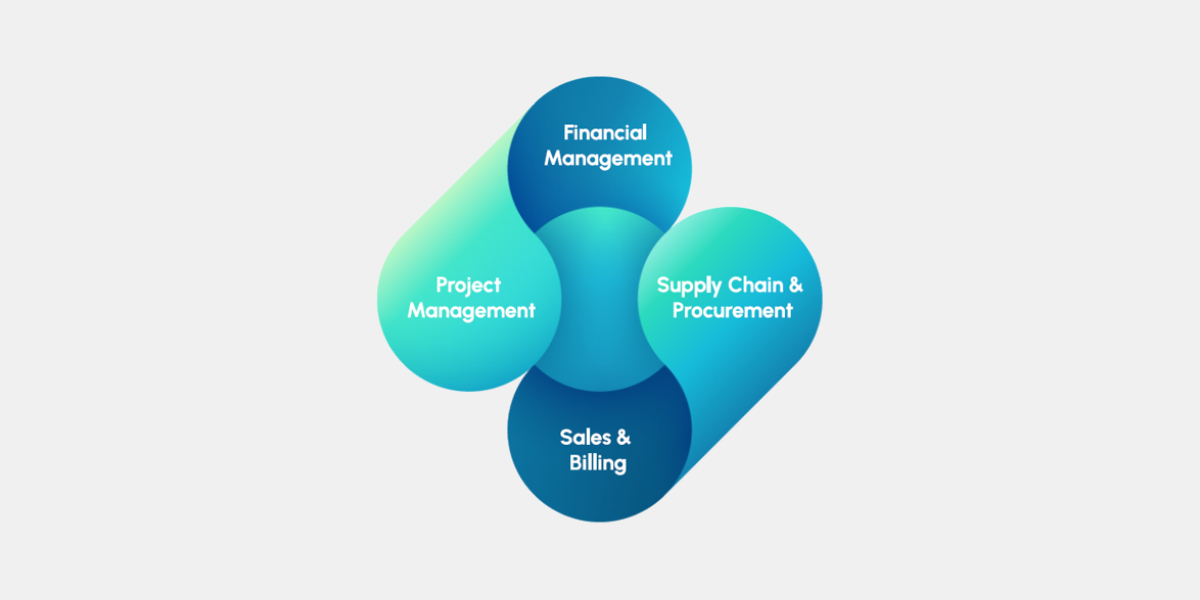
For multi-entity contractors, ProjectPro brings these requirements into one construction ERP environment. It combines construction job costing by project, phase, and cost code with intercompany accounting, labor and equipment resource management, subcontracts, retention, progress billing, and WIP.

Each company can maintain its own books while finance and project teams work from connected project and financial data across the group. That gives CFOs a clearer view of what each entity owns, what it owes, and what each project actually costs across the organization

CTA

The Bottom Line

QuickBooks Enterprise can tell you how each company did. A growing contractor also needs to know how each job did across all of them. When that answer lives in a spreadsheet, the structure has outgrown the software.

See how multi-entity job costing works in ProjectPro. Take the product tour.

Frequently asked questions

Multi-entity job costing tracks construction project costs across two or more legal entities, such as a general contractor, self-perform subsidiary, and equipment company. A shared cost code structure helps finance teams see project costs and profitability across each entity and the group.

QuickBooks Enterprise can combine selected financial reports from multiple company files into Excel, including balance sheet, profit and loss, cash flow, and trial balance reports. The company files must use matching account names, types, and levels. Its built-in Combine Reports feature does not include job-cost reports or provide a project-level view of costs across entities.

In Microsoft Dynamics 365 Business Central, you can assign intercompany partners to customers and vendors. When one company sends an intercompany transaction, the corresponding document can be created in the partner company, reducing duplicate entry across entities.

The terms are often used interchangeably. Multi-company construction accounting generally refers to managing multiple companies or sets of books within an accounting system. Multi-entity job costing goes further by connecting project costs, commitments, and WIP across those companies, so finance teams can see each job’s cost across the group.

A common trigger is when multiple entities share jobs, equipment, or labor and group-level job costs, intercompany balances, or WIP have to be rebuilt in spreadsheets each month. That is a sign to evaluate whether the accounting system can support the way the business operates.

ProjectPro brings construction job costing, intercompany accounting, commitments, WIP, and project financials into the same ERP environment. Built on Microsoft Dynamics 365 Business Central, it helps construction companies track costs by project, phase, and cost code while maintaining separate company books.

5 Signs You’ve Outgrown QuickBooks (And What It’s Costing Your Job Margins)

Picture this: it’s the second week of the quarter, and your bank wants an updated WIP schedule before renewing your line of credit.

Your controller exports job reports from QuickBooks, then opens WIP_Q3_FINAL_v6.xlsx. Committed costs come from project managers’ subcontract logs. Percent complete comes from emails to superintendents. Change orders come from a folder everyone hopes is current.

Three days later, the schedule is done. The hospital renovation everyone thought was running at an 18% margin is closer to 9%. The margin started slipping two months ago. Nobody saw it because the numbers showing it lived in different places.

QuickBooks reported what was in the system. The rest lived elsewhere.

Here’s our view at Netsmartz: contractors outgrow QuickBooks when the numbers that run construction, like margin, commitments, billing, and cost to complete, spread into spreadsheets around it.

Every spreadsheet around the ERP is another piece of the job living somewhere else.

Quick answer

Your construction business has outgrown QuickBooks when it can no longer serve as the central source for the numbers you use to run jobs. When WIP, commitments, job costs, billing, or other critical project data live in spreadsheets, emails, or separate tools, it’s time to consider a QuickBooks alternative for contractors.

Sign 1: Your WIP Schedule Lives in a Spreadsheet

The work-in-progress schedule is the most important report a contractor produces. It shows whether each job is making money, whether you’ve overbilled or underbilled, and what’s left to earn. Banks and sureties rely on it.

If yours is rebuilt in Excel every month or quarter, you’re only seeing margin at the moment someone finishes the spreadsheet. By then, a job that started fading in the field has had weeks to keep fading.

The test: Could you answer, “Which three jobs are losing margin right now?” today, without opening a spreadsheet?

You Find Out What a Job Costs When the Bill Arrives

Sign 2: You Find Out What a Job Costs When the Bill Arrives

Your PM signs a $220,000 subcontract on Monday. If that commitment isn’t recorded in the accounting system, the job cost report may not reflect the exposure until the first bill or pay app is entered.

That gap is where cost overruns can hide. Actual costs tell you what you’ve spent. Committed costs tell you what you’ve already promised to spend: signed subcontracts, open purchase orders, and approved change orders. Without both in one view, “What’s our total exposure on this job?” becomes a question for the PM’s spreadsheet instead of your accounting system.

The test: Does your job cost report include committed costs, or only bills that have been entered?

Sign 3: Billing Day Takes Days

Progress billing in construction isn’t just invoicing. It means a schedule of values, percent complete by line item, retainage, approved change orders, and often AIA G702 and G703 forms. When that lives in a separate spreadsheet or tool, every pay app means re-keying numbers and checking them twice.

The cash stakes are real. Billd’s 2026 National Subcontractor Market Report (600+ respondents, June 2026) found that subcontractors wait an average of 51 days to get paid after submitting a pay application, 64% report being slow-paid by their GC, and 83% of owner-operators are worried about cash flow.

Payment timing may be outside your control. Timely, accurate, contract-compliant pay applications are within your process.

The test: How many hours does one pay app take, from pulling percent complete to sending the invoice?

Sign 4: You’re Working Around QuickBooks’ Built-In Limits

Every QuickBooks Online plan has usage limits, and Intuit publishes them. QuickBooks Online Plus allows 5 billable users, 250 accounts in the chart of accounts, and 40 classes and locations combined. Advanced raises that to 25 users with unlimited accounts, classes, and locations.

Contractors feel these limits in practical ways. Classes get used for phases or divisions, jobs become sub-customers, and field staff may share logins or lack access. None of this breaks the books, but every workaround adds another step and another place for errors to hide.

If you’re on QuickBooks Desktop, there’s another factor. Intuit stopped selling Desktop Pro Plus, Premier Plus, and Mac Plus to new U.S. subscribers on September 30, 2024. Existing subscribers can keep renewing, but many contractors are already facing a platform decision. It makes sense to make it once, for the business you’re becoming.

The test: How many of your QuickBooks “settings” are really workarounds someone set up years ago?

Sign 5: Every Fix is Another Spreadsheet, or Another Hire

When the system can’t do something, growing contractors usually do one of two things: add a spreadsheet, or add a person to manage the spreadsheets. Over time, the back office grows faster than the business.

Hiring your way out is getting harder. In AGC and Sage’s 2026 Construction Hiring and Business Outlook (951 firms), 80% of firms reported difficulty filling salaried positions. If month-end already depends on one person who knows how the spreadsheets fit together, that’s not just inefficient. It’s a risk.

The test: If your controller took two weeks off at quarter-end, could anyone else produce the WIP schedule?

What Changes When Construction Accounting Runs in One System

A construction ERP doesn’t just add features to accounting. It puts the job at the center, so costs, commitments, billing, and field progress all update the same record.

That’s what ProjectPro, an AI-powered construction ERP built on Microsoft Dynamics 365 Business Central, is designed to do. It’s built for general, electrical, mechanical, civil, and specialty contractors managing real job complexity. Here’s how it maps to the five signs:

The sign How ProjectPro handles it
1. WIP lives in a spreadsheet WIP is tracked in the system: estimated costs, recognized revenue, and projected profit across the life of each job. Change orders update budgets, forecasts, and WIP automatically.
2. Costs show up when the bill arrives Job cost by project, phase, and cost code, with planned vs. committed material costs and subcontractor management in the same job record.
3. Billing day takes days Progress billing in AIA G702, G703, or generic formats, with schedules of values, retainage, and billing by percent complete, units, or lump sum. A pre-posting review shows the impact on the job, customer, and general ledger before you post.
4. You’re working around built-in limits Built on Microsoft Dynamics 365 Business Central, with a job structure designed for construction instead of classes and sub-customers standing in for phases and jobs.
5. Every fix is another spreadsheet or hire ProjectPro Field brings timesheets and site data into the same record, payroll integration connects your existing provider to job costing, and Microsoft Copilot is built into the system.

The Netsmartz View: Move to ProjectPro, Not Your Workarounds

As contractors move beyond QuickBooks, the focus should be on building a cleaner foundation for the business. That includes leaving behind the workarounds that have grown around the existing system.

That’s why we recommend moving to ProjectPro job-first, not data-first. Here’s what that looks like:

  1. Set up your cost codes in ProjectPro first. Define phases and cost codes once, so every job reports the same way, with job cost by project, phase, and cost code from day one.
  2. Bring open jobs forward with the full picture. Move open contracts, commitments, billed-to-date amounts, and retainage balances into ProjectPro, so your first WIP report is complete rather than rebuilt.
  3. Go live on WIP and progress billing first. That’s where spreadsheets cost you the most. In ProjectPro, change orders update budgets, forecasts, and WIP automatically, and pay apps go out in AIA G702 and G703 formats.
  4. Keep your payroll provider. ProjectPro integrates with ADP, Paychex, Payroll NOW, and Paylocity, so payroll keeps running while labor costs flow into job costing.
  5. Retire the spreadsheet after one side-by-side close. Close one month in both, compare WIP, and then make ProjectPro your system of record.

The goal is a connected business process where the WIP schedule, job cost report, and pay application all come from the same place. That’s what ProjectPro is built for.

The Bottom Line

You won’t get an error message telling you you’ve outgrown QuickBooks. You’ll get a longer month-end, a bigger WIP spreadsheet, and a margin surprise that shows up too late to fix.

So count the spreadsheets. If the numbers you run your business on live outside your accounting system, you’ve already outgrown it.

See how ProjectPro brings job costing, commitments, progress billing, and WIP into one system. Take the product tour or schedule a demo.

FAQs

QuickBooks can track income and expenses by job, and QuickBooks Online Plus and Advanced include project tracking. That works well for simpler operations. It gets harder when you need committed costs, cost-to-complete forecasts, WIP, and progress billing with retainage in the same place. Those often end up in spreadsheets or add-on tools.

Not entirely. Intuit stopped selling QuickBooks Desktop Pro Plus, Premier Plus, Mac Plus, and Enhanced Payroll to new U.S. subscribers on September 30, 2024. Existing subscribers can keep renewing, and QuickBooks Desktop Enterprise is still sold to new and existing customers.

When the numbers you run jobs on, such as WIP, commitments, and progress billing, are managed outside QuickBooks, when you’re hitting user or class limits, or when month-end depends on one person’s spreadsheets. The number and complexity of jobs matter more than revenue.

QuickBooks is general accounting software that can be set up to track jobs. A construction accounting software is built around the job: cost codes, commitments, change orders, progress billing, retainage, and WIP are part of the core system, so accounting and project data update the same record.

Yes. ProjectPro isn’t a payroll processor. It integrates with payroll providers, including ADP, Paychex, Payroll NOW, and Paylocity, and connects payroll data back to job costing.

CFMA 2026 Member