All-In-One Construction Accounting Software

Three Entities, One Job: Why Construction CFOs Outgrow QuickBooks Enterprise

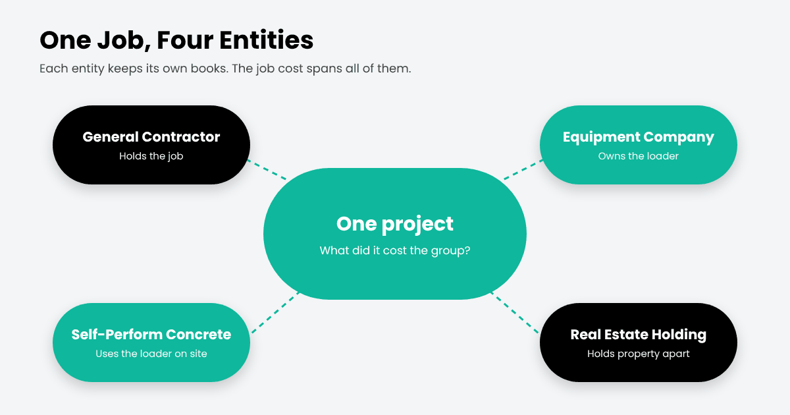
Four entities. One project. The general contractor holds the job. A related equipment company owns the loader. A self-perform concrete company uses it on site.

Now the CFO has a simple question: What did this project cost the group?

In QuickBooks Enterprise, those companies may sit in separate company files. Equipment charges move between entities, while project costs need to stay tied to the job. Across dozens of projects, month-end can become a reconciliation exercise before the CFO sees the full job cost.

QuickBooks Enterprise can combine certain reports across company files. But Intuit’s documentation limits that feature to standard statements and trial balance reports, with matching account names and Excel as the output. Job cost reports aren’t included in Enterprise’s built-in Combine Reports feature.

That’s the real issue. Multi-entity job costing isn’t a month-end consolidation task. The cost needs to stay connected to the job as transactions move across entities.

In short

Multi-entity job costing tracks project costs across several legal entities with shared cost codes and automated intercompany entries. QuickBooks Enterprise keeps each entity in a separate file and combines only summary financial reports, so group-level job costs are usually rebuilt in spreadsheets.

Why Contractors Run Multiple Entities

Few mid-size contractors operate as a single company for long. Common reasons include:

  • Liability separation: keeping risky work or regions in their own entity.
  • Equipment companies: owning fleets separately and renting internally.
  • Self-perform or specialty subsidiaries: concrete, electrical, or site work under their own license.
  • Real estate and development: holding property apart from operations.

Each reason makes sense. Together, they turn one project into several sets of books.
Why Contractors Run Multiple Entities

Where QuickBooks Enterprise Runs Out

QuickBooks Enterprise can handle accounting within each company. The challenge comes when you need to connect those companies around the same construction project:

  • Separate company files: each entity maintains its own company file, with its own jobs and cost codes.
  • Limited combined reporting: selected financial reports can be combined across company files, subject to matching account structures and Excel output.
  • Intercompany transactions: Platinum and Diamond support intercompany transactions between related company files, but each entity still maintains its own company records.
  • No unified cross-entity job view: the key question is not simply whether transactions can move between companies. It is whether the CFO can see the true cost and profitability of a project across the group.

One Loader, Three Sets of Books

Here’s how a single internal rental plays out when each entity keeps its own books :
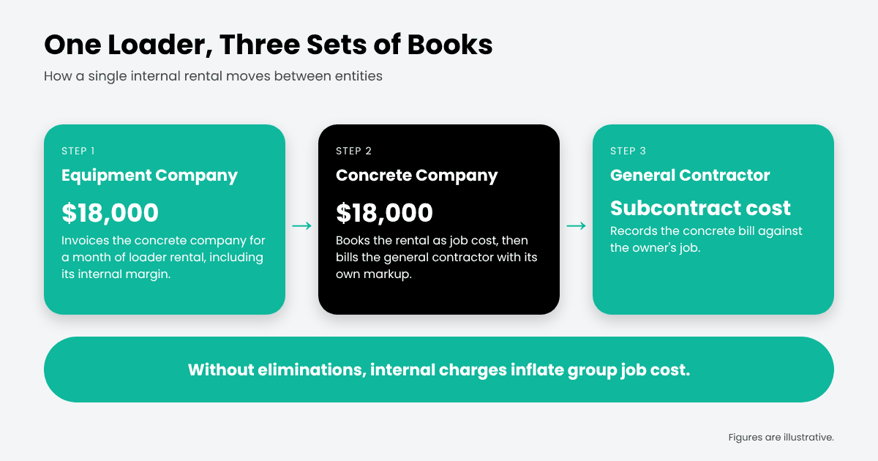
Each company’s books can be correct, but the group-level job view can still be distorted. The equipment company records rental revenue, while the concrete company records the rental as a project cost. Without a clear intercompany trail and elimination process, those internal charges can inflate the group’s apparent job cost and distort project profitability.

What Multi-Entity Job Costing Actually Requires

Before evaluating any system, construction CFOs should check for these five capabilities:

What you need Why it matters to a construction CFO
Intercompany that posts once An equipment rental or labor charge between entities is entered one time and balances both sets of books.
One cost code structure across entities A concrete cost code means the same thing in every company, so job costs roll up cleanly.
A group-level view of each job You can see what a project costs the whole group, not just the entity that holds the contract.
Committed costs and WIP by entity Subcontracts, POs, and WIP are tracked where they belong, ready for lenders and sureties.
Consolidation with traceable intercompany Every intercompany entry is tagged to a partner, so eliminations are easy to find and review.

Modern ERP platforms handle much of the accounting side. In Microsoft Dynamics 365 Business Central, for example, intercompany partners enter information once, and “a corresponding document is created at the other partner.” Microsoft is also candid that consolidation eliminations remain a manual step, which is why tagging every intercompany entry matters.

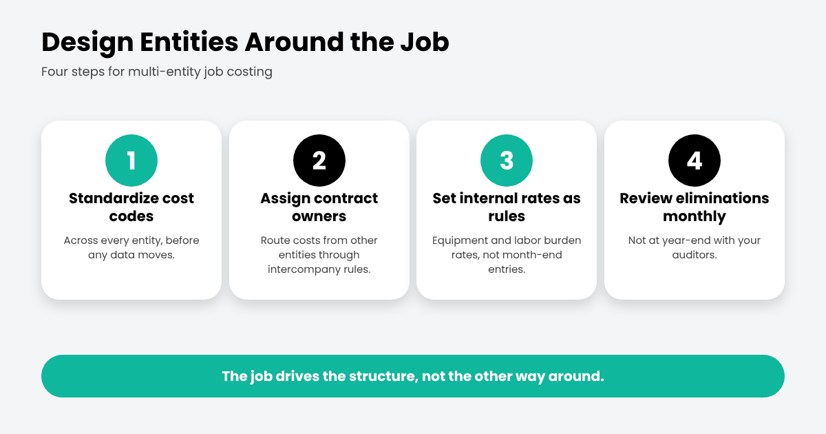
The Netsmartz View: Design Entities Around the Job

Most multi-entity pain comes from setting up entities for legal reasons and hoping job costing follows. Flip it:
The Netsmartz View: Design Entities Around the Job

Where ProjectPro Comes In

ProjectPro is Netsmartz’s all-in-one, AI-powered construction ERP built on Microsoft Dynamics 365 Business Central. It brings construction job costing and financial management into one platform, with Microsoft 365 Copilot as the intelligence layer.
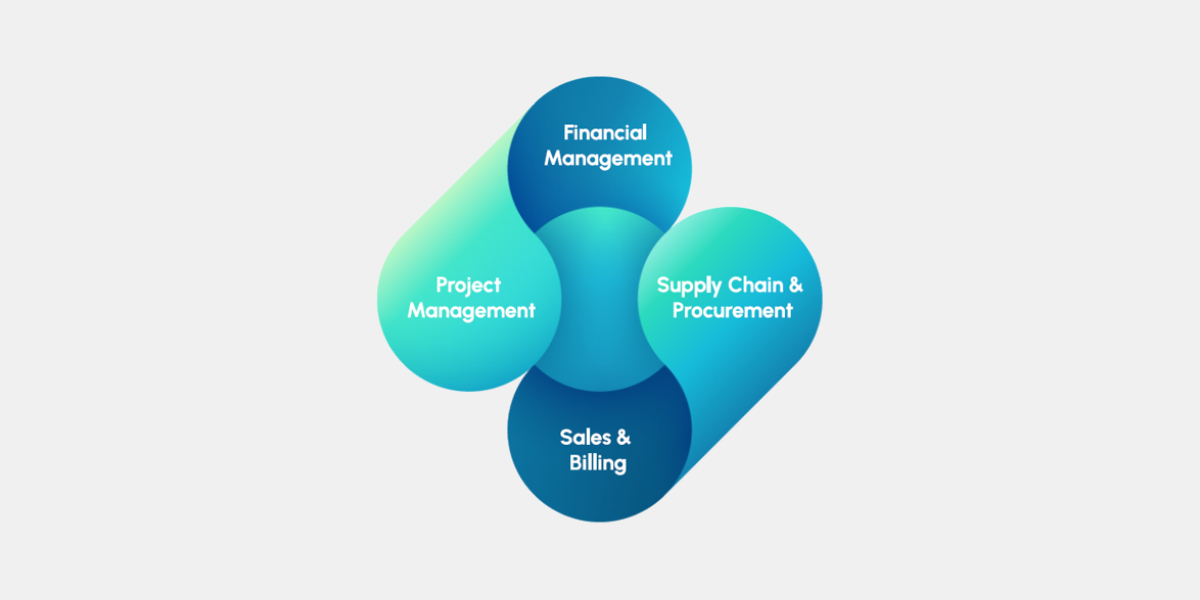
For multi-entity contractors, ProjectPro brings these requirements into one construction ERP environment. It combines construction job costing by project, phase, and cost code with intercompany accounting, labor and equipment resource management, subcontracts, retention, progress billing, and WIP.

Each company can maintain its own books while finance and project teams work from connected project and financial data across the group. That gives CFOs a clearer view of what each entity owns, what it owes, and what each project actually costs across the organization

CTA

The Bottom Line

QuickBooks Enterprise can tell you how each company did. A growing contractor also needs to know how each job did across all of them. When that answer lives in a spreadsheet, the structure has outgrown the software.

See how multi-entity job costing works in ProjectPro. Take the product tour.

Frequently asked questions

Multi-entity job costing tracks construction project costs across two or more legal entities, such as a general contractor, self-perform subsidiary, and equipment company. A shared cost code structure helps finance teams see project costs and profitability across each entity and the group.

QuickBooks Enterprise can combine selected financial reports from multiple company files into Excel, including balance sheet, profit and loss, cash flow, and trial balance reports. The company files must use matching account names, types, and levels. Its built-in Combine Reports feature does not include job-cost reports or provide a project-level view of costs across entities.

In Microsoft Dynamics 365 Business Central, you can assign intercompany partners to customers and vendors. When one company sends an intercompany transaction, the corresponding document can be created in the partner company, reducing duplicate entry across entities.

The terms are often used interchangeably. Multi-company construction accounting generally refers to managing multiple companies or sets of books within an accounting system. Multi-entity job costing goes further by connecting project costs, commitments, and WIP across those companies, so finance teams can see each job’s cost across the group.

A common trigger is when multiple entities share jobs, equipment, or labor and group-level job costs, intercompany balances, or WIP have to be rebuilt in spreadsheets each month. That is a sign to evaluate whether the accounting system can support the way the business operates.

ProjectPro brings construction job costing, intercompany accounting, commitments, WIP, and project financials into the same ERP environment. Built on Microsoft Dynamics 365 Business Central, it helps construction companies track costs by project, phase, and cost code while maintaining separate company books.
Estimate to Budget Handoff: Your Budget Was Set Before You Won the Job

The day you win a bid, someone opens a new job and types in a budget. In most shops, nobody chooses what goes in. The estimate goes in, because it is the only number anyone has. That is the estimate to budget handoff, and it is a quiet decision with a long tail.

The estimate was built under a deadline, on one person’s judgment, to be competitive. From award day it becomes the yardstick for every cost report, change order and WIP schedule. If it carries a mistake, or a structure that does not match how you code costs, the job starts slightly out of true, and you spend months wondering why the margin keeps slipping.

Where the handoff goes wrong

Three patterns worth checking for your own jobs. They are things to look for, not statistics.

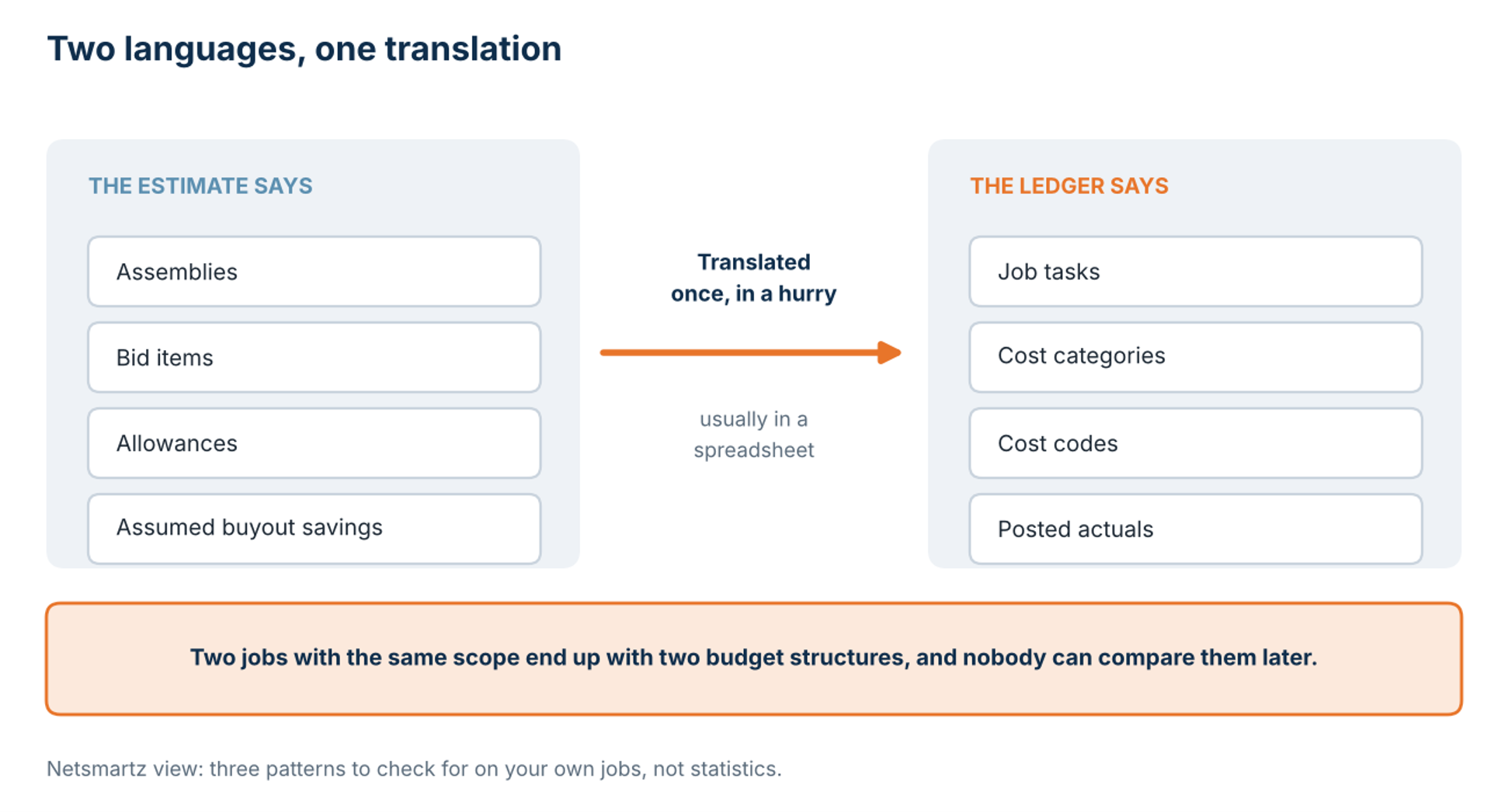
The estimate and the ledger speak different languages. Estimators think in assemblies and bid items. Accounting thinks in cost codes. Somewhere between award and the first purchase order, someone translates one into the other, usually in a spreadsheet, usually once, usually in a hurry. Two jobs with the same scope end up with different budget structures, and nobody can compare them later.

Where the handoff goes wrong

The translation that happens between award and the first purchase order.

The assumptions do not travel. The number makes it into the system. The reasons behind it do not: the allowance carried for a long-lead item, the savings counted on at buyout, the scope excluded from the proposal. Six weeks in, a project manager sees a variance and cannot tell whether it is a problem or just an assumption coming due.

There is no clean baseline to change. The first change order lands, and the question is whether it gets added to the budget or tracked beside it. If the original budget was never frozen, you are amending a moving target.

Underneath all three sits a simpler problem: the handoff has no owner. The estimator feels the job ended at award. Accounting feels it starts when the budget arrives. The project manager inherits whatever lands between them. Nobody is careless. The task simply belongs to nobody.

A small example, invented for illustration. The estimate carries an allowance for switchgear because the supplier has not quoted yet. Six weeks after award the quote comes in higher. If the allowance was never written down, the project manager see an overrun on electrical equipment and starts asking the field what went wrong. If it was written down, the same number is a known assumption coming due, and the conversation is about buyout instead of blame.

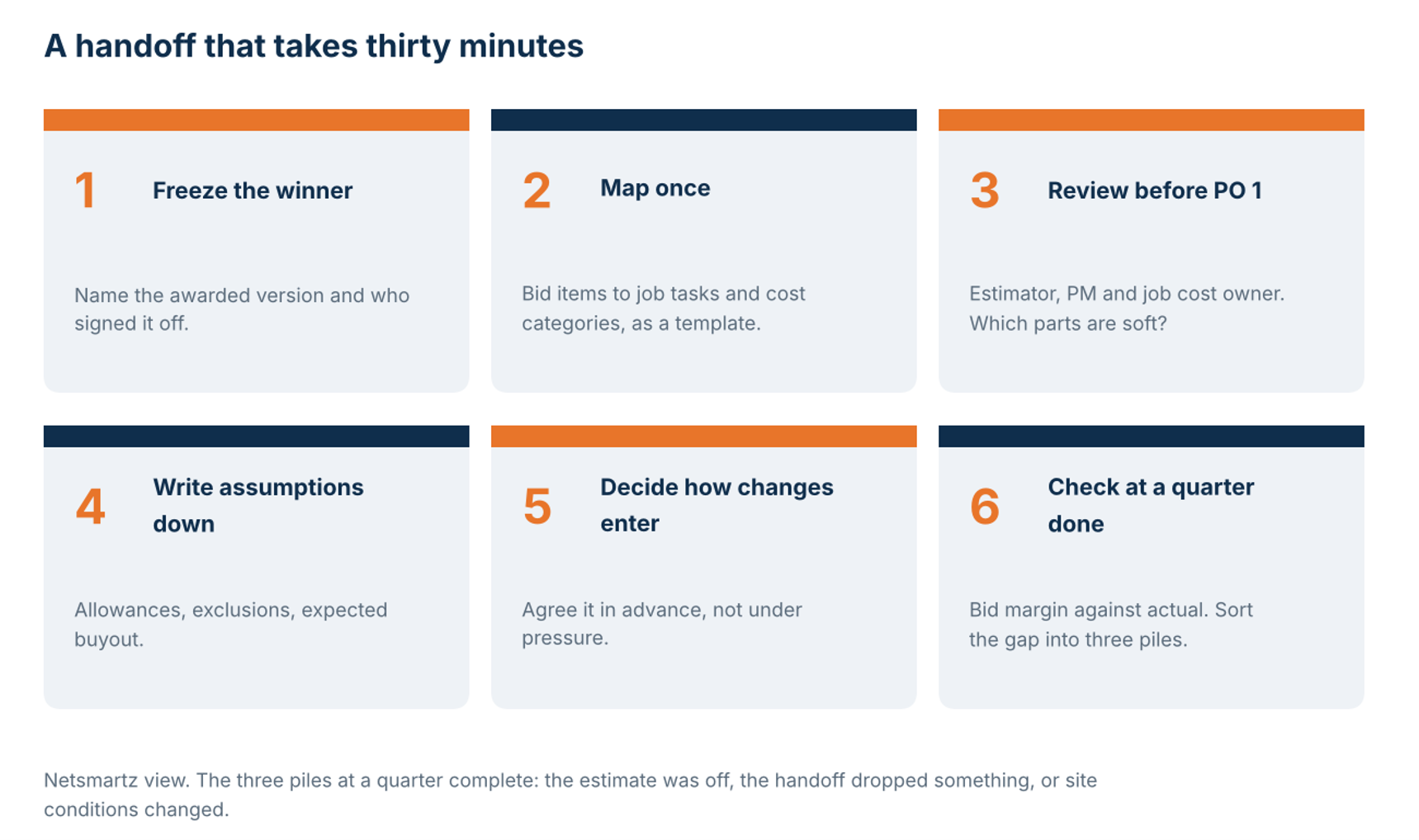
An estimate to budget handoff that takes thirty minutes

You do not need new software to try this on your next award.

  1. Freeze and name the version that won. “Awarded estimate, signed off by [name], [date]” beats “final_v3_revised”.
  2. Map bid items to job tasks and cost categories once, as a template, not job by job.
  3. Hold a short review before the first purchase order: estimator, project manager and whoever owns job cost. The estimator’s job in that meeting is to say which parts of the number are soft.
  4. Write the assumptions down beside the budget: allowances, exclusions, expected buyout.
  5. Decide in advance how approved changes enter the baseline, so you are not deciding it under pressure.
  6. At roughly a quarter complete, compare actual margin with bid margin. Sort each gap into three piles: the estimate was off, the handoff dropped something, or site conditions changed. The middle pile is the one you can fix.

An estimate to budget handoff that takes thirty minutes

The six steps. Run them whatever you estimate in.

Why the baseline matters in Business Central

ProjectPro is built on Microsoft Dynamics 365 Business Central, so it helps to know how Business Central treats a budget. A project budget is built from planning lines on each task. Every line has a type: Budget, Billable, or Both. The budget is compared with actual usage posted to the project. And according to Microsoft’s documentation, Budget-type usage “is used to calculate WIP.”

So a wrong baseline does not stay on the budget screen. It flows into the WIP schedule, which is a document your bonding company and your bank may ask to see. The handoff is not a back-office detail.

From estimate to WIP schedule. The Microsoft quotation is from Learn; the bank and surety point is our inference.

Where ProjectPro fits

ProjectPro’s job quoting page describes quotes built from bid items, job tasks and assemblies of labor, equipment and subcontract cost. It describes quotes that convert into jobs, and a view of budgeted versus actual cost by bid item. When the quote and the job live in the same system, there is less to retype at award, and retyping is where handoff errors tend to start.

Software can carry the numbers across. Someone still has to say which of them are soft. Run the thirty-minute review either way.

See how a quote becomes a job in ProjectPro

Book a demo and bring your last job awarded. We will walk through how the quote, the budget, and the cost report connect.

FAQs

It is the moment an awarded estimate becomes the operating budget for a job. It is where structure, assumptions and ownership change hands.

Usually the estimate is the starting point. The questions are what has changed since the bid, such as buyout results and scope clarifications, and whether you want to keep the bid margin visible next to a separate operating budget. That is a policy choice, and a good one to make on purpose.

The frozen version of the budget that every later cost report, change order and WIP schedule is measured against. Without one you are comparing actuals to a moving target.

No. The steps above work whatever you estimate.

Why Construction ERP Feature Checklists Fail: What Contractors Should Test Instead

Most ERP evaluations test features. Contractors should test the financial chain of a real project.

A contractor can spend eight months evaluating construction ERP software, score five vendors against the same feature matrix, and still choose a system that creates problems after go-live. Months later, finance may still reconcile project costs outside the ERP, while project managers build workarounds because the system does not fit how they run jobs.

The problem is not always missing features. It is what happens when those features have to work together.

In construction, a labor overrun can change the forecast. A subcontractor’s commitment can affect projected costs. A change of order can alter the contract, budget, billing, WIP, and expected margin. Late field activity can leave finance working with outdated numbers.

The best ERP demo is not a feature tour. It is your project, run from estimate to final margin.

Start With the Financial Chain, Not the Feature List

Most ERP evaluations begin with a checklist:

  • Job costing? Check.
  • WIP? Check.
  • Payroll integration? Check.
  • Mobile access? Check.

Those answers matter, but they do not show whether the system connects the financial consequences of a real project. Take a job where labor runs high, a subcontractor submits a change, material costs increase, and billing needs to change.

The real test is whether you can trace:

Estimate → Budget → Commitments → Actual Costs → Changes → Billing/WIP → Projected Final Margin

This is what contractors should use throughout an ERP evaluation.

Microsoft Dynamics 365 Business Central, for example, supports project budgets, resource and employee time tracking, project supplies, invoicing, project analytics, and WIP methods. For contractors, the evaluation question goes further: how do those capabilities work with the construction processes surrounding them?

1. Can the Estimate Become a Controllable Job?

Start with an actual estimate and ask the vendor to show how it becomes a project budget. Follow labor, materials, equipment, subcontractors, cost codes, and assumptions into the awarded job.

Check for:

  • Estimate-to-budget handoff
  • Original vs. revised budget
  • Cost codes and categories
  • Forecast cost to complete

The key question: Does the original estimate remain a meaningful benchmark after the project starts? If the team must rebuild the budget manually, the ERP has created a gap between what was sold and what is being managed.

2. Test Job Cost Visibility Before the Problem Becomes a Report

Give the vendor one scenario: labor is over budget, a subcontract commitment increases, materials cost more, a change order is pending, and the project manager revises the forecast.

Then ask:

What changes in projected cost to complete and final margin, and when can the team see it?

That matters in today’s labor environment. AGC reported in September 2026 that contractors continue to struggle to fill open positions, while workforce shortages remain a significant constraint on construction projects. An ERP cannot solve a labor shortage, but it can help contractors see the financial impact of labor constraints sooner

An ERP cannot solve a labor shortage. It can help contractors see its financial effect sooner.

3. Make Field Activity Part of the Financial Record

Do not stop at asking whether the ERP has a mobile app. Follow a real field event:

Field activity → Project record → Actual cost → Forecast → Financial reporting

Test time entry, equipment activity, project updates, approved changes, and anything requiring re-entry. The goal is to reduce the distance between what happens on the job site and what finance knows about the job.

4. Use Change Orders and Billing as Stress Tests

Change orders expose whether an ERP’s modules actually work together. Take one pending and one approved change order and follow:

Contract → Budget → Commitment → Cost → Billing → WIP → Forecast

Can the system distinguish pending from approved work? Does the approved change update project values and the forecast? Can finance see the effect on billing and WIP?

Then test a project with costs incurred before billing, partial completion, retainage, approved changes, and a revised forecast.

Ask the vendor to show:

  • Revenue
  • WIP
  • Billing
  • Projected profitability

Business Central supports WIP methods including cost value, sales value, recognizable cost, percentage of completion, and completed contract.

But “Does it support WIP?” is not enough.

Can it produce the accounting result your construction business needs from the project data it captures?

5. Your Contractor Type Changes the ERP Test

Construction is not an operating model.

Contractor type What to test Why it matters
General contractors Commitments, changes, billing, project controls Future costs can be missed before they become actuals.
Specialty contractors Labor, materials, project profitability Delayed labor data can hide margin problems.
Equipment-heavy Equipment costs, utilization, allocation Equipment economics can materially affect project performance.
Multi-entity Intercompany, consolidation, permissions Growth adds reporting and control complexity.

Instead of asking, “Does the ERP support construction?”

Ask: Does it support how your business builds, bills, and makes money?

6. Test Integrations, Migration, and Implementation Together

An integration logo proves very little. Ask which system owns each data set, how often information syncs, what happens when it fails, who maintains it, and how upgrades are handled.

Then treat migration as a financial continuity issue, not just a technical task.

Ask:

  • What historical data will migrate?
  • How will open jobs and cost codes be handled?
  • How will historical reporting work?
  • Who validates the migrated data?

If a vendor says “we can migrate your data” without showing you what that data looks like inside a working project, they are treating migration as a technical task rather than a financial continuity issue.

The same scrutiny should apply to the implementation partner. Ask what they would not customize and why, how they handle field adoption and data validation, and what typically causes comparable construction projects to go off track.

A good implementation should not simply reproduce the old system. It should distinguish genuine requirements from processes that need to change.

Don’t Let AI Become a Band-Aid for Bad Data

AI should not distract from the underlying ERP architecture. If job costing, WIP, commitments, and change orders are disconnected, AI cannot reliably answer questions about financial information it cannot access.

Gartner forecasts that AI-enabled solutions will account for 62% of cloud ERP spending by 2027, up from 14% in 2024. Gartner also cites data quality, integration complexity, skills gaps, and inconsistent multi-entity support among adoption challenges.

For contractors, test AI against the same project scenario:

  • Can it identify unusual spending?
  • Can it explain a change in projected margin?
  • Can it access job cost, WIP, commitments, and change-order data?
  • Can users verify the numbers behind its answer?

The Real ERP Test: Run Your Project Through It

Give every shortlisted vendor the same project scenario:

Estimate → Award → Budget → Purchase → Labor → Materials → Subcontract → Change Order → Progress → Billing → WIP → Final Margin

Then ask:

  • Can you trace a field event to the financial record?
  • Can a change update the forecast without manual reconciliation?
  • Do finance and operations see the same underlying numbers?
  • Can the system preserve the project’s history from an estimate through a final margin?

Those answers tell you more about construction ERP software than a feature-count comparison.

The Bottom Line: Test the Chain, Not the Checklist

A construction ERP should not win because it checks the most boxes. It should survive the project scenario that matters to your business.

Take one real job from estimate through budget, commitments, costs, changes, billing, WIP, and final margin. Then test field workflows, integrations, migration, implementation, and AI against that same reality.

If a vendor cannot show you how the pieces connect, a feature list will not fill the gap. That is the difference between evaluating what an ERP has and what it can actually do for a construction business.

Want to Put the Framework to the Test?

If you’re evaluating construction ERP software, bring your project scenario and toughest financial workflow to Netsmartz at Booth #1608 at Community Summit North America 2026, October 11–15 in Nashville.

ProjectPro is an AI-powered construction project management solution that connects job costing, procurement, billing, financials, labor, equipment, and project controls in one system. Built on Microsoft Dynamics 365 Business Central and powered by Microsoft 365 Copilot, it gives contractors a connected view of project performance from the field to the back office.

Book a meeting with our construction technology experts To discuss your project workflows, ERP requirements, and how ProjectPro can fit your business.

FAQs

Look at estimating, job costing, commitments, field activity, change orders, billing, WIP, integrations, and reporting. More importantly, test how those capabilities work together on an actual project.

Use a real project as the test case. Follow the estimate into the budget, field activity into job cost, changes into the forecast, and project data into finance. Use the same scenario with every vendor.

Ask the vendor to demonstrate estimate-to-budget, purchasing, labor, changes, billing, WIP, and projected final margin using the same project scenario. Ask what requires customization, integration, or manual reconciliation.

The partner affects configuration, migration, integrations, adoption, and process fit. Ask about comparable contractors, common implementation problems, and what the partner recommends not customizing.

Capabilities vary by platform and implementation. Ask vendors to demonstrate the systems you use, explain data ownership and synchronization, and show how integration failures and upgrades are handled.

At Community Summit North America 2026, contractors can meet Netsmartz at Booth #1608 to explore AI Coworkers, ProjectPro, and ProjectPro Field for construction. See how construction teams can connect project management, job costing, field operations, and AI-powered assistance across the project lifecycle. You can also book a meeting with our construction technology experts to discuss your specific requirements.

ProjectPro vs. Viewpoint Vista: Which ERP Architecture Fits Your 5-Year Growth Plan?

Two contractors run the same demos, score the same feature matrix, and choose opposite systems. Both can be right.

ProjectPro and Viewpoint Vista cover much of the same core ground. What differs is the foundation underneath: ProjectPro is built on Microsoft Dynamics 365 Business Central, while Vista sits within Trimble Construction One. That affects more than accounting. It shapes integrations, reporting, field technology, what AI can access, and what your team maintains after go-live.

So don’t start with the longest feature list. Start with the foundation.

Short Answer

ProjectPro gives contractors a construction ERP built on Microsoft Dynamics 365 Business Central, connecting construction operations with the broader Microsoft ecosystem.

Viewpoint Vista provides a configurable construction ERP that serves as a financial and operational foundation within Trimble Construction One.

For contractors already invested in Microsoft technologies, ProjectPro should be evaluated as part of that environment. Contractors heavily invested in Trimble Construction One should evaluate Vista within that technology stack.

The decision comes down to more than features. Look at the foundation, data flow, integrations, AI access, and ownership load.

ProjectPro vs Viewpoint Vista: Compare the Operating Model

What to evaluate ProjectPro Viewpoint Vista
ERP foundation Microsoft Dynamics 365 Business Central with construction-specific capabilities Construction ERP and financial/operational foundation within Trimble Construction One
Technology ecosystem Microsoft 365, Power Platform, Power BI, Copilot AI Trimble Construction One and connected construction solutions
Construction operations Estimating, job costing, project management, procurement, job material, progress billing, WIP, financials, payroll, subcontractor management. Job costing, project management, financials, procurement, equipment, service, HR/payroll
Reporting Business Central data with Power BI and Microsoft reporting Vista reporting and analytics within the Trimble environment
Field-to-office ProjectPro Field, built on Microsoft Power Platform Vista connects with Trimble’s field and construction technology
AI approach Microsoft 365 Copilot & AI agents as the intelligence layer AI capabilities evaluated within the broader Trimble environment
Ownership Business Central, ProjectPro extensions, integrations, reporting, Microsoft platform components Vista configuration, integrations, reporting, Trimble components, customization
Strategic question Does a Microsoft-based foundation fit your technology strategy? Does a Trimble-centered foundation fit your construction technology strategy?

Start With the ERP Foundation

ProjectPro’s key architectural distinction is Business Central. Business Central supports project management, budgets, resources, invoicing, WIP, and project analytics. ProjectPro adds construction-specific processes such as estimating, job costing, project operations, billing, and financial management.

Vista takes a different path. Trimble positions it as a construction ERP and financial and operational foundation within Trimble Construction One, with capabilities spanning job costing, accounting, project management, equipment, procurement, service, HR, and payroll.

The real question is which foundation fits the systems your contractor already uses and plans to build around.

The Ecosystem Matters

Construction technology stacks continue to expand. Autodesk’s 2025 construction research found that digital leaders use an average of 5.3 digital tools per construction project, compared with 3.4 among beginner organizations. It also found that 67% of construction leaders agree their company’s future growth depends on digital tools.

More tools do not automatically create a better operating model. The question is how those systems work together.

Trimble Construction One currently describes its stack as more than 40 interconnected solutions. For a contractor already invested in Trimble technologies, Vista needs to be evaluated in that context. For a contractor already using Microsoft 365, Power Platform, Power BI, or other Microsoft applications, ProjectPro needs the same broader assessment.

Don’t Compare Job Costing in Isolation

A demo can show budgets, commitments, actuals, forecasts, and margins. It cannot show how the system behaves when a real project changes.

Give both vendors the same project:

Estimate → Award → Budget → Commitments → Labor → Materials → Subcontract → Change Order → Billing → WIP → Forecast → Final Margin

Then ask:

  • Does a change order update the project outlook?
  • Can teams see commitments against budget and actual costs?
  • Does field activity reach project costing without duplicate entry?
  • Can billing and WIP be reviewed with project performance?
  • Where do spreadsheets or manual processes enter?

The real test is how well the job-costing workflow matches the way your teams control a project.

Field-to-Office Operations Matter

The ERP decision should not stop with accounting. Take a real field scenario. Enter labor, material usage, equipment activity, a change, or project progress. Then follow it into project costing, billing, WIP, and financial reporting.

This reveals whether field and office teams work from the same project information or create another handoff to reconcile. ProjectPro Field is built on Microsoft Power Platform and supports construction workflows including RFIs, submittals, documents, punch lists, daily reports, and safety logs.

Ask how much work happens between the jobsite and the financial system.

AI Changes the Comparison, But Not the Foundation

AI makes the underlying data architecture more important. Autodesk’s 2025 construction Research found that only 32% of construction leaders reported approaching or achieving their AI goals. These figures describe the construction industry broadly, not ERP buyers specifically.

ProjectPro, a construction ERP, is powered by Microsoft 365 Copilot, serving as the intelligence layer over Business Central.

Construction-specific data such as job cost, WIP, and retainage can live in the ISV application layer rather than standard Business Central tables. Whether AI can reach that data depends on how that layer is exposed, not on the AI itself.

That changes the AI evaluation. Ask:

  • Can AI access job cost, WIP, and commitments?
  • Can it explain changes in projected margin?
  • Can users trace answers to underlying records?
  • What permissions govern AI access?

AI is only as useful as the construction data the ERP makes available to it.

Don’t Ignore the Ownership Load

Every ERP requires administration, reporting, integrations, configuration, training, and support.

At Netsmartz, we see this during ERP assessments: the implementation conversation often focuses on what the system can do, while the ownership conversation starts much later.

Ask upfront:

  • Who maintains reports and integrations?
  • Who owns configuration changes?
  • How much internal ERP expertise is required?
  • What happens when the person who understands the system leaves?

The ownership model should be part of the ERP decision, not an afterthought.

Which Operating Model Fits Your Contractor?

ProjectPro may be worth evaluating if you:

  • Want a construction ERP built on Business Central
  • Already use Microsoft 365, Power Platform, or Power BI
  • Want construction accounting and operations within the Microsoft ecosystem
  • Are exploring AI across construction and financial data

Vista may be worth evaluating if you:

  • Need a highly configurable construction ERP
  • Have complex requirements across accounting, HR/payroll, equipment, or service
  • Are already heavily invested in Trimble Construction One
  • Want your ERP within the Trimble construction ecosystem

These are technology strategy decisions, not simply product preferences.

The Better ProjectPro vs Viewpoint Vista Test

Use one real project instead of a feature checklist. Run the same workflow through both systems and ask:

  1. What data is native?
  2. What requires an integration or extension?
  3. How does field information reach financial reporting?
  4. What will your team still own five years after go-live?

Those answers will tell you more than a feature matrix.

Choose the Foundation, Not the Feature Count

ProjectPro and Viewpoint Vista both address major construction ERP requirements. The bigger difference is the foundation underneath those capabilities.

ProjectPro extends Microsoft Dynamics 365 Business Central with construction-specific ERP capabilities, integrated with the broader Microsoft ecosystem. Vista provides a construction ERP foundation within Trimble Construction One.

So evaluate the systems around the ERP, not just the ERP itself.

Don’t choose based on the demo alone. Put your project through both systems and see which foundation fits the way your business actually builds, bills, and manages work.

See How ProjectPro Fits Your Construction Workflow

Feature lists only tell you what an ERP can do. A real project shows how it fits your operation.

[Book a ProjectPro Workflow Assessment →]

Netsmartz can identify the integrations, data flows, and construction-specific requirements you need to address before implementation.

FAQs

ProjectPro can be evaluated as an alternative to Vista, but the fit depends on your workflows, data requirements, integrations, reporting needs, and technology strategy.

If you’re considering a move, start with your open projects, job-cost structures, financial history, critical reports, integrations, and field processes. That gives you a migration scope based on your business rather than a generic feature comparison.

The architectural difference is the ERP foundation.

ProjectPro is built on Microsoft Dynamics 365 Business Central, while Vista serves as a financial and operational ERP foundation within Trimble Construction One.

That foundation affects how you approach integrations, reporting, field technology, AI, and long-term ownership.

It can be, particularly when Microsoft 365 is already central to the contractor’s technology environment. The useful next step is to map your current Microsoft applications, project workflows, reporting requirements, and integrations against ProjectPro before deciding whether the fit is right.

Start with what the business needs to operate and report on: open projects, balances, job-cost structures, master data, critical reports, integrations, and selected historical information. A migration assessment can then determine what should move, integrate, or remain accessible elsewhere.

Use one real project. Run it from estimate and budget through commitments, actual costs, change orders, forecasting, billing, WIP, and final margin. Then document where each platform requires integrations, spreadsheets, manual processes, or configuration. That gives you a practical view of how each ERP would operate inside your business.

CFMA 2026 Member