Construction accounts payable (AP) has a problem that generic automation cannot solve by simply reading documents. A subcontractor pay application may arrive as a PDF, just like an ordinary vendor invoice. The similarity pretty much ends there.
A typical accounts payable automation platform is good at questions such as: Who sent this? What is the invoice number? What is the amount? Which vendor is it? Which purchase order does it match?
A construction finance team has a longer list. How much of the subcontract has already been billed? What work was actually completed? Are the current amounts within the schedule of values? Was that change order approved? Is retainage correct? Are the required waivers and supporting documents there? Does the amount agree with the project record?
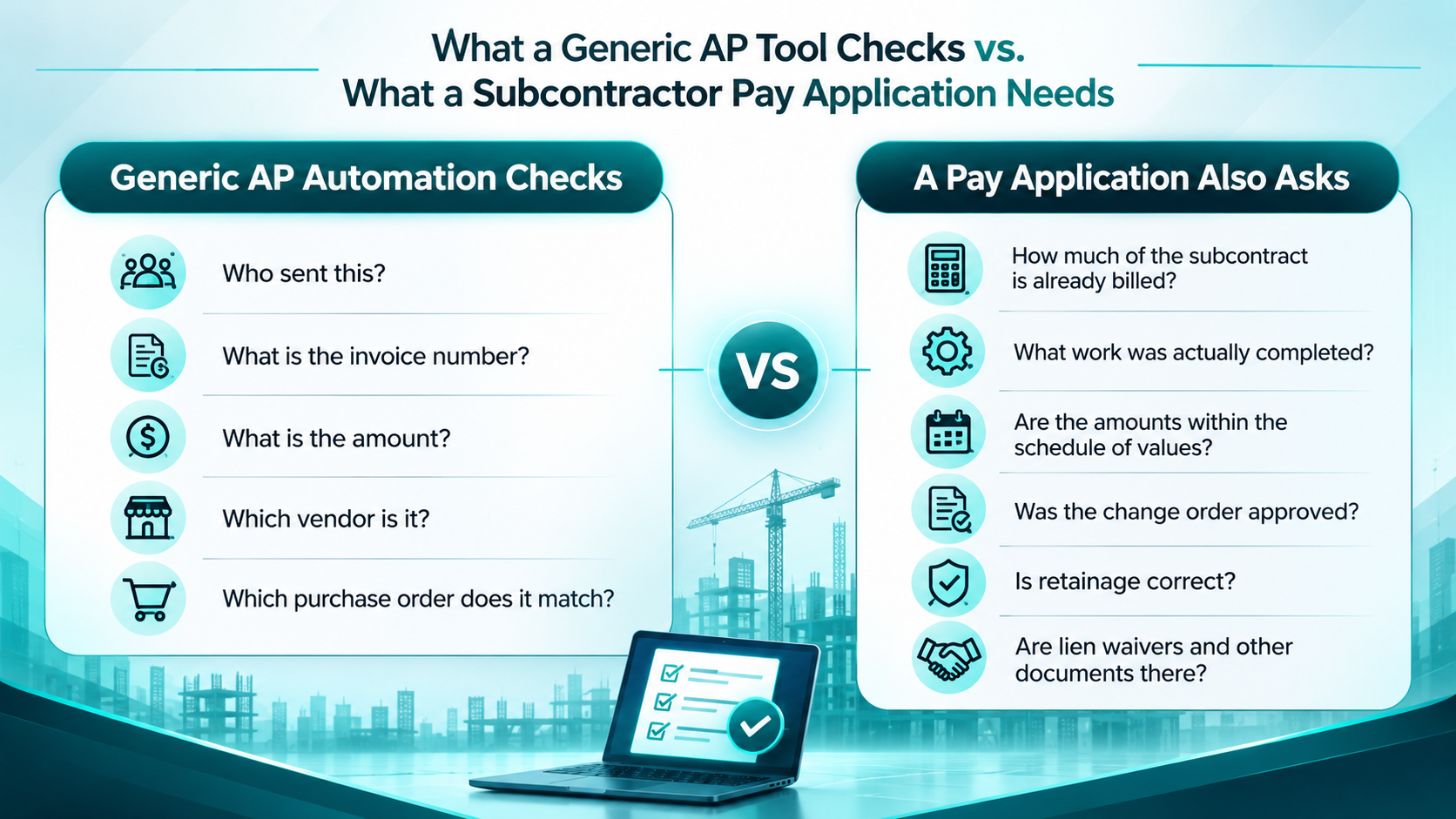
That is the gap. Generic AP automation can automate the document. Construction AP automation has to understand the job.
And that distinction matters more as contractors move toward AI-powered finance workflows.
A Pay Application Is a Financial Claim, Not Just an Invoice
Think about what sits behind a monthly subcontractor pay application. A subcontractor is not simply saying, “Here is my invoice for $250,000.” They are saying, in effect, “Based on our contract, the work completed this period, approved changes, previous billings, stored materials, and applicable retainage, this is the amount we are asking you to certify and pay.”
The document needs context from the project itself. The schedule of values matters. The subcontract matters. Prior applications matter. Change orders matter. Retainage matters. And, depending on the project, compliance documents such as lien waivers and certified payroll can matter too.
A documented subcontractor payment workflow lays out the process clearly: a pay application can move from receipt and PM review through lien-waiver verification, AP processing, and payment. The review itself includes checking completed work, contract value, change orders, retainage, prior payments, and supporting documentation.
Where Generic AP Automation Usually Stops
This is where many accounts payable automation solutions look impressive in a demo and less impressive when the first complicated pay app lands in the queue.
1. Accounts Payable Automation Software Can Read the Document, Not the Contract
OCR and document intelligence are useful. They can pull the vendor name, dates, amounts, line items, and other fields from a PDF. But extracting a number is different from deciding whether that number belongs on this month’s payment.
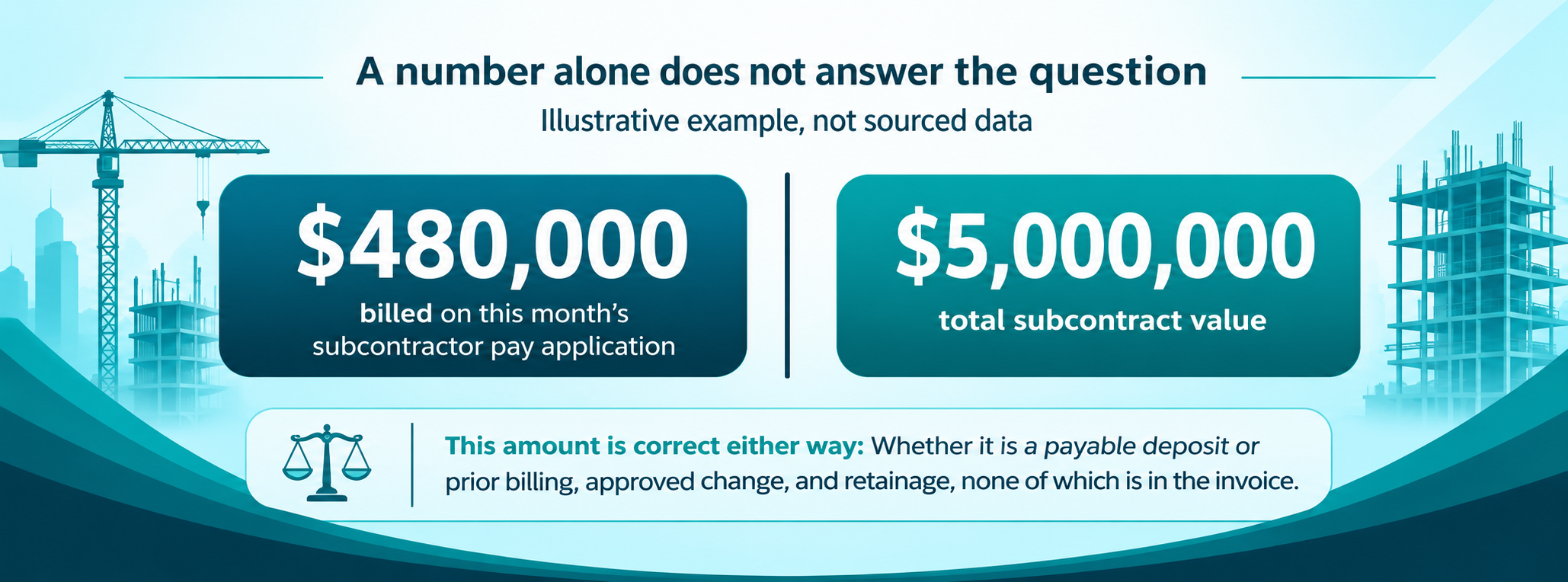
Suppose a subcontractor submits $480,000 against a $5 million contract. The automation reads the $480,000 correctly. That does not tell you whether the subcontractor has already billed $4.7 million, whether the remaining contract balance supports the claim, or whether the amount includes work covered by an unapproved change order.
2. Behind the Invoice Is a Schedule of Values
The schedule of values is one of the biggest reasons a subcontractor pay application is different from a standard invoice.
The AP team needs to see how the current application relates to the original contract and prior billing. A line for concrete, for example, is not just a $90,000 expense. It is part of a contract line with a history: scheduled value, previous applications, current progress, stored materials, retainage, and balance remaining.
Construction AP automation software needs to preserve that relationship instead of flattening everything into an invoice record.
3. Change Orders Can Change the Math
This is another place where a generic workflow can get uncomfortable quickly.
A subcontractor may bill against work that is legitimate but tied to a change order. The question is not simply whether the change exists. The question is whether it has been approved, how it changes contract value, and whether the pay application reflects the approved amount.
ProjectPro, for example, supports contract and change-order tracking alongside progress billing. Its product documentation describes tracking approved amounts, contract change orders, AIA applications, and schedules of values within the construction workflow.
4. Retainage Is Not a Footnote
Retainage can be easy to overlook when an AP system treats every document as a standard invoice.
In construction, the retainage rate can be tied to the contract and can affect the amount that is actually payable. It also becomes part of the financial picture that project managers, controllers, and executives need to track.
ProjectPro’s construction feature set includes retainage management in subcontract management, plus progress billing with AIA applications and schedules of values.
5. The Field May Know Something AP Does Not
Here is the part that often gets missed in conversations about AP automation.
A pay application is ultimately about work performed. The finance system may have the contract and the previous billing, but the project team may be the group that knows whether the claimed work is actually complete.
If the subcontractor says 80% of a scope is complete and the project team says it is closer to 65%, the automation should not quietly pick a number. It should surface the exception and route it to the person responsible for resolving it.
Automating data entry is not the same as automating a controlled workflow.
The construction AP workflow has to connect project progress, contract records, compliance, and payment approval.
What Construction AP Automation Software Should Actually Do
The answer is not “more AI.” It is better context.
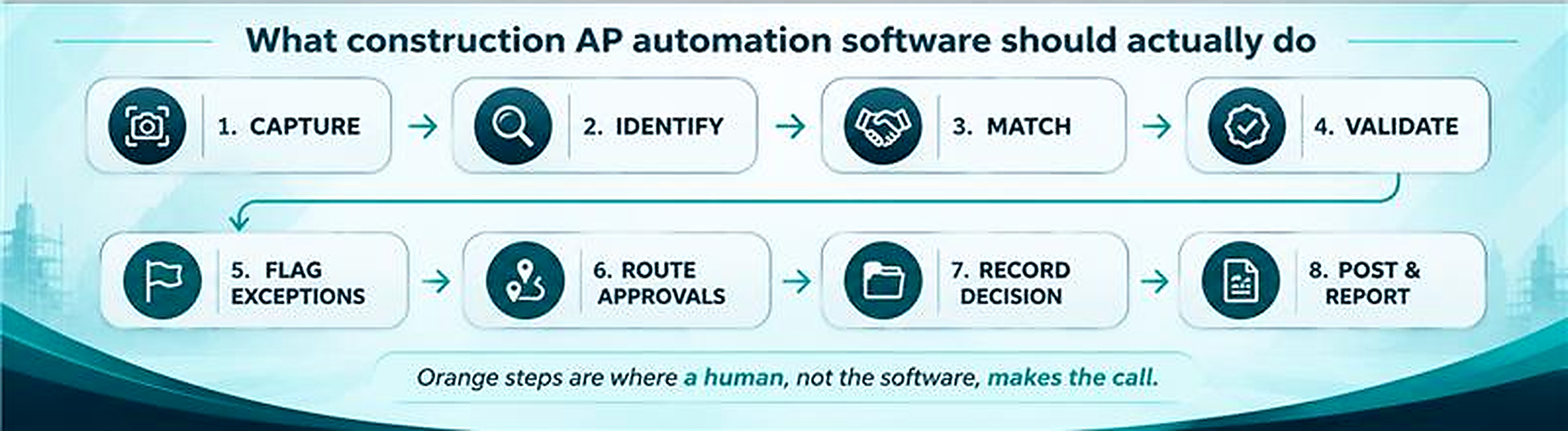
- Capture: Bring the pay application and supporting documents into a controlled workflow.
- Identify: Recognize the subcontractor, project, contract, billing period, and relevant documents.
- Match: Compare the application with the subcontract, schedule of values, prior billing, purchase orders or commitments, and approved changes.
- Validate: Check amounts, retainage, progress, required documentation, and configured business rules.
- Flag exceptions: Stop the workflow when something needs a PM, AP, controller, or other human decision.
- Route approvals: Send the right exception or approval to the person who owns it.
- Record the decision: Keep the approved amount, adjustments, supporting documents, and audit trail together.
- Post and report: Carry the approved financial information into the ERP and make it available for job costing, WIP, cash flow, and reporting.
This Is Where AI Can Help. But AI Needs the Right System Behind It.
Microsoft’s current Business Central AI capabilities show where AP automation is heading. The Payables Agent can monitor a designated mailbox, extract invoice information, identify vendors, suggest invoice details, and create purchase invoice drafts for review. It can also match invoices with purchase orders and receipts in supported scenarios.
What makes that useful is where it operates: the agent works inside Business Central, where vendor, purchasing, accounting, and business-rule context already exists. Microsoft also keeps a human review step in the workflow, including review of suggested invoice details before finalization.
For construction, the same principle applies. An AI model can read a pay application. The real value comes when the workflow can also reach the project data needed to decide what the application means.
Where ProjectPro Fits
ProjectPro is built on Microsoft Dynamics 365 Business Central and is designed specifically for construction firms. Its construction capabilities include subcontract management, retainage, progress billing, AIA applications, schedules of values, contract and change-order management, and project cost visibility.
That matters because AP does not operate in isolation on a construction project. The same project data influences commitments, job costs, billing, change orders, WIP, and cash flow.
ProjectPro’s role-based model also gives finance and project teams different views into the same underlying business information. Finance sees job costs, WIP, retainage, and cash flow. Project managers work with committed costs, change orders, budgets, and billing.
For a subcontractor pay application, that connected context is the point. The AP team should not have to reconstruct the project every time a payment request arrives.
And This Is Where NCIP Can Take It Further
NCIP is built around a simple idea: AI should work with the construction operation, not sit beside it.
For AP, that could mean an AI teammate that helps review incoming subcontractor pay applications against the records already sitting in the construction platform. It can help identify missing information, surface unusual amounts, compare billing with approved contract changes, flag exceptions, and prepare the work for human review.
The important word is “help.” A payment decision still needs the right people, permissions, controls, and audit trail. The AI should make the review faster and more consistent, not make an unexplained payment decision on its own.
This lines up with Microsoft’s own agent model for Business Central: agents are designed to automate specific processes while keeping the work transparent, reviewable, and within defined permissions.
A Better Question to Ask When Evaluating AP Automation
Instead of asking, “Can this software read invoices?” ask a harder question:
A BETTER QUESTION
Can this workflow understand why this payment is due, what supports it, and what should happen if something does not match?
That question will quickly separate a document-processing tool from a construction-ready AP workflow.
Look at a real pay application from one of your active jobs. Then trace the information behind it. Where is the subcontract? Where are the approved change orders? Where is the schedule of values? Where is prior billing? Where is retainage? Where does the PM confirm progress? Where are compliance documents stored? And after approval, where does the final amount land?
If the answer is six systems, three spreadsheets, email, and someone’s memory, the problem is bigger than invoice capture.
The Goal Is Not Just Faster AP
Faster invoice processing sounds good. But construction finance teams need more than speed.
They need confidence that the amount being processed belongs to the right project, the right contract, the right billing period, and the right approval path.
They need project managers and AP teams looking at the same numbers. They need finance to see the impact on job costs and cash flow. They need a clear record when an application is adjusted or held.
That is what construction accounts payable automation should ultimately deliver: fewer manual checks where software can handle them, better visibility where people need to make decisions, and a financial record that stays connected to the job.
FAQs
A subcontractor pay application is a periodic request for payment based on work completed and other contractually eligible amounts. It can include a schedule of values, prior billing, current progress, stored materials, change orders, and retainage.
An invoice generally asks for payment for a defined amount. A subcontractor pay application is usually tied to project progress and contract terms. The amount may need to be reviewed against the schedule of values, prior applications, approved changes, retainage, and project progress before it becomes payable.
At minimum, the workflow should be able to connect the application to the project and subcontract, check prior billing and contract value, account for approved change orders and retainage, verify required supporting documents, route exceptions, and maintain an approval trail.
AI can assist with document extraction, matching, anomaly detection, workflow routing, and preparation for review. It should operate within defined permissions and business rules, with human review for decisions that require project or financial judgment.
ProjectPro connects construction finance and project workflows on Microsoft Dynamics 365 Business Central. Its capabilities include subcontract management, retainage, progress billing, AIA applications, schedules of values, contract and change-order management, and project cost visibility.
ProjectPro exists for exactly this kind of problem. It connects construction AP, subcontractors, job costs, contracts, billing, and project data in one Microsoft-based platform, so a pay application does not have to be reconstructed by hand every time it lands in the queue.
See how ProjectPro handles subcontractor pay applications. Book a 20 minute walkthrough →