All-In-One Construction Accounting Software

The Hazard Was There. The Log Wasn’t. Why Construction Teams Are Rethinking Safety Documentation

Construction sites move fast, and somewhere at that pace, a hazard gets spotted, mentally noted, and forgotten before it ever makes it into a safety log.

For field managers, the reality is familiar. A quick photo on a personal phone, a handwritten note buried in paperwork, or a safety observation that never gets formally documented. Not because anyone is careless, but because reporting is fragmented and competes with everything else happening on site.

The result? Gaps in documentation, incomplete safety records, and preventable hazards slipping through the cracks. Valuable time gets spent chasing photos, notes, and incomplete logs instead of resolving issues in the field.

That is where ProjectPro Field’s Hazard Detection Agent makes a difference. Built into an field-ready construction management solution powered by Microsoft, it allows teams to capture hazards during inspections or walkthroughs and turn them into structured safety logs in seconds.

Why Safety Logging Matters Beyond the Incident

In construction, safety documentation is often treated as a reaction, something you do after something goes wrong. But the strongest safety cultures are built through consistent, day-to-day logging of hazards and observations before they escalate.

Here’s where many field teams struggle:

  • Hazards are noticed in real time but never formally documented.
  • Safety observations often stay trapped in photos, texts, or handwritten notes.
  • Fragmented records make it difficult to identify recurring risks across projects or crews.
  • Small unresolved hazards can later resurface as near-misses or preventable incidents.
  • Valuable field time is spent chasing incomplete documentation instead of resolving issues.

Building a reliable safety process requires tools that match the pace of the field. Logging must be quick enough to happen in the moment, consistent enough to create usable records, and structured enough to help teams spot patterns before they become larger problems.

Introducing the Hazard Detection Agent in ProjectPro Field

Hazard Detection

The Hazard Detection Agent is ProjectPro Field’s built-in AI module designed for the people closest to the work: field managers, safety officers, and on-site supervisors.

It’s built for the pace of the field. Whether it’s part of a planned site walkthrough or a quick observation between tasks, the agent helps teams capture hazards when they are noticed, not hours later when details are harder to recall, and the moment has passed.

At its core, the Hazard Detection Agent organizes safety activity around two distinct log types:

  • Safety Incidents: Events that have already occurred, such as a worker slipping near an excavation. Documentation is immediate and factual.
  • Safety Observations: Potential hazards are spotted before they cause harm, such as an unmarked open hole near a walkway. Documentation is proactive and preventive.

The distinction matters. Incidents demand a response. Observations build a record that, over time, helps teams identify patterns, improve site awareness, and get ahead of risk before it becomes an event.

How It Works: The AI-Powered Reporting Flow

The Hazard Detection Agent turns a multi-step manual process into a fast, structured workflow, moving from photo to finalized log in minutes.

  1. Capture the scene: Field personnel take photos directly within ProjectPro Field while on-site. No switching between tools or uploading files later.
  2. AI hazard analysis: The Hazard Detection Agent analyzes the photo, identifies potential hazards, and generates a description of what it detects automatically.
  3. Auto-classification: The agent classifies the findings as either an incident or observation and assigns a severity level, giving every log a consistent structure from the start.
  4. User review and selection: Users review the agent’s findings, make edits if needed, and decide what to include in the final log. Humans stay in control of every decision.
  5. Auto-generated log entry: The system drafts the log details automatically, helping teams avoid repetitive manual data entry and speed up documentation.
  6. Submit for approval: Completed logs can be routed to safety officers or supervisors for review and sign-off directly within the app.

The Hazard Detection Agent does not replace the safety manager’s judgment. It reduces the time spent on data entry, so teams can focus more attention on field safety and faster responses to risk.

Key Benefits for Field Teams

The Hazard Detection Agent is not just a smarter way to log hazards. It changes how field teams experience safety documentation entirely.

1. Speed

Logging a hazard used to mean stepping away from the work, finding the right form, and piecing together details afterward. Now it can be completed in minutes, directly on-site and in the moment.

2. Accuracy

The Hazard Detection Agent automatically identifies and classifies hazards by type and severity, helping reduce inconsistencies that often come with manual entry across different people and job sites.

3. Consistency

Every log follows the same structure, regardless of who submits it or where it originates. That consistency makes records easier to review, compare, and act on over time.

4. Reduced Data Entry

Field staff spend less time filling out forms and more time focused on active site safety. The agent handles the initial description and classification, allowing teams to review and confirm instead of starting from scratch.

5. Approval Workflow

Safety officers and supervisors can review, comment on, and approve logs remotely within ProjectPro Field, helping teams avoid delays and disconnected communication.

The shift toward proactive safety management is already happening across the construction industry. AI-powered tools help teams capture hazards earlier, improve visibility across projects, and create more consistent field reporting processes.

Conclusion

Safety documentation has always competed with the pace of the field, and too often, the field wins. Field teams spot hazards, let moments pass, and fail to create logs that should exist.

The Hazard Detection Agent changes that. It handles data entry, analyzes the scene, generates descriptions, and classifies findings, allowing field teams to document hazards faster and more consistently in the moment.

The result is not just better records. It is less time spent on forms and more time focused on the work that actually keeps job sites safe.

Learn more: The CFO’s ERP Checklist Every Contractor Should Bring to CFMA 2026

Went to See It in Action?

We’re heading to the CFMA 2026 Annual Conference & Exhibition. Stop by booth #315 to see how ProjectPro Field is helping construction teams improve job site safety documentation.

CFMA

FAQs

Yes. Modern AI systems can analyze construction site images to identify visible risks such as exposed edges, blocked walkways, missing barriers, equipment hazards, and unsafe site conditions. AI helps teams document hazards faster and more consistently directly from the field.

AI is helping construction teams reduce manual reporting effort by automating parts of the documentation process. This includes image analysis, hazard classification, severity tagging, and structured log generation, allowing field teams to capture safety activity in real time.

Manual safety reporting often depends on handwritten notes, disconnected photos, delayed follow-ups, and after-the-fact data entry. On busy jobsites, that process can lead to incomplete records, inconsistent reporting, and missed observations.

Mobile-first construction safety reporting software allows hazards and observations to be captured directly from the jobsite. This improves reporting speed, reduces administrative effort, and helps ensure details are documented while the situation is still fresh.

Traditional safety forms rely entirely on manual input. A Hazard Detection Agent uses AI to assist with image analysis, issue descriptions, classification, and structured log creation, helping teams complete safety documentation faster and with greater consistency.
Dynamics GP Is Phasing Out: Contractors Still on WennSoft Should Migrate to Business Central in 2026

For many construction firms, WennSoft has been a dependable solution for years, helping manage job costing, service operations, and financial processes. But because WennSoft is built on Microsoft Dynamics GP, the platform’s future is now tied to Microsoft’s broader product roadmap.

Microsoft has announced that Dynamics GP will reach end of support in 2029, with certain security updates being phased out earlier. For companies still relying on GP-based systems, this timeline is prompting an important question:

What comes next for construction ERP systems built on Dynamics GP?

At the same time, the industry is rapidly shifting toward cloud-based ERP. For contractors currently running WennSoft, this creates a clear decision point: whether to upgrade the existing WennSoft ERP system or migrate from WennSoft to Business Central to adopt a modern cloud platform.

Moving to a modern ERP can help contractors improve reporting, strengthen integrations, and gain better visibility into project performance while preparing their systems for long-term growth.

Why the WennSoft–Dynamics GP Timeline Demands Action

Delaying your ERP move could put projects, compliance, and growth at risk.

Dynamics GP End-of-Support Timeline (Dec 2029)

  • End of product support: December 2029
  • Only critical security patches until Apr 2031
  • No feature updates, compliance changes, or bug fixes

Licensing Limits

  • Perpetual licenses stopped in 2025
  • Subscription licenses to end in 2026
  • No license expansions after 2031

What This Means for Construction Firms

For construction companies running GP-based systems, these changes can limit scalability, increase compliance risk, and reduce integration with modern tools. Over time, teams may rely more on manual workarounds, making project management and financial visibility harder to maintain.

Migrating from WennSoft to Business Central helps contractors stay ahead, modernize workflows, and protect operations before it’s too late.

Modernizing Your Construction ERP: WennSoft to Business Central with ProjectPro

As construction firms plan their next ERP move, many are choosing to migrate from WennSoft to Dynamics 365 Business Central with ProjectPro.

ProjectPro is a construction-focused project management solution built on Microsoft Dynamics 365 Business Central. It unifies project operations, financials, payroll, and compliance into a single platform.

This combination allows contractors to modernize their ERP system while gaining:

  1. Job Costing and Financial Control

WennSoft provides basic job costing, but ProjectPro on Business Central takes it further. Contractors can track:

  • Labor, materials, equipment, and overhead in detail
  • Planned budgets vs. real-time project expenses
  • Comprehensive financial reports for tighter margin control

With ProjectPro, project managers and finance teams can spot overruns early, make informed decisions, and protect profitability, deliver more actionable insights.

  1. Resource Planning and Workforce Optimization

Many WennSoft users struggle with limited workforce visibility. ProjectPro enhances planning by providing:

  • Real-time resource availability
  • Workload distribution and project scheduling
  • Alerts for over- or underutilized labor

Contractors can optimize staffing, reduce scheduling conflicts, and keep projects on track, turning workforce planning into a competitive advantage.

  1. Seamless Integration Across Systems

WennSoft integrates with Dynamics GP, but modern firms need broader connectivity. ProjectPro on Business Central allows integration with:

  • Microsoft 365 for collaboration
  • Power Platform for automation and analytics
  • Reporting and BI tools

This ensures smooth data flow between finance, operations, and project teams, reducing manual work and improving efficiency.

  1. Cloud Accessibility and Collaboration

WennSoft is primarily on-premises, limiting remote access. ProjectPro unlocks cloud accessibility, letting teams collaborate from:

  • Desktops, tablets, and mobile devices
  • Multiple job sites

This enables real-time collaboration between office and field teams, improving efficiency across projects.

  1. Advanced Reporting and Analytics

While WennSoft allows some reporting, ProjectPro on Business Central gives contractors:

  • Custom dashboards with Power BI
  • Insights into project profitability, resource utilization, and budget performance
  • Operational efficiency tracking

ProjectPro transforms data into actionable insights, helping contractors make smarter decision to stay ahead of project risks.

  1. Customization and Scalability

Every construction firm has unique workflows. ProjectPro allows customization tailored to construction, while Business Central provides cloud-based scalability.

Firms can expand over time by adding new modules, integrations, or automation tools, without rebuilding their ERP. This flexibility supports growth that WennSoft may struggle to handle.

  1. Flexible Pricing and Licensing

WennSoft users often rely on legacy licensing models. ProjectPro uses subscription-based pricing, allowing contractors to:

  • Scale usage as operations grows
  • Reduce upfront costs
  • Align ERP spending with project needs

This ensures firms can modernize affordably while supporting growth.

Download the Solution Brochure:

Projectpro Brochures

Final Thoughts

With Dynamics GP support ending, construction firms using WennSoft face a critical technology decision. Waiting too long can increase maintenance costs, limit integrations, and complicate future upgrades

Many contractors are now evaluating whether to upgrade WennSoft or migrate to Business Central with ProjectPro. ProjectPro adds construction-specific capabilities like project accounting, detailed job costing, and operational workflows on a single cloud platform, helping modernize reporting, improve project visibility, and reduce transition disruption.

Built on Microsoft Dynamics 365 Business Central, ProjectPro unifies project accounting, job costing, and operations on one platform.

To learn how ProjectPro can fit your construction workflow, let’s talk!

Why 70% of Construction Firms are Moving to the Cloud (And Why You Should Too)

Construction projects today involve multiple teams, tight schedules, and constantly shifting costs. On top of that, managing everything through spreadsheets or disconnected tools can quickly lead to delays, miscommunication, and budget overruns.

That’s why many contractors are turning to cloud construction management software to manage projects more efficiently.

According to industry research, more than 70% of construction firms have adopted cloud technology to improve project visibility and collaboration. It highlights the rising need for technology in the construction industry.

Cloud platforms allow contractors to access project data from anywhere, track budgets in real time, and keep office and field teams aligned.

In this guide, we’ll explore five key benefits of cloud construction management software and why it’s becoming essential for modern construction companies.

Top 5 Benefits of Cloud Construction Management Software

The main benefits of cloud construction management software include the following:

1. Real-Time Project Visibility

One of the biggest advantages of cloud construction management software is real-time access to project data.

Project managers can track:

  • Project progress
  • Labor productivity
  • Budgets and cost performance
  • Material usage

Because all data is stored in a centralized system, contractors can identify potential issues early and make faster decisions.

2. Better Collaboration Between Office and Field Teams

Construction projects involve many stakeholders, including contractors, subcontractors, architects, and suppliers.

Cloud construction software allows teams to collaborate through shared dashboards, documents, and task updates.

Field teams can upload updates directly from job sites, while office teams can monitor progress and respond immediately.

This improves communication and reduces delays caused by outdated information.

3. Improved Cost Tracking and Budget Control

Cost overruns are one of the biggest challenges in construction.

With construction software for contractors, project managers can monitor:

  • Labor costs
  • Material expenses
  • Subcontractor payments
  • Equipment costs

Real-time financial visibility helps contractors identify cost issues early and maintain tighter control over project budgets.

4. Faster Project Scheduling and Time Management

Construction schedules change frequently due to weather, supply delays, or design updates.

Cloud-based construction management tools allow project managers to:

  • Update schedules instantly
  • Assign tasks to teams
  • Monitor progress across projects

This helps contractors adjust quickly and keep projects on track.

5. Scalability for Growing Construction Companies

As construction companies grow, managing multiple projects becomes more complex.

Cloud systems allow contractors to add users, projects, and features without investing in additional IT infrastructure.

This makes cloud construction management software a practical solution for both small contractors and large construction firms.

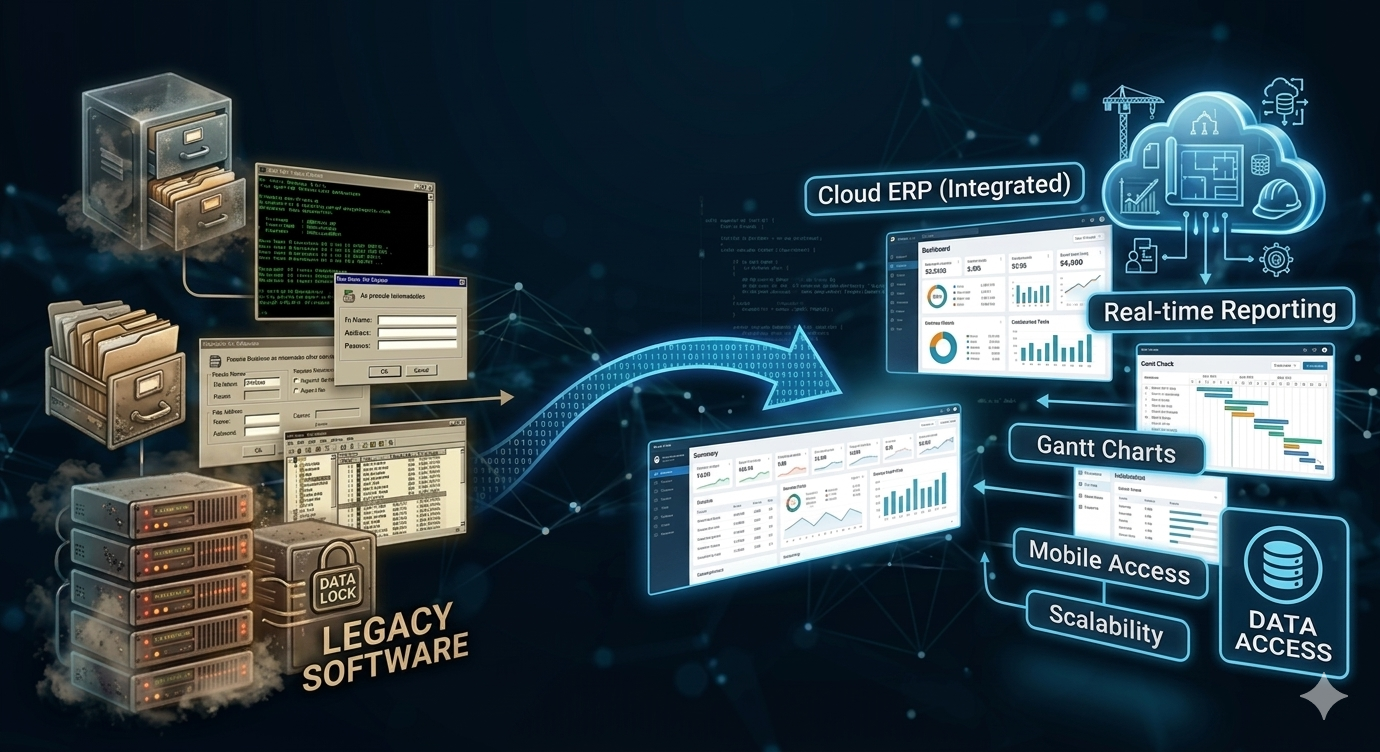
From Legacy Software to Cloud ERP for Construction Companies

cloud ERP

While many contractors begin with basic project management tools, growing construction firms often require deeper financial and operational visibility.

This is where cloud ERP for construction companies becomes valuable.

Cloud ERP platforms connect project management with accounting, job costing, procurement, and financial reporting in one system. This gives contractors a complete view of both project performance and company finances.

How ProjectPro Helps Construction Companies Manage Projects in the Cloud

Modern construction companies need more than just project tracking tools. They need a connected platform that links project management with financial management.

That’s where ProjectPro steps in. Built on Microsoft Dynamics 365 Business Central, ProjectPro helps contractors manage projects, job costs, and financial operations from a single system.

With ProjectPro, construction companies can:

  • Track labor and material costs by job
  • Monitor project budgets in real time
  • Manage subcontractors and resources
  • Automate billing and financial reporting
  • Gain full visibility into project profitability

By centralizing project and financial data, ProjectPro helps contractors make better decisions and deliver projects more efficiently.

Ready to Take Control of Your Construction Projects?

Managing projects with disconnected tools or spreadsheets can lead to delays, miscommunication, and rising costs.

With ProjectPro, contractors can manage projects, finances, and job costs on a single cloud platform. Gain real-time visibility, improve collaboration, and keep your projects on track from start to finish.

To see how ProjectPro helps construction companies work smarter, connect with a ProjectPro specialist today.

FAQs

Cloud construction management software is a digital platform that allows contractors to manage project schedules, budgets, documents, and teams through an online system accessible from any location.

Contractors use cloud construction management software to improve project visibility, streamline communication between field and office teams, and track project costs more accurately.

Cloud ERP for construction companies integrates project management, accounting, job costing, and financial reporting into a single cloud-based platform.

Construction software for contractors should include:

  • Project scheduling
  • Job costing
  • Document management
  • Budget tracking
  • Real-time reporting
  • Collaboration tools

Construction planning best practices include early stakeholder engagement, documented scope, aligned scheduling, integrated design, risk mitigation, and real-time collaboration.

CFMA 2026 Member