All-In-One Construction Accounting Software

ProjectPro vs. QuickBooks Enterprise: Choosing the Right System for Growing Contractors

Your controller closes the month. QuickBooks balances to the penny, and the job cost report shows your largest project is on budget.

Then the project manager walks in with a different number. His forecast includes two change orders still waiting for approval, a revised cost-to-complete on the steel package, and an expected overrun nobody has committed yet. The job isn’t on budget. It’s heading toward a loss.

QuickBooks didn’t fail. It reported what it was designed to report. The PM’s forecast simply lives somewhere else.

That’s the real choice behind ProjectPro vs QuickBooks Enterprise. It isn’t about which system has more features. It’s whether project teams need to report on job costs or manage the project and its financial impact in the same operating environment.

Short answer: QuickBooks Enterprise is a capable choice for construction accounting and job costing. ProjectPro is built for contractors that need the project itself to sit at the center of costing, forecasting, billing, and financial management.

The Real Difference: Reporting the Job vs. Running the Job

QuickBooks Enterprise is built around accounting and business management, with construction-specific tools for job costing, estimates, change orders, committed costs and WIP.

ProjectPro, built on Microsoft Dynamics 365 Business Central, takes a construction ERP approach where project operations and financial management are connected.

At Netsmartz, we call the gap between a project change and when its financial impact becomes visible cost lag. As project complexity increases, that gap can make it harder for leadership to act on current information.

When is QuickBooks Enterprise Still the Right Choice?

QuickBooks Enterprise can be a strong fit for contractors that want accounting, construction job costing, and business management in a familiar platform. Its Contractor Edition supports:

  • Job costing & profitability
  • Estimates & cost-to-complete reporting
  • Change orders & committed costs
  • WIP & contractor reporting
  • Time tracking, budgeting & forecasting
  • Multi-company & intercompany management

For contractors with manageable project complexity and an accounting-led operating model, that may be enough.

As complexity grows, the question changes. Intuit also positions Enterprise Suite as an ERP option for multi-entity organizations with more advanced project costing needs in construction and services. The issue isn’t a revenue threshold. It’s whether the operating model still works as the business grows.

What Are the Signs You’ve Outgrown an Accounting-First Approach?

1. Two Versions of Job Cost

Finance has one number.
Project teams have another forecast.
Result: More reconciliation, less confidence.

2. Changes Reach Finance Late

Subcontract changes, commitments and change orders happen first.
Financial visibility comes later.
Result: Decisions are based on outdated project data.

3. Reconciliation Is Growing with the Business

More projects mean more spreadsheets, POs, reports and manual matching.
Result: Growth creates more administrative work.

When project complexity grows faster than financial visibility, it may be time to rethink the operating model.

What Changes with ProjectPro?

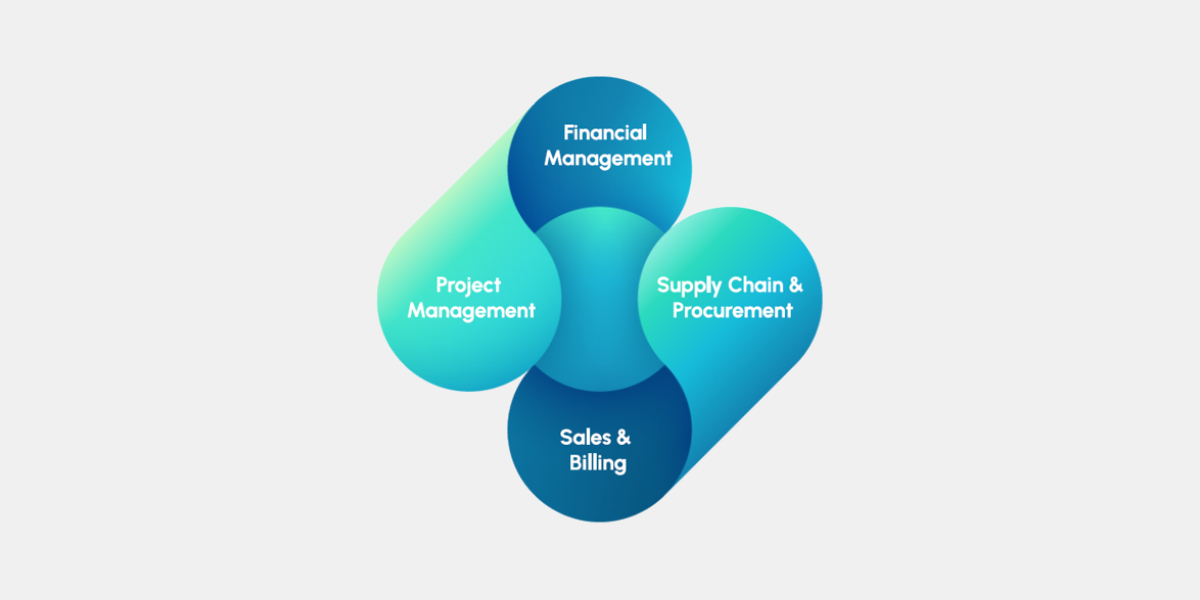
ProjectPro, an AI-powered construction management software, brings project operations and financial management into the same ERP environment, built on Microsoft Dynamics 365 Business Central.

ProjectPro supports:

  • Job Costing & Cost Control: Track job costs, budgets, commitments and project profitability.
  • Project Forecasting: Manage project forecasts, including remaining costs and expected project outcomes.
  • WIP & Revenue Recognition: Support percentage-of-completion accounting and revenue recognition.
  • Progress Billing: Support construction billing workflows, including AIA G702 and G703.
  • Retention & Holdbacks: Track retention within project billing and financial workflows.
  • Change Orders: Connect project changes with their financial impact.
  • Subcontract Management: Manage subcontract commitments and related project workflows.
  • Procurement & Material Planning: Connect purchasing activities with project requirements.
  • Labor & Equipment: Track project resources, timesheets, and related costs.
  • Payroll Integration & Reconciliation: Connect project labor information with payroll processes.

See how an industrial insulation contractor used ProjectPro to automate AIA progress billing, improve job-cost visibility, and accelerate cash flow.

Read the Case Study →

ProjectPro vs QuickBooks Enterprise: At a Glance

Decision area QuickBooks Enterprise ProjectPro
Core focus Accounting-led business management with construction job costing Construction ERP built around project and financial operations
Where the forecast lives Within financial planning and job-costing workflows Within the project and financial workflow
Who works in the system Finance, accounting and project teams using construction-specific tools Finance, project management, operations, procurement and other project teams
How changes reach finance Depends on how project teams capture and update changes Project activity and financial processes are connected within the ERP
Growth fit Strong fit when project complexity remains manageable Strong fit when project complexity and financial coordination increase

An Illustrative Example: A Mechanical Contractor Growing From $15M to $40M

Consider a mechanical contractor that has grown from $15 million to $40 million in annual revenue.

At $15 million, the company may have been able to manage project forecasts through QuickBooks, spreadsheets, and a few specialized tools. Finance could reconcile the numbers at month-end without creating much disruption.

At $40 million, there are more active jobs, more subcontractors, more purchasing activities, and more changes moving through the business.

Now imagine a $250,000 subcontract change that the PM knows about on Monday, but finance does not see reflected in the project forecast until the following month. During those weeks, leadership may approve spending, review project margins, or make cash decisions using information that is already outdated. That’s where the cost lag becomes expensive.

The problem isn’t $250,000. It’s the decisions made while that $250,000 is missing from the financial picture.

A construction ERP can shorten that gap by connecting the project event with the financial workflow.

How Should Contractors Decide Between ProjectPro and QuickBooks Enterprise?

Don’t start with the software. Start by measuring the cost of your current process.

Look at four numbers:

Days: How long does it take for a project change to reach finance?

Dollars: How much committed or forecasted cost sits outside the financial system at any given time?

Hours: How many hours does finance spend each month reconciling project information?

Margin exposure: How much expected project margin can change before leadership sees it?

Then consider your growth plan. If the number of projects, subcontractors, entities, or operational teams is expected to increase significantly, ask whether the current process can scale without adding another layer of spreadsheets and reconciliation.

The Netsmartz Recommendation

At Netsmartz, we don’t recommend moving to a construction ERP simply because a contractor has reached an arbitrary revenue threshold.

We recommend looking at where project complexity is creating financial blind spots.

If QuickBooks Enterprise gives your teams the visibility and control they need, staying with it can be the right decision.

If project teams are managing critical cost and forecast information outside the financial workflow, and finance is spending increasing time reconciling that information, it is worth evaluating a construction ERP such as ProjectPro.

The goal is not to replace a system because it is familiar. It is to make sure the system still matches the way the business operates.

Ready to See Where Cost Lag is Affecting Your Projects?

Talk with a Netsmartz construction ERP specialist to map your current job-costing process, identify where project information is reaching finance late, and determine whether your current system can support the next stage of growth.

FAQs

Yes. Most contractors migrate master data, open jobs, balances, and a defined period of transaction history. Older history can often be archived, so it remains accessible without adding unnecessary data to the new system. Netsmartz can review your QuickBooks company files and recommend what to migrate, archive, or rebuild.

It depends on the number of companies, active projects, integrations, and the amount of process change involved. Netsmartz can assess your current environment and build a migration timeline around your project and financial requirements.

Some workflows may change. Forecasts, change orders, and commitments that PMs manage in spreadsheets today can move into the same system finance uses. Netsmartz can map your current PM workflows and show how they would work in ProjectPro.

ProjectPro is built on Microsoft Dynamics 365 Business Central and can connect with payroll, procurement, field, tax, and other business systems. Netsmartz can review your current integrations and determine what should be connected, replaced, or retained.

Start by measuring how long project changes take to reach finance and how much time your team spends on reconciliation. Netsmartz’s Cost Lag Assessment can evaluate these gaps across your active projects and help determine whether staying with QuickBooks or moving to ProjectPro makes more sense.
Three Entities, One Job: Why Construction CFOs Outgrow QuickBooks Enterprise

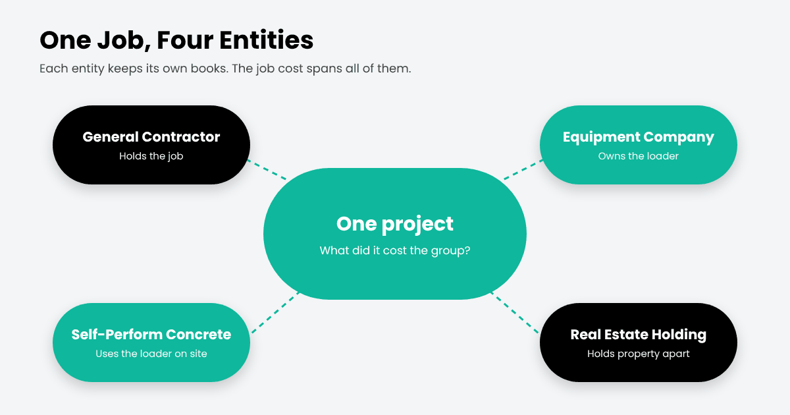
Four entities. One project. The general contractor holds the job. A related equipment company owns the loader. A self-perform concrete company uses it on site.

Now the CFO has a simple question: What did this project cost the group?

In QuickBooks Enterprise, those companies may sit in separate company files. Equipment charges move between entities, while project costs need to stay tied to the job. Across dozens of projects, month-end can become a reconciliation exercise before the CFO sees the full job cost.

QuickBooks Enterprise can combine certain reports across company files. But Intuit’s documentation limits that feature to standard statements and trial balance reports, with matching account names and Excel as the output. Job cost reports aren’t included in Enterprise’s built-in Combine Reports feature.

That’s the real issue. Multi-entity job costing isn’t a month-end consolidation task. The cost needs to stay connected to the job as transactions move across entities.

In short

Multi-entity job costing tracks project costs across several legal entities with shared cost codes and automated intercompany entries. QuickBooks Enterprise keeps each entity in a separate file and combines only summary financial reports, so group-level job costs are usually rebuilt in spreadsheets.

Why Contractors Run Multiple Entities

Few mid-size contractors operate as a single company for long. Common reasons include:

  • Liability separation: keeping risky work or regions in their own entity.
  • Equipment companies: owning fleets separately and renting internally.
  • Self-perform or specialty subsidiaries: concrete, electrical, or site work under their own license.
  • Real estate and development: holding property apart from operations.

Each reason makes sense. Together, they turn one project into several sets of books.

Why Contractors Run Multiple Entities

Where QuickBooks Enterprise Runs Out

QuickBooks Enterprise can handle accounting within each company. The challenge comes when you need to connect those companies around the same construction project:

  • Separate company files: each entity maintains its own company file, with its own jobs and cost codes.
  • Limited combined reporting: selected financial reports can be combined across company files, subject to matching account structures and Excel output.
  • Intercompany transactions: Platinum and Diamond support intercompany transactions between related company files, but each entity still maintains its own company records.
  • No unified cross-entity job view: the key question is not simply whether transactions can move between companies. It is whether the CFO can see the true cost and profitability of a project across the group.

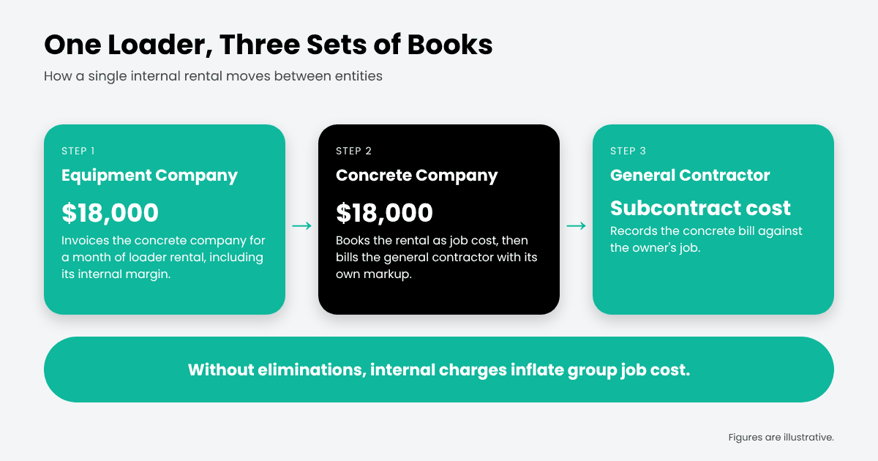
One Loader, Three Sets of Books

Here’s how a single internal rental plays out when each entity keeps its own books :

Each company’s books can be correct, but the group-level job view can still be distorted. The equipment company records rental revenue, while the concrete company records the rental as a project cost. Without a clear intercompany trail and elimination process, those internal charges can inflate the group’s apparent job cost and distort project profitability.

What Multi-Entity Job Costing Actually Requires

Before evaluating any system, construction CFOs should check for these five capabilities:

What you need Why it matters to a construction CFO
Intercompany that posts once An equipment rental or labor charge between entities is entered one time and balances both sets of books.
One cost code structure across entities A concrete cost code means the same thing in every company, so job costs roll up cleanly.
A group-level view of each job You can see what a project costs the whole group, not just the entity that holds the contract.
Committed costs and WIP by entity Subcontracts, POs, and WIP are tracked where they belong, ready for lenders and sureties.
Consolidation with traceable intercompany Every intercompany entry is tagged to a partner, so eliminations are easy to find and review.

Modern ERP platforms handle much of the accounting side. In Microsoft Dynamics 365 Business Central, for example, intercompany partners enter information once, and “a corresponding document is created at the other partner.” Microsoft is also candid that consolidation eliminations remain a manual step, which is why tagging every intercompany entry matters.

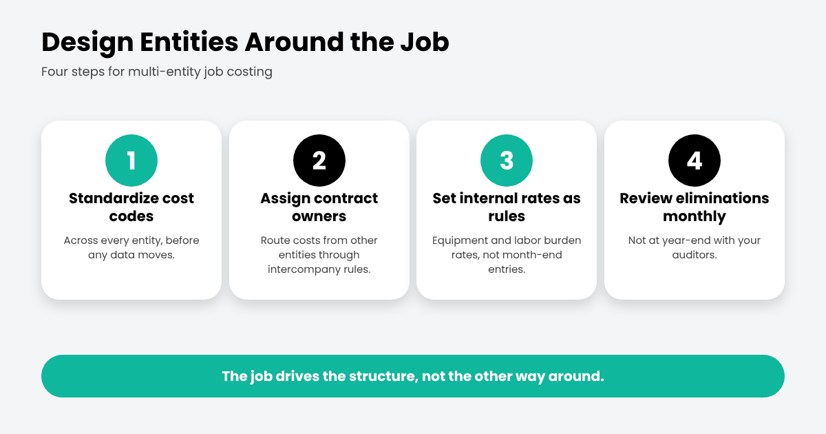
The Netsmartz View: Design Entities Around the Job

Most multi-entity pain comes from setting up entities for legal reasons and hoping job costing follows. Flip it:

The Netsmartz View: Design Entities Around the Job

Where ProjectPro Comes In

ProjectPro is Netsmartz’s all-in-one, AI-powered construction ERP built on Microsoft Dynamics 365 Business Central. It brings construction job costing and financial management into one platform, with Microsoft 365 Copilot as the intelligence layer.

For multi-entity contractors, ProjectPro brings these requirements into one construction ERP environment. It combines construction job costing by project, phase, and cost code with intercompany accounting, labor and equipment resource management, subcontracts, retention, progress billing, and WIP.

Each company can maintain its own books while finance and project teams work from connected project and financial data across the group. That gives CFOs a clearer view of what each entity owns, what it owes, and what each project actually costs across the organization

CTA

The Bottom Line

QuickBooks Enterprise can tell you how each company did. A growing contractor also needs to know how each job did across all of them. When that answer lives in a spreadsheet, the structure has outgrown the software.

See how multi-entity job costing works in ProjectPro. Take the product tour.

Frequently asked questions

Multi-entity job costing tracks construction project costs across two or more legal entities, such as a general contractor, self-perform subsidiary, and equipment company. A shared cost code structure helps finance teams see project costs and profitability across each entity and the group.

QuickBooks Enterprise can combine selected financial reports from multiple company files into Excel, including balance sheet, profit and loss, cash flow, and trial balance reports. The company files must use matching account names, types, and levels. Its built-in Combine Reports feature does not include job-cost reports or provide a project-level view of costs across entities.

In Microsoft Dynamics 365 Business Central, you can assign intercompany partners to customers and vendors. When one company sends an intercompany transaction, the corresponding document can be created in the partner company, reducing duplicate entry across entities.

The terms are often used interchangeably. Multi-company construction accounting generally refers to managing multiple companies or sets of books within an accounting system. Multi-entity job costing goes further by connecting project costs, commitments, and WIP across those companies, so finance teams can see each job’s cost across the group.

A common trigger is when multiple entities share jobs, equipment, or labor and group-level job costs, intercompany balances, or WIP have to be rebuilt in spreadsheets each month. That is a sign to evaluate whether the accounting system can support the way the business operates.

ProjectPro brings construction job costing, intercompany accounting, commitments, WIP, and project financials into the same ERP environment. Built on Microsoft Dynamics 365 Business Central, it helps construction companies track costs by project, phase, and cost code while maintaining separate company books.

ProjectPro vs. Viewpoint Vista: Which ERP Architecture Fits Your 5-Year Growth Plan?

Two contractors run the same demos, score the same feature matrix, and choose opposite systems. Both can be right.

ProjectPro and Viewpoint Vista cover much of the same core ground. What differs is the foundation underneath: ProjectPro is built on Microsoft Dynamics 365 Business Central, while Vista sits within Trimble Construction One. That affects more than accounting. It shapes integrations, reporting, field technology, what AI can access, and what your team maintains after go-live.

So don’t start with the longest feature list. Start with the foundation.

Short Answer

ProjectPro gives contractors a construction ERP built on Microsoft Dynamics 365 Business Central, connecting construction operations with the broader Microsoft ecosystem.

Viewpoint Vista provides a configurable construction ERP that serves as a financial and operational foundation within Trimble Construction One.

For contractors already invested in Microsoft technologies, ProjectPro should be evaluated as part of that environment. Contractors heavily invested in Trimble Construction One should evaluate Vista within that technology stack.

The decision comes down to more than features. Look at the foundation, data flow, integrations, AI access, and ownership load.

ProjectPro vs Viewpoint Vista: Compare the Operating Model

What to evaluate ProjectPro Viewpoint Vista
ERP foundation Microsoft Dynamics 365 Business Central with construction-specific capabilities Construction ERP and financial/operational foundation within Trimble Construction One
Technology ecosystem Microsoft 365, Power Platform, Power BI, Copilot AI Trimble Construction One and connected construction solutions
Construction operations Estimating, job costing, project management, procurement, job material, progress billing, WIP, financials, payroll, subcontractor management. Job costing, project management, financials, procurement, equipment, service, HR/payroll
Reporting Business Central data with Power BI and Microsoft reporting Vista reporting and analytics within the Trimble environment
Field-to-office ProjectPro Field, built on Microsoft Power Platform Vista connects with Trimble’s field and construction technology
AI approach Microsoft 365 Copilot & AI agents as the intelligence layer AI capabilities evaluated within the broader Trimble environment
Ownership Business Central, ProjectPro extensions, integrations, reporting, Microsoft platform components Vista configuration, integrations, reporting, Trimble components, customization
Strategic question Does a Microsoft-based foundation fit your technology strategy? Does a Trimble-centered foundation fit your construction technology strategy?

Start With the ERP Foundation

ProjectPro’s key architectural distinction is Business Central. Business Central supports project management, budgets, resources, invoicing, WIP, and project analytics. ProjectPro adds construction-specific processes such as estimating, job costing, project operations, billing, and financial management.

Vista takes a different path. Trimble positions it as a construction ERP and financial and operational foundation within Trimble Construction One, with capabilities spanning job costing, accounting, project management, equipment, procurement, service, HR, and payroll.

The real question is which foundation fits the systems your contractor already uses and plans to build around.

The Ecosystem Matters

Construction technology stacks continue to expand. Autodesk’s 2025 construction research found that digital leaders use an average of 5.3 digital tools per construction project, compared with 3.4 among beginner organizations. It also found that 67% of construction leaders agree their company’s future growth depends on digital tools.

More tools do not automatically create a better operating model. The question is how those systems work together.

Trimble Construction One currently describes its stack as more than 40 interconnected solutions. For a contractor already invested in Trimble technologies, Vista needs to be evaluated in that context. For a contractor already using Microsoft 365, Power Platform, Power BI, or other Microsoft applications, ProjectPro needs the same broader assessment.

Don’t Compare Job Costing in Isolation

A demo can show budgets, commitments, actuals, forecasts, and margins. It cannot show how the system behaves when a real project changes.

Give both vendors the same project:

Estimate → Award → Budget → Commitments → Labor → Materials → Subcontract → Change Order → Billing → WIP → Forecast → Final Margin

Then ask:

  • Does a change order update the project outlook?
  • Can teams see commitments against budget and actual costs?
  • Does field activity reach project costing without duplicate entry?
  • Can billing and WIP be reviewed with project performance?
  • Where do spreadsheets or manual processes enter?

The real test is how well the job-costing workflow matches the way your teams control a project.

Field-to-Office Operations Matter

The ERP decision should not stop with accounting. Take a real field scenario. Enter labor, material usage, equipment activity, a change, or project progress. Then follow it into project costing, billing, WIP, and financial reporting.

This reveals whether field and office teams work from the same project information or create another handoff to reconcile. ProjectPro Field is built on Microsoft Power Platform and supports construction workflows including RFIs, submittals, documents, punch lists, daily reports, and safety logs.

Ask how much work happens between the jobsite and the financial system.

AI Changes the Comparison, But Not the Foundation

AI makes the underlying data architecture more important. Autodesk’s 2025 construction Research found that only 32% of construction leaders reported approaching or achieving their AI goals. These figures describe the construction industry broadly, not ERP buyers specifically.

ProjectPro, a construction ERP, is powered by Microsoft 365 Copilot, serving as the intelligence layer over Business Central.

Construction-specific data such as job cost, WIP, and retainage can live in the ISV application layer rather than standard Business Central tables. Whether AI can reach that data depends on how that layer is exposed, not on the AI itself.

That changes the AI evaluation. Ask:

  • Can AI access job cost, WIP, and commitments?
  • Can it explain changes in projected margin?
  • Can users trace answers to underlying records?
  • What permissions govern AI access?

AI is only as useful as the construction data the ERP makes available to it.

Don’t Ignore the Ownership Load

Every ERP requires administration, reporting, integrations, configuration, training, and support.

At Netsmartz, we see this during ERP assessments: the implementation conversation often focuses on what the system can do, while the ownership conversation starts much later.

Ask upfront:

  • Who maintains reports and integrations?
  • Who owns configuration changes?
  • How much internal ERP expertise is required?
  • What happens when the person who understands the system leaves?

The ownership model should be part of the ERP decision, not an afterthought.

Which Operating Model Fits Your Contractor?

ProjectPro may be worth evaluating if you:

  • Want a construction ERP built on Business Central
  • Already use Microsoft 365, Power Platform, or Power BI
  • Want construction accounting and operations within the Microsoft ecosystem
  • Are exploring AI across construction and financial data

Vista may be worth evaluating if you:

  • Need a highly configurable construction ERP
  • Have complex requirements across accounting, HR/payroll, equipment, or service
  • Are already heavily invested in Trimble Construction One
  • Want your ERP within the Trimble construction ecosystem

These are technology strategy decisions, not simply product preferences.

The Better ProjectPro vs Viewpoint Vista Test

Use one real project instead of a feature checklist. Run the same workflow through both systems and ask:

  1. What data is native?
  2. What requires an integration or extension?
  3. How does field information reach financial reporting?
  4. What will your team still own five years after go-live?

Those answers will tell you more than a feature matrix.

Choose the Foundation, Not the Feature Count

ProjectPro and Viewpoint Vista both address major construction ERP requirements. The bigger difference is the foundation underneath those capabilities.

ProjectPro extends Microsoft Dynamics 365 Business Central with construction-specific ERP capabilities, integrated with the broader Microsoft ecosystem. Vista provides a construction ERP foundation within Trimble Construction One.

So evaluate the systems around the ERP, not just the ERP itself.

Don’t choose based on the demo alone. Put your project through both systems and see which foundation fits the way your business actually builds, bills, and manages work.

See How ProjectPro Fits Your Construction Workflow

Feature lists only tell you what an ERP can do. A real project shows how it fits your operation.

[Book a ProjectPro Workflow Assessment →]

Netsmartz can identify the integrations, data flows, and construction-specific requirements you need to address before implementation.

FAQs

ProjectPro can be evaluated as an alternative to Vista, but the fit depends on your workflows, data requirements, integrations, reporting needs, and technology strategy.

If you’re considering a move, start with your open projects, job-cost structures, financial history, critical reports, integrations, and field processes. That gives you a migration scope based on your business rather than a generic feature comparison.

The architectural difference is the ERP foundation.

ProjectPro is built on Microsoft Dynamics 365 Business Central, while Vista serves as a financial and operational ERP foundation within Trimble Construction One.

That foundation affects how you approach integrations, reporting, field technology, AI, and long-term ownership.

It can be, particularly when Microsoft 365 is already central to the contractor’s technology environment. The useful next step is to map your current Microsoft applications, project workflows, reporting requirements, and integrations against ProjectPro before deciding whether the fit is right.

Start with what the business needs to operate and report on: open projects, balances, job-cost structures, master data, critical reports, integrations, and selected historical information. A migration assessment can then determine what should move, integrate, or remain accessible elsewhere.

Use one real project. Run it from estimate and budget through commitments, actual costs, change orders, forecasting, billing, WIP, and final margin. Then document where each platform requires integrations, spreadsheets, manual processes, or configuration. That gives you a practical view of how each ERP would operate inside your business.

Certified Payroll Is Where Construction ERPs Quietly Fail

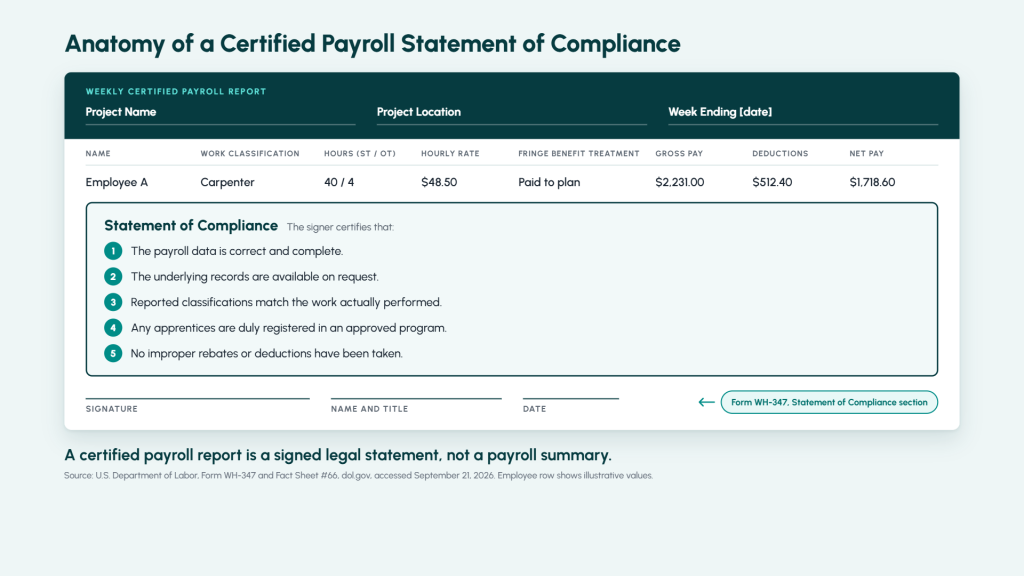
A certified payroll report ends with a signature, not a submit button. On the Statement of Compliance section of Form WH-347, someone at your company certifies that a specific week’s hours, wage rates, classifications, fringe benefits, and deductions are accurate for every worker on a federally funded job, and that the underlying records are complete and available on request. Get that wrong often enough and it stops being a paperwork problem.

Certified payroll, the weekly reporting required on Davis-Bacon and state prevailing wage jobs, is not a payroll run with extra fields. It demands a weekly cadence instead of biweekly, wage rates that shift by trade and county, fringe benefit math with its own annualization rules, apprentice ratios tracked against a registered program, and a report format that depends on which government agency is asking. Most construction ERPs were built around job costing and billing, not around that list, and certified payroll got added later, if it got added at all.

What a Certified Payroll Report Actually Has to Prove

The Department of Labor’s Fact Sheet #66, covering the Davis-Bacon and Related Acts, is direct about the cadence: contractors on covered jobs pay workers weekly and submit weekly certified payroll records to the contracting agency, not monthly, not at the end of the job. Each report covers one project, one pay period, and every laborer or mechanic who touched the site that week.

The document that carries the legal weight is the Statement of Compliance, the signed section of Form WH-347. It is not a summary. Signing it certifies that the payroll data is correct and complete, that the underlying records will be produced on request, that each worker’s reported classification matches the work actually performed, that any apprentices are properly registered in a bona fide program, and that no rebates or improper deductions were taken from anyone’s pay. Five separate certifications, one signature, every week, for the life of the project.

The Department of Labor released an online fillable version of the WH-347 in December 2025, alongside an annotated guide, specifically to cut down on the errors contractors were making on the paper form. Wage and Hour Division Administrator Andrew Rogers framed it as a tool to “improve accuracy, reduce administrative burden, and promote consistent reporting practices across DBRA-covered projects.” The web version is optional. The underlying obligation, submitting accurate weekly data under a signed certification, is not, and has not changed.

Fringe Benefits Are Where Davis-Bacon Compliance Gets Complicated

A Davis-Bacon wage determination sets a base hourly rate and a fringe benefit rate, and a contractor can satisfy the fringe portion in cash, through a bona fide benefit plan, or some combination of both. That flexibility is useful. It is also where the math stops being simple.

The Department of Labor’s Fact Sheet #66E lays out the mechanics. Credit for a fringe benefit plan is based on the annualized rate of contribution, meaning a contractor has to average what it pays into that plan across all hours an employee works during the year, Davis-Bacon and non-Davis-Bacon hours alike, not just the hours on the certified job. Benefits expressed as a percentage of the base rate do not automatically carry into overtime calculations the same way cash wages do. A contractor’s own administrative cost of running the benefit plan is not creditable against the fringe obligation. And whether a given payment counts as a fringe benefit or as straight wages changes how overtime gets calculated on that check.

None of that shows up as a validation error in a general ledger. A payroll system built for a standard biweekly cycle has no built-in reason to track annualized contribution rates or flag a benefit that is structured as a percentage instead of a flat dollar amount. It just runs the numbers it is given.

Apprentice Ratios Are a Prevailing Wage Reporting Trap

Apprentices can legally be paid less than the prevailing wage rate on a covered job, but only inside a specific limit. Department of Labor guidance is precise about it: an apprentice can be paid below the wage determination rate only if the ratio of apprentices to journey workers on site does not exceed the ratio set by the apprentice’s registered program, or by the standards for the locality where the project sits, if that differs from where the program is registered.

That is a headcount rule, tracked daily, on a jobsite where crews move between tasks and subcontractors bring their own people. Exceed the ratio and the apprentices working above it are owed the full journeyworker rate retroactively, not a warning. Most systems that track labor hours were not built to flag a ratio breach in real time. They log hours by employee and classification, and the ratio math happens later, if it happens at all.

Why the WH-347 Form Isn’t the Only Certified Payroll Form

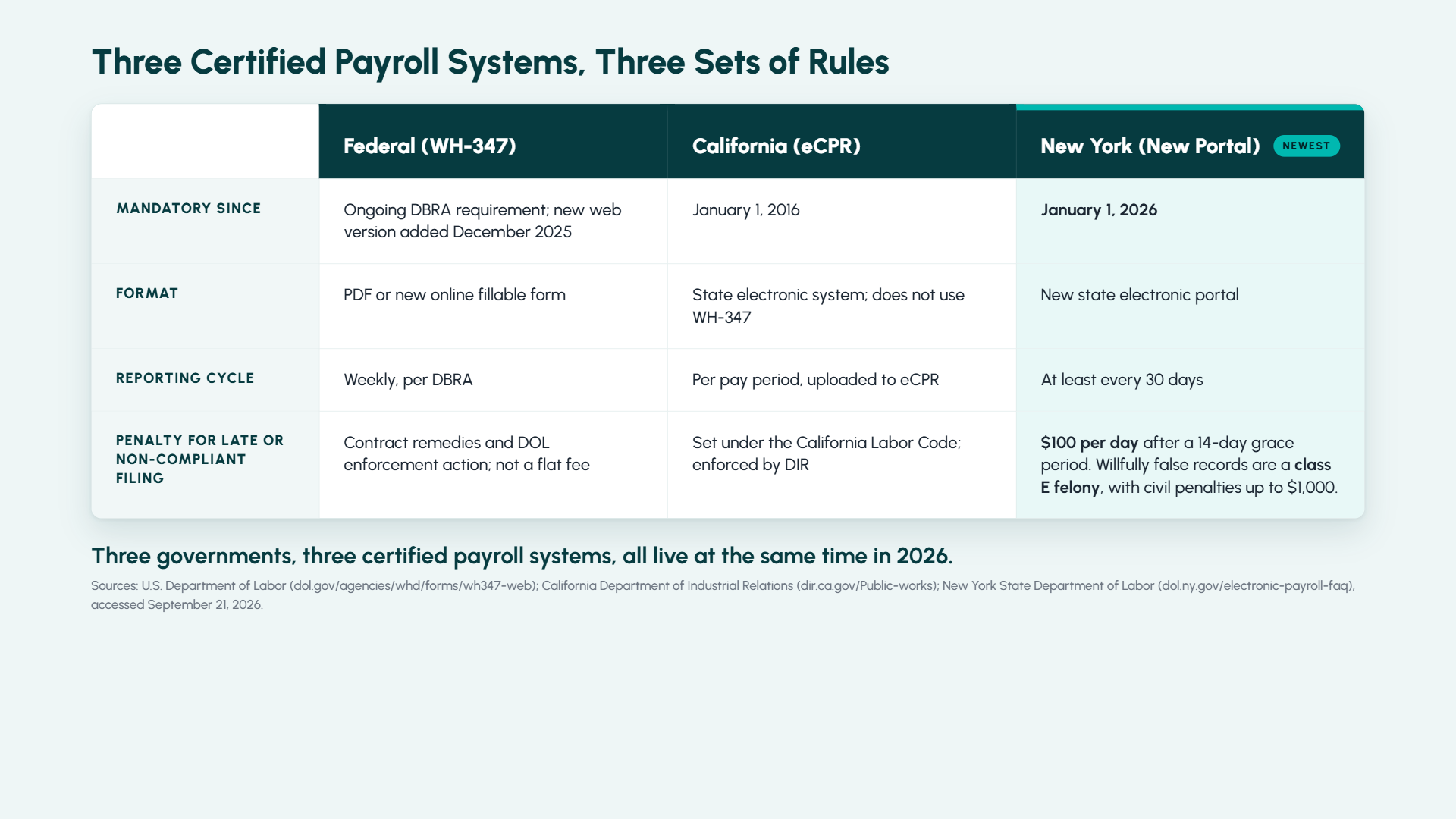
Federal contractors have used Form WH-347 for decades, and the Department of Labor gave it its first real interface update in December 2025: an online fillable version at dol.gov, built to catch the errors contractors made filling in the PDF by hand. It works in a browser, nothing gets installed, and the department says the data stays on the user’s machine rather than a DOL server. The older PDF is still valid. Using either version is optional; submitting accurate weekly certified payroll is not.

States were not waiting on Washington to modernize their own systems. California has required contractors on public works to file through its own electronic certified payroll reporting system, eCPR, since January 1, 2016, and the federal WH-347 does not enter into it at all. New York went further in the other direction. Starting January 1, 2026, contractors and subcontractors on New York public work and on many privately funded prevailing wage projects have to submit certified payroll through a new state portal at least every 30 days, with a $100-per-day penalty kicking in after a 14-day grace period for late submissions, and separate criminal exposure for knowingly false records.

Three governments, three different systems, three different cadences and formats, and that is before a contractor works across county-level or agency-specific wage determinations on top of it. A construction ERP that assumes certified payroll means one form, filled out one way, is already behind.

What DOL’s Enforcement Numbers Actually Show

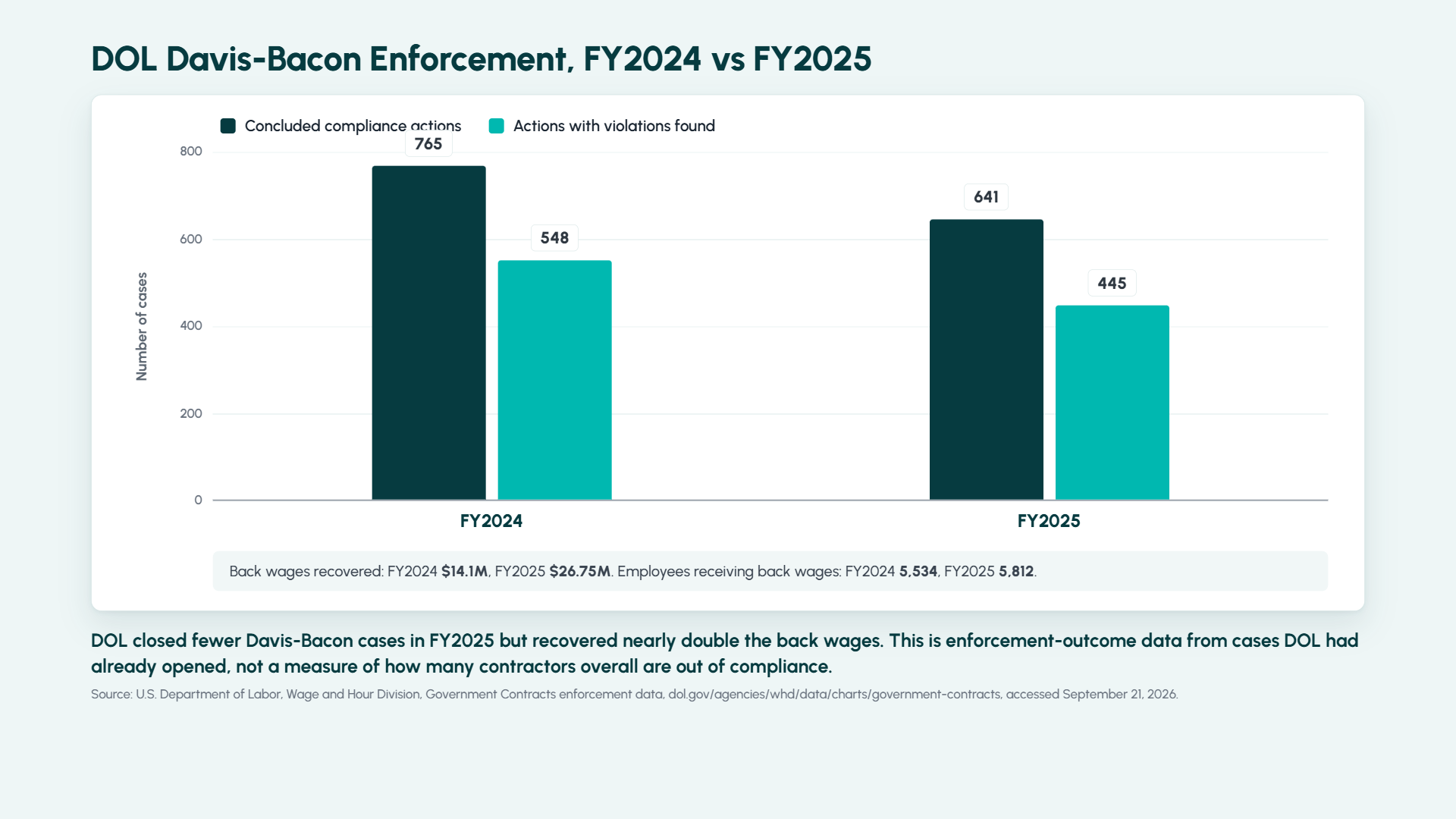
The Department of Labor’s Wage and Hour Division publishes its own enforcement results by act, and the Davis-Bacon and Related Acts numbers for fiscal year 2025 are worth reading carefully, in both directions. WHD closed 641 DBRA compliance actions in FY2025 and found violations in 445 of them, about 69%, recovering just over $26.75 million in back wages for 5,812 employees. In FY2024, WHD closed 765 actions, found violations in 548, about 72%, and recovered $14.1 million for 5,534 employees.

Read those numbers for what they are, not for what they sound like. This is not a survey of the construction industry and it is not a random sample. These are outcomes from cases WHD had already opened, typically because something, a worker complaint, a referral, a targeted review, flagged the contractor for investigation in the first place. A 69% violation rate among investigated cases says something about how hard the details are to get right once an investigator starts pulling records. It says nothing about what percentage of contractors overall are out of compliance, and it should not be quoted that way.

What the two years do show consistently is that when DOL looks, it tends to find something, and the dollar recovery moved up sharply even as the case count went down. That combination, fewer cases opened, more money recovered per case, points to violations that were not small clerical slips.

Construction ERP Compliance: Where ProjectPro Fits

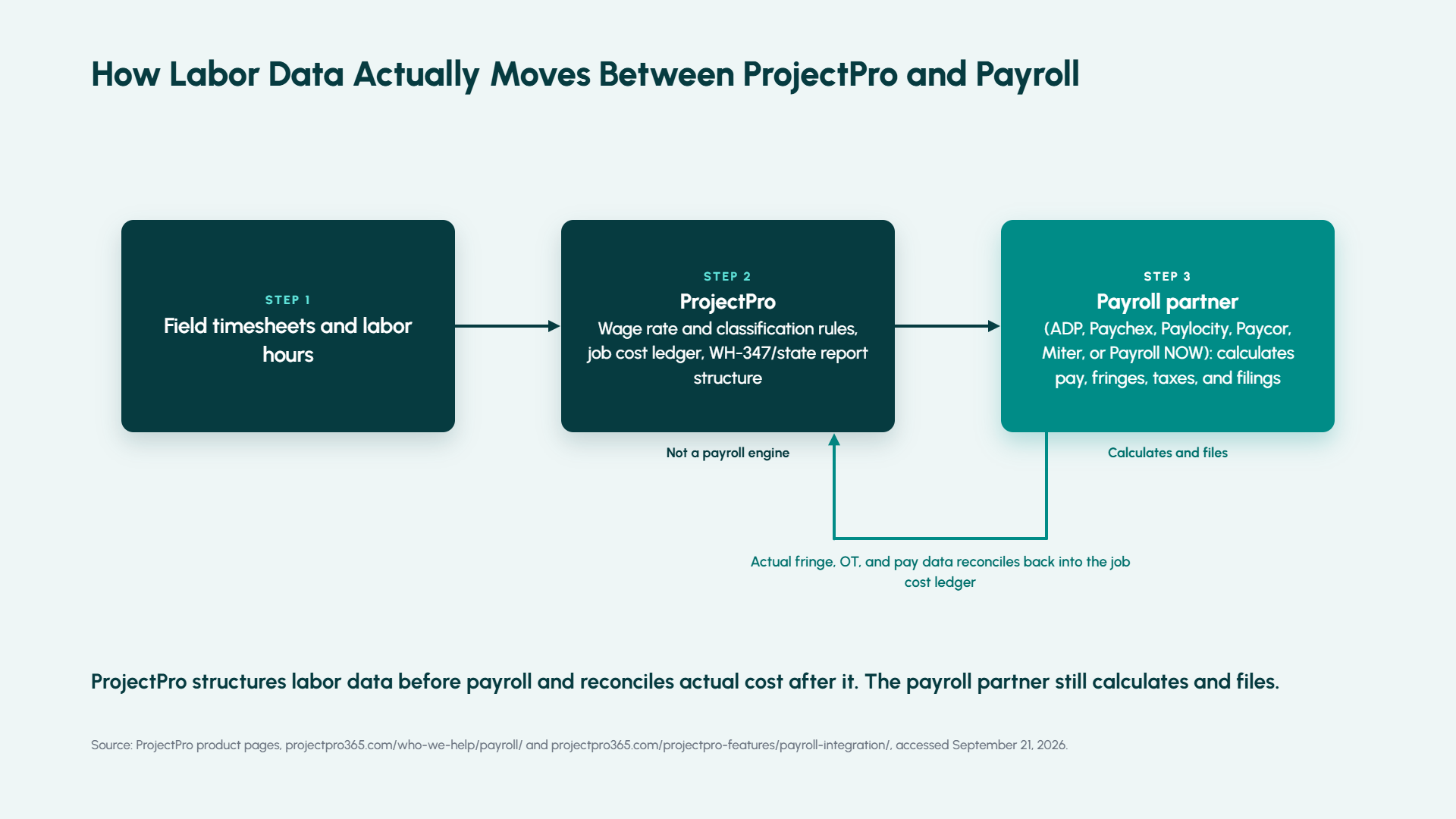
ProjectPro, Netsmartz’s construction ERP built on Microsoft Dynamics 365 Business Central, does not run payroll, and says so plainly on its own product pages. It works alongside outsourced payroll providers rather than replacing them, naming integrations with ADP, Paychex, Paylocity, Paycor, and Miter, plus a tighter path to Integrity Data’s Payroll NOW for firms that want payroll running inside Business Central itself. Fringe benefits, tax withholding, and the actual filing work stay with whichever payroll partner a contractor uses. In that sense, ProjectPro is not certified payroll software in the way a standalone payroll engine is: it does not calculate or file on a contractor’s behalf.

What ProjectPro is built to do sits on either side of that payroll run. On the front end, it maps labor codes to project wage rates by location and classification, so hours get categorized correctly (straight time, overtime, fringe-eligible or not) before they ever reach the payroll system. On the back end, once the payroll partner has calculated actual pay, fringes, and overtime, that data reconciles back into ProjectPro’s job cost ledger, so the labor burden on a certified payroll job shows up correctly against the right cost code. ProjectPro’s own materials describe generating WH-347 and state-format reports from that structured labor data, applying the wage and fringe rules that were set up on the front end.

What that does not mean is auto-filing with a state agency. Nothing in ProjectPro’s public materials claims a direct integration with California’s eCPR system or New York’s new portal specifically, and a contractor using either state’s system should confirm the export format and filing process with their implementation team rather than assume it is handled. The honest version of this story is data readiness and reporting structure, not a payroll engine and not a state filing service.

The Signature Is the Risk

Every certified payroll report still ends the same way it did when Form WH-347 was a typewritten page: someone signs it, and that signature is a legal statement, not an administrative formality. What changed in the last year is how many different systems that signature now has to satisfy: a federal web form that is optional but does not replace the underlying weekly obligation, a California system that has run independently for a decade, and a New York portal that started enforcing its own 30-day cycle and daily penalty on January 1, 2026.

For a CFO or controller, the practical question is not whether an ERP claims to handle certified payroll. It is whether the wage rates, classifications, fringe treatment, and apprentice ratios feeding that report are correct before anyone signs anything, and whether the system can prove it if an investigator asks. That is a data problem before it is a compliance problem, and it is worth auditing before the next bid, not after the next investigation.

Next Step

If certified payroll reporting on your Davis-Bacon or prevailing wage jobs still runs on spreadsheets, or on wage and classification data nobody fully trusts before it reaches payroll, it is worth a short conversation about what a structured job cost and wage data setup looks like in ProjectPro. Talk to the ProjectPro team at projectpro365.com to walk through your current process before your next audit or bid.

FAQs

Certified payroll is the weekly wage reporting required on federal Davis-Bacon projects and most state prevailing wage jobs. Each week, a contractor reports every covered worker’s hours, classification, wage rate, and fringe benefit treatment for that specific project, then signs a Statement of Compliance certifying the data is accurate and complete.

A normal payroll run pays employees on whatever cycle a company uses, often biweekly, and reports wages in aggregate. Certified payroll requires weekly reporting tied to a specific project, wage rates set by a government wage determination rather than a company’s standard pay scale, and a signed legal certification, not just a pay stub.

No. Some states accept the federal WH-347 form or a close variant, but others run entirely separate systems. California has required contractors to file through its own eCPR system since January 1, 2016, and New York started requiring submissions through a new state portal on January 1, 2026. A contractor working across state lines may need to satisfy more than one format inside the same company.

It is the signed certification section of Form WH-347, or the equivalent on a state form. Signing it certifies that the payroll data for that week is correct and complete, that supporting records are available on request, that reported classifications match the work performed, that any apprentices are properly registered, and that no improper deductions were taken from workers’ pay.

Generally, no. Certified payroll software and construction ERPs typically manage job costing, wage classification, and report generation, while a payroll provider, such as ADP, Paychex, or Paylocity, calculates actual pay, withholds taxes, and handles fringe benefit contributions. The two systems are meant to work together, with labor data flowing one way and actual pay and fringe data reconciling back the other way.

CFMA 2026 Member