
Ch 04 – Project Posting Groups
Contents
| INTRODUCTION |
| PROJECT POSTING GROUPS |
| Fields in the Project Posting Groups Window |
INTRODUCTION
Basically, project posting groups define the relationship between your project and the general ledger. So, the whole basic set up here, are account numbers from the chart of accounts stating where the system should post work in progress cost amounts, or where I should post item costs, and the sales.
PROJECT POSTING GROUPS
The purpose of Project Posting Groups is primarily for Business Central’s Project WIP Process. For Construction Accounting using the “Percentage of Completion” as the most common method of revenue recognition, ProjectPro has added the functionality to create financial entries for revenue recognition along with “Over Billings & Under Billing” calculations that can generate General Ledger Entries at month end.
*** ProjectPro does not use the standard Business Central Project WIP Calculation process ***
One aspect of planning projects is deciding which posting accounts to use for Project costing. To be able to post projects, you set up accounts for posting for each project posting group. A posting group represents a link between the Project and how it should be treated in the general ledger. When you create a project, you specify a posting group, and by default, each task you create for the Project is associated with that posting group. However, as you create tasks, you can override the default and select a posting group that is more appropriate.
Search for “Project Posting Groups” from the search tab and click on the one coming under Administration section, below page will open.
Make entries into the various fields. Skip fields you do not need. Be sure to enter the following fields to properly record transactions.
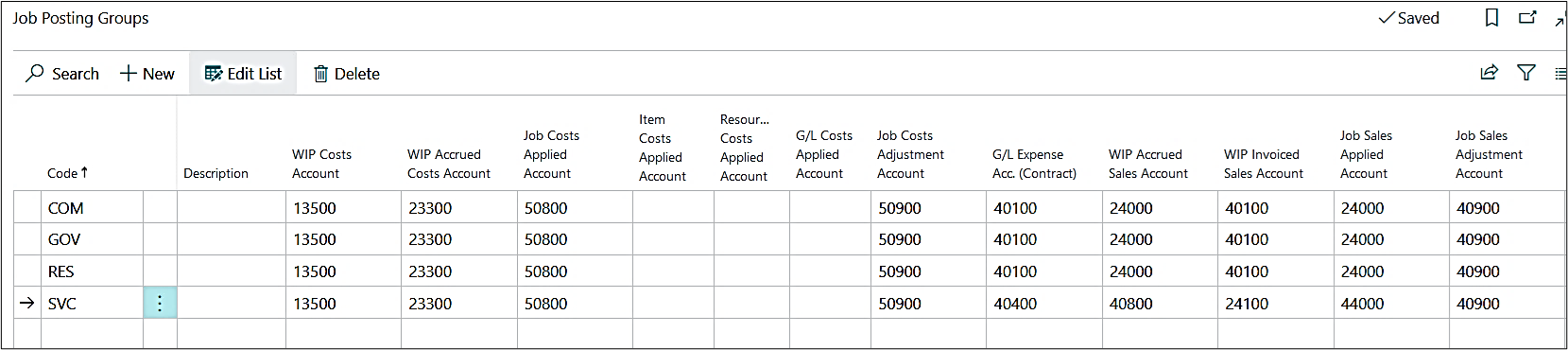
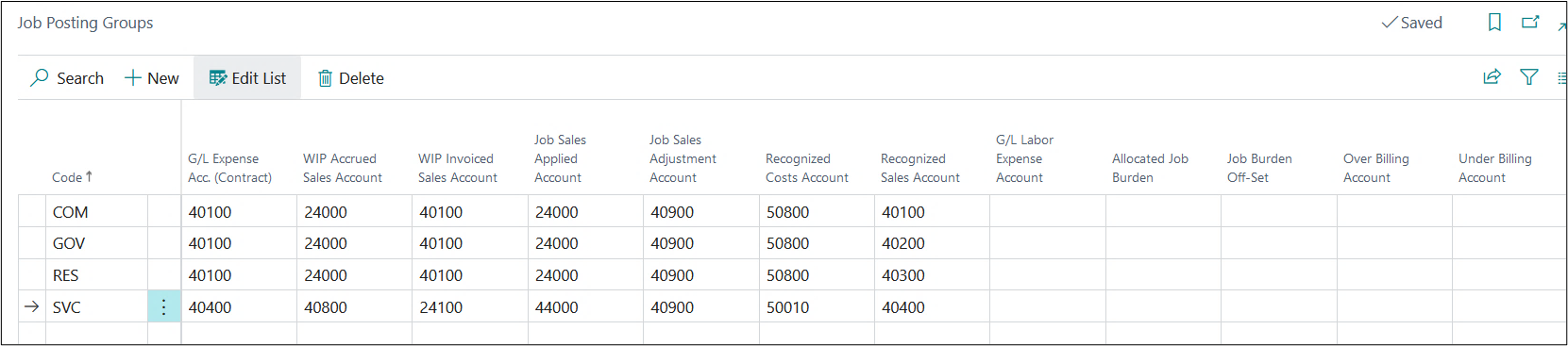
To see a list of the account number fields, click the Assist Button for the field. When the Chart of Accounts window appears, select the account you want, and then click OK.
Fields in the Project Posting Groups Window
| FIELDS | DESCRIPTION |
| Code | Specifies a code for the posting group that defines to which G/L account you post Project transactions when the Project card contains the Project posting group.The code must be unique with a maximum of 10 characters, including spaces |
| Description | Specifies the description or the full name of the posting group, if required. |
| WIP Cost Account | Specifies the work in process (WIP) account for the calculated cost of the project WIP for Project tasks with this posting group. The account is normally a balance sheet capital asset account.
When you recognize usage for a Project (moved to the income statement), the program transfers all the entries in this account to the account you specified in the Cost Account field in this window. **Not used by ProjectPro** |
| WIP Accrued Costs Account | This account is for the Project’s WIP method Cost Value or Cost of Sales, which accumulates postings when the costs recognized, based on the invoiced value of the Project, are greater than the current usage total posted. The account is normally a balance sheet accrued expense liability account.
When a WIP adjustment requires you to increase the usage costs that you post to your income statement, you post to this account. **Not used by ProjectPro** |
| Project Costs Applied Account | Specifies the balancing account to WIP Cost Account. The account is normally a contra (or Credit) for a negative expense account. After you calculate recognition, the program moves entries from WIP Cost Account into this account.
**Not used by ProjectPro** |
| Item Costs Applied Account | Specifies the balancing account for the WIP Costs account for items used in projects. The account is normally an expense (credit) account.
**Not used by ProjectPro** |
| Resource Costs Applied Account | Specifies the balancing account for the WIP Costs account for resources used in projects. The account is normally an expense (credit) account.
**Not used by ProjectPro** |
| G/L Costs Applied Account | Specifies the balancing account for the WIP Costs account.
**Not used by ProjectPro** |
| Project Costs Adjustment Account | Specifies the balancing account to WIP Accrued Costs account if the work in process (WIP) method for the project is Cost Value or Cost of Sales. The account is normally an expense account.
**Not used by ProjectPro** |
| G/L Expense Acc. (Contract) | Specifies the sales account to be used for G/L expenses in Project tasks with this posting group. This is usually an income statement direct expense account. For example, you can use this account to write up expenses on a Project. If left empty, the G/L account entered on the planning line will be used.
**Not used by ProjectPro** |
| WIP Accrued Sales Account | Specifies an account that will be posted to when the revenue that can be recognized for the Project is greater than the current invoiced value for the Project if the work in process (WIP) method for the Project is Sales Value.
If the WIP method for the Project is Percentage of Completion, this field contains the account that will be used for posting the recognizable sales value of the total usage currently completed on the Project. The account is normally a Balance Sheet accrued income asset account. When you record the Project sales, the program credits the resource or item account and debits the accounts receivable account. **Not used by ProjectPro** |
| WIP Invoiced Sales Account | Specifies the account for the invoiced value, for the Project for Project tasks, with this posting group. The account is normally a Balance sheet liability account.
**Not used by ProjectPro** |
| Project Sales Applied Account | Select the G/L account that represents the unearned revenue account. This is usually a balance sheet account (liability). When you run the WIP Process through the Periodic Activities Menu, the WIP Sales Account will be Credited, and the Project Sales Adjustment Account will be Debited.
**Not used by ProjectPro** |
| Project Sales Adjustment Account | Specifies the balancing account to the WIP Accrued Sales account if the work in process (WIP) Method for the project is the Sales Value. The account is normally an income account.
**Not used by ProjectPro** |
| Recognized Costs Account | Specifies the account for recognized costs for the project. The account is normally an expense account.
**Not used by ProjectPro** |
| Recognized Sales Account | Specifies the account for recognized sales (or revenue) for the project. The account is normally an income account.
This account is typically used during the Progress Billing and Revenue Recognition process. 1. During Progress Billing, this account is used for the revenue posting, when the “Use Project Planning Lines” (Project Setup) is not used on the project card. 2. During Revenue Recognition, this account is used to adjust Over and Under Billings. |
| G/L Labor Expense | Specify the G/L Account to be used for “Advanced Payroll Import” on General Journal.
Note: Further technical setup may be required for 3rd party payroll services. |
| Allocated Project Burden | Specifies the Allocated Project Burden G/L Account – Debit. This account is used when using “Advanced Project Burden Allocation to G/L” batch. |
| Project Burden Off-Set | Specifies the Project Burden Off-Set G/L Account – Credit. This account is used when using “Advanced Project Burden Allocation to G/L” batch. |
| Over Billing Account | Specifies the Allocated Rev. Rec. G/L Account for over billings – Credit. This account is used when using “Revenue Recognition” process. |
| Under Billing Account | Specifies the Allocated Rev. Rec. G/L Account for under billings – Debit. This account is used when using “Revenue Recognition” process. |