
Ch 12 – Revenue Recognition
Contents
| INTRODUCTION |
| REVENUE RECOGNITION SETUPS |
| 1. Projects Setup |
| 2. Project Posting Group |
| 3. User Setup |
| 4. Project Card |
| REVENUE RECOGNITION PROCESS |
| 1. Project Forecast Method |
INTRODUCTION
Revenue Recognition is a Generally Accepted Accounting Principle (GAAP) that allows revenues to be recognized on the income statement in the period when realized and earned – not necessarily when cash is received.
Revenue Recognition features allow the user to see the Project Performance, as Revenue Recognition shows figures on various metrics like Gross Profit, Gross Revenue, Net Profit and Net Revenue. The Billing Adjustment (Over/Under Billing or Net Revenue) could then be posted to the General Ledger Account.
REVENUE RECOGNITION SETUPS
1. Projects Setup
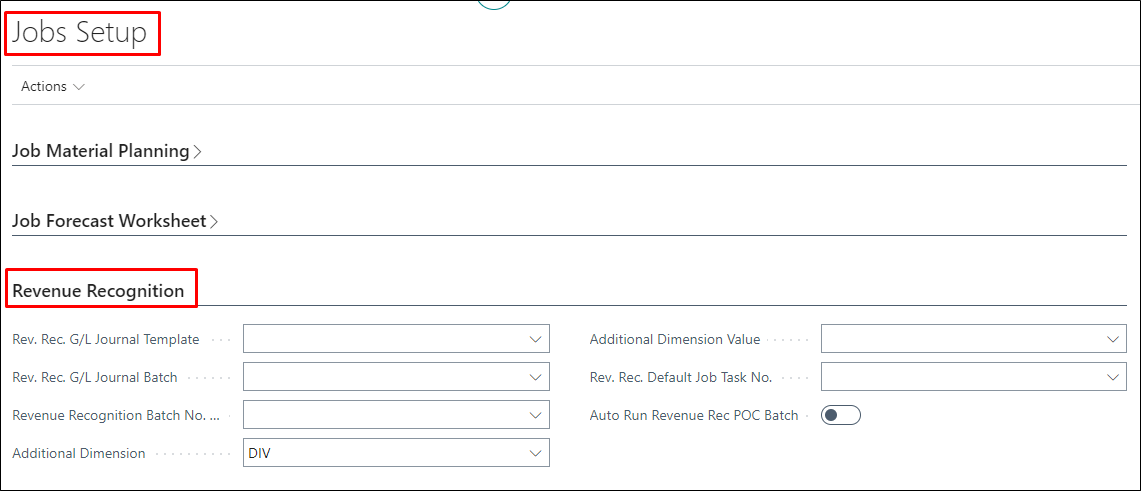
| FIELDS | DESCRIPTION |
| Rev. Rec. G/L Journal Template | Specifies the default General Journal Template to be used for the posting of Revenue Recognition entries. |
| Rev. Rec. G/L Journal Batch | Specifies the default General Journal Batch as per template selected above to be used for the posting of Revenue Recognition entries. |
| Revenue Recognition Batch No.Series | Specifies the default No. Series to be used for the reversal entries. |
| Additional Dimension | Specifies the default Dimension Code to be used for every revenue recognition entry when posted to G/L in addition to the existing dimensions on Project. |
| Additional Dimension Value | Specifies the Dimension Value as per code selected above to be used for every revenue recognition entry when posted to G/L in addition to the existing dimensions on Project. |
| Rev. Rec. Default Project Task No. | Species the default Project Task No. to be used at the backend for the posting of General Journal. |
| Auto Run Revenue Rec POC Batch | Specifies if you want the batch “Calculate Revenue Recognition” to run automatically. |
2. Project Posting Group
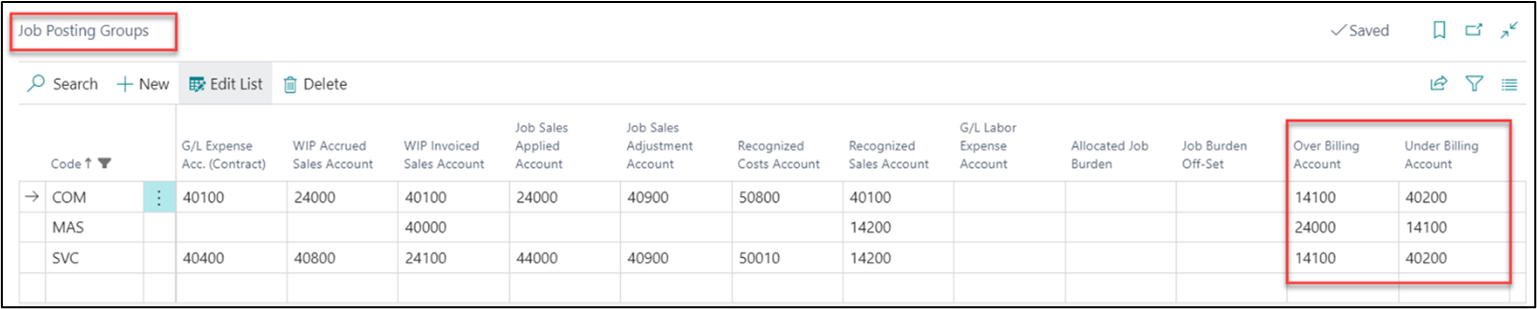
The Project Posting Groups page consists of two accounts to be mapped that are related to over and under billing calculation through revenue recognition and posted through General Journal.
The Over Billing Account specifies the allocated rev. rec. G/L account to be credited, while the Under Billing Account specifies the rev. rec. G/L account to be debited.
3. User Setup
On the User Setup page, permissions can be assigned for the following:
- Access to Rev. Recognition Report – Specifies if the user has access to run the Revenue Recognition Summary Detail functionality.
- Modify Revenue Recognized Project – Specifies if the user has access to run “Revenue Recognition Batch/Report”, modify the details on the “Revenue Recognition Summary Details” page, and modify the “Revenue Recognized” Boolean on the Project Card.

4. Project Card
On the Project card under “Rev Rec POC Calculation” we can specify the POC Method based on which the project revenue will be recognized.
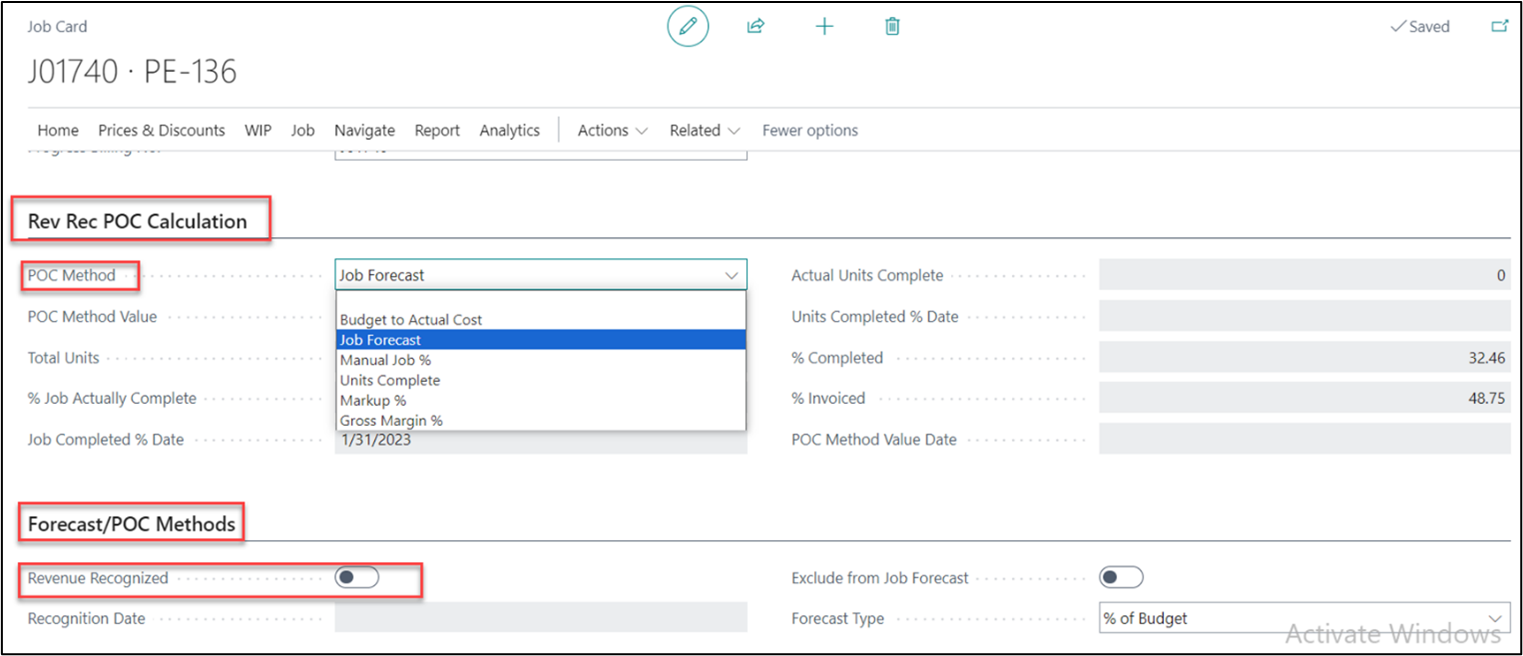
| FIELDS | DESCRIPTION |
| POC Method | We can select different methods, if left blank then the system calculates POC based on “Project Forecast”. |
| POC Method Value | This field gets enabled on selecting POC Method “Markup%” and “Gross Profit %”. On this field user enters the Percentage for Markup/Gross Margin. |
| Total Units | This field gets enabled when “Units Complete” Method is selected. |
| % Project Actually Complete | This field gets enabled when “Manual Project%” Method is selected. |
| Project Completed % Date | This field gets enabled when “Manual Project%” Method is selected. |
| Actual Units Complete | This field gets enabled when “Units Complete” Method is selected. |
| Units Completed % Date | This field gets enabled when “Units Complete” Method is selected. |
| % Completed | The percentage value which is derived by Actual (Total Cost) / Budget (Total Cost) |
| % Invoiced | The percentage value which is derived by Invoiced (Total Price) / Billable (Total Price) |
| POC Method Value Date | The Date gets populated based on the value entered on field “POC Method Value” also the date populates for “Markup%” and “Gross Profit %” |
REVENUE RECOGNITION PROCESS
The revenue recognition process can be performed on a project using different methods available as POC Methods on the project card. To understand the same, let’s go through them one by one.
1. Project Forecast Method
Select the POC Method on the project card as “Project Forecast”, see below.
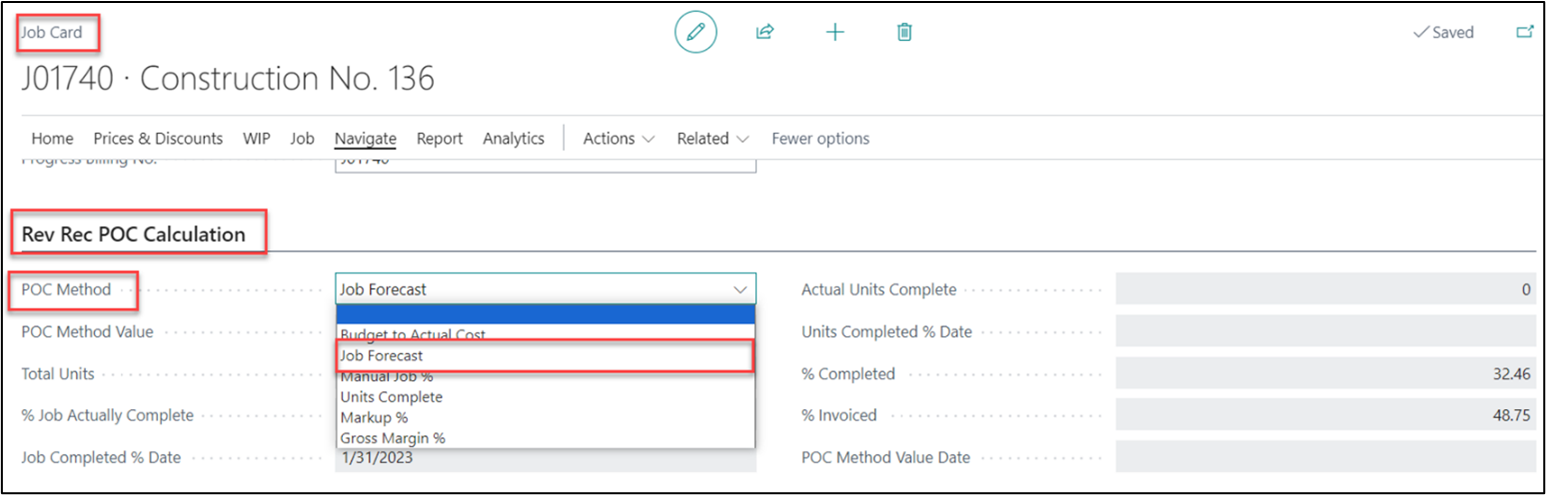
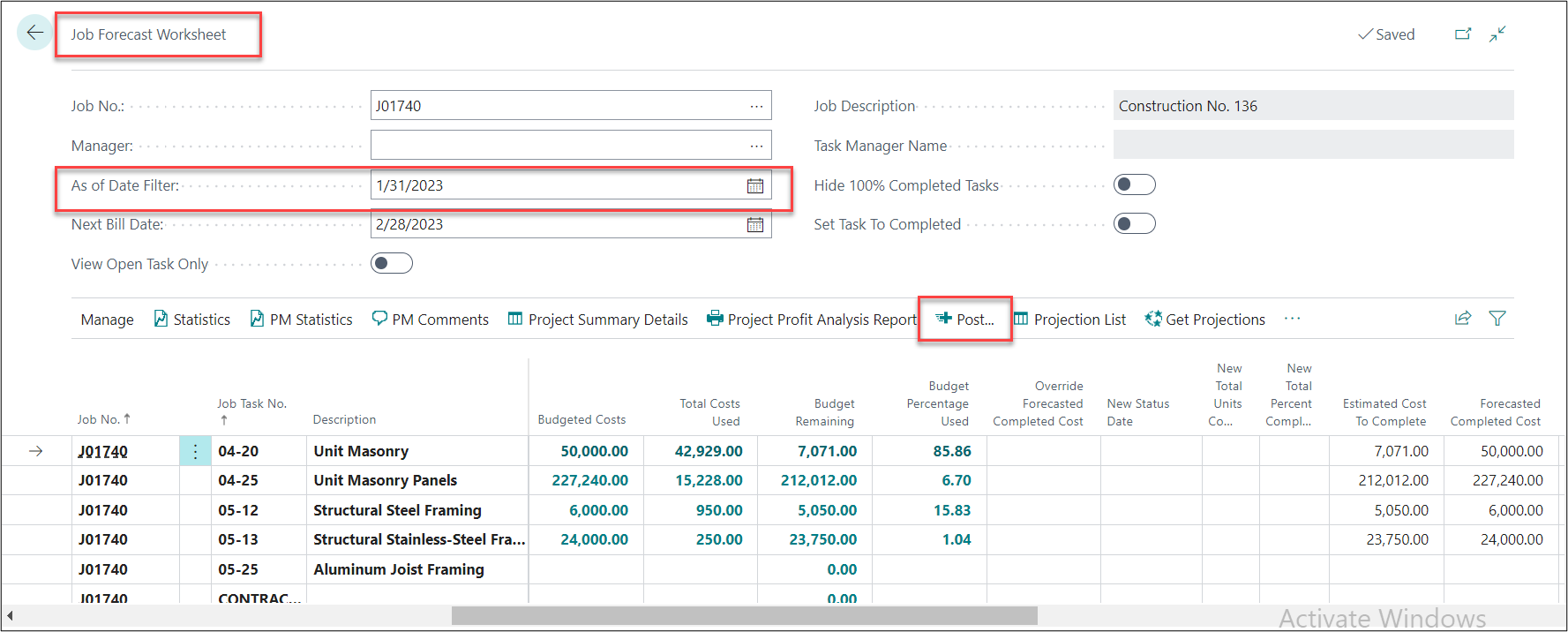
This method creates a revenue recognition entry on the Revenue Recognition Summary Details page when a project forecast is posted for the project.
On the Revenue Recognition page, the system will calculate metrics which determine the performance of the project.
For Example: Gross Revenue, Gross Profit, Net Revenue, Net Profit, Under Billings and Over Billings.
As per the illustration below, the “Billing to Date” is $120,000 and Gross Revenue is $77,277.60 therefore the project is billed excessively with value of $42,722.40. The Excessive billing for the period will be shown under the “Over Billings” column.

This Over Billings value can be posted to the General Ledger account by clicking on “Generate General Journal”.
