Ch 13 – Customer Lien Waiver
Contents
STORY BOARD
CUSTOMER LIEN WAIVER
A “Customer Lien Waiver” document is a “Legal” document that waives the right to place a lien on a property”. A lien is a claim on the property as a security for the payment of a debt or service. A lien waiver document is signed by the contractor to the construction project who has received payment and agrees to give up any future lien rights against the property.
Lien Waiver Types
There are 4 types of the Customer Lien Waiver.
- Conditional Progress Lien Waiver – This form is released by the Contractor to state that he has billed the customer with a sales invoice and against this billing, he has not received the payment due. This form is signed by the claimant, claiming the amount which is due for the payment.
- Unconditional Progress Lien Waiver – This form is released by the Contractor to state that he has received the amount against the billed invoices. It is an acknowledgment that the Claimant is acknowledging that he has received the amount that was due for the payment from the customer end.
- Conditional Final Lien Waiver – This Form is released by the Contractor which is the acknowledgment that the invoice on which he is releasing the “Conditional Final Lien Release” is the final invoice, which is invoiced, and the amount of this invoice is the final payment yet to be received.
- Unconditional Final Lien Waiver – This form is released at the time when the contractor has received all the payments that were due for payment, and nothing is due for the payment against the issued invoices.
Note: A lien waiver is a legal document where one party waives their right to place a lien against another party’s property for money owed for work performed, raw materials used, and equipment supplied to improve that property.
Let’s explain all Customer Lien Waiver Reports using the example below:
The below screenshot has the overview of what process was initiated in January 2023 and how it ended in December 2023 followed by different “Progress Bill” invoices followed by the payments at different month intervals.
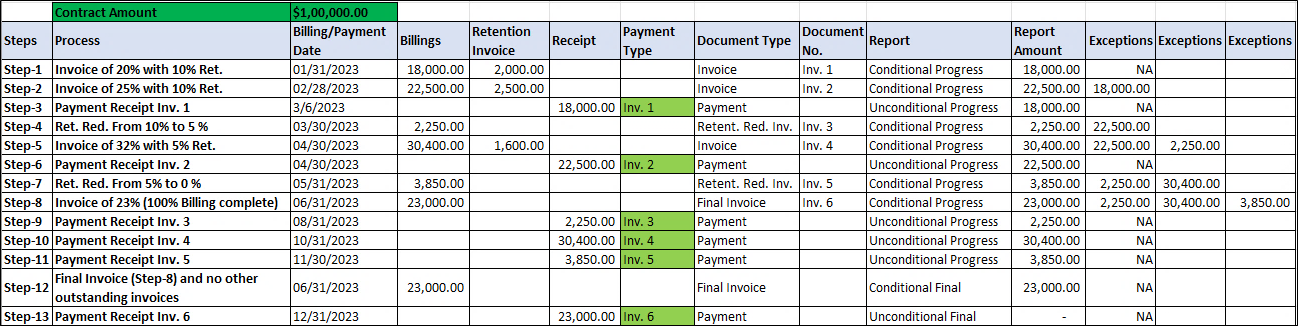
Step 1 – Invoice of 20% with 10% Retention
- On our PB we are creating our 1st invoice () on date 01/31/2023 with 20% of its work amount with additional retention of 10%.
- This will give us the Billing of $18,000.00 and Retention of $2,000.00
- In this scenario, we will run our “Conditional Progress Lien Waiver” report.
a) This report will show the report amount of $18,000.00 with no Exceptions, since this is the first billing entry.
Customer Ledger Entry – We must select the Lien Waiver type as “Conditional Progress” on the Invoice line having the “Retention Ledger Code” as “Normal”.
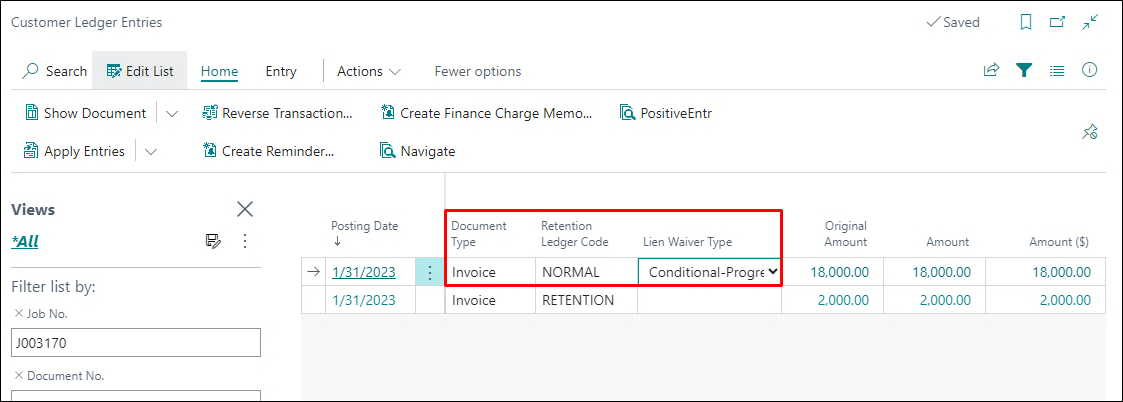
Conditional Progress Lien Waiver Report
This Lien waiver is released by the Contractor to claim the amount mentioned on the field “Amount of Check” and the invoices mentioned under the “Exceptions” which are due for payment.
**********Report screenshot*****
Step 2 – Invoice of 25% with 10% Retention
- On our PB we are creating our 2nd invoice () on date 02/28/2023 with 25% of its work amount with additional retention of 10%.
- This will give us the Billing of $22,500.00 and Retention of $2,500.00
- In this scenario, we will run our “Conditional Progress Lien Waiver” report.
a) This report will show the reported amount of $22,500.00, which is our current invoice amount.
b)This will also show an Exception of our prior pending invoice (Step1 – Invoice 1 -) for the amount of $18,000.00.
Customer Ledger Entry – We must select the Lien Waiver type as “Conditional Progress” on the Invoice line having the “Retention Ledger Code” as “Normal”.
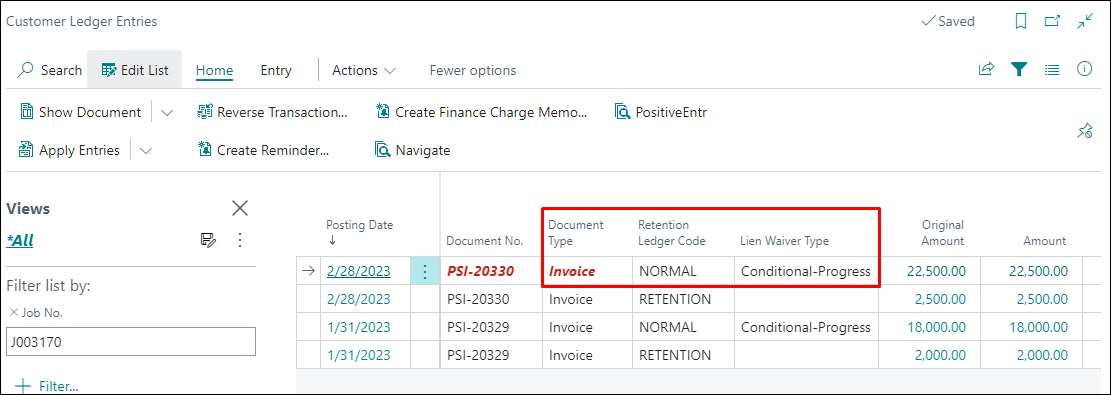
Conditional Progress Lien Waiver Report
**********Report screenshot*****
Step 3 – Payment Receipt against 1st Invoice
- Receiving the payment against our 1st progress billing invoice () Billed date (01/31/2023) for amount ($18,000.00).
- In this scenario, we will run our
“Unconditional Progress Lien Waiver” report.
a) This report will show the amount in the field “Check Amount) as $18,000.00, which is our payment amount.
Customer Ledger Entry – We must select the Lien Waiver type as “Unconditional Progress” on the 1st Invoice line against which the payment has been received with the “Retention Ledger Code” as “Normal”.
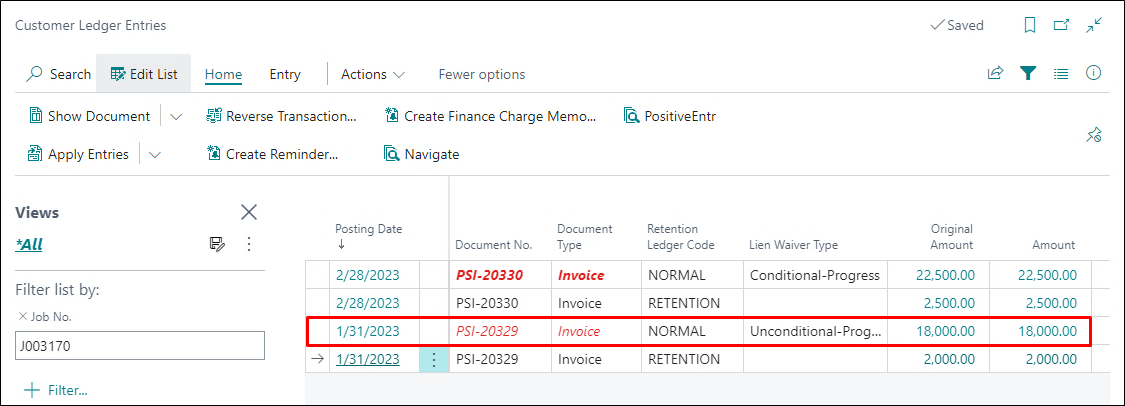
Note: Unconditional Progress Lien Waiver Report on 1st Invoice () As in the above step the payment has been received for this invoice.
Conditional Progress Lien Waiver Report – On this report, only that amount will come in the filed “Amount of Check” as this is the acknowledgment by the Contractor that he has received the payment.
**********Report screenshot*****
Step 4 – Invoice for reducing the “Retention” from 10% to 5 % without billing.
-
On our Progress Billing we are creating our 3rd invoice () on date 03/31/2023 in this invoice we are reducing the “Work Retention” % from 10% to 5% with the same percentage of completion on the Progress Billing line which was in the previous billing.
-
This will create the Retention Reduction Invoice of $2250.00.
-
In this scenario, we will run our “Conditional Progress Lien Waiver” report.
a)This report will show the report amount of $ 2,250.00, which is our current invoice amount.
b)This will also show an Exception of our prior pending invoice (Step 2 – Invoice 1) for $22,500.00.
Customer Ledger Entry
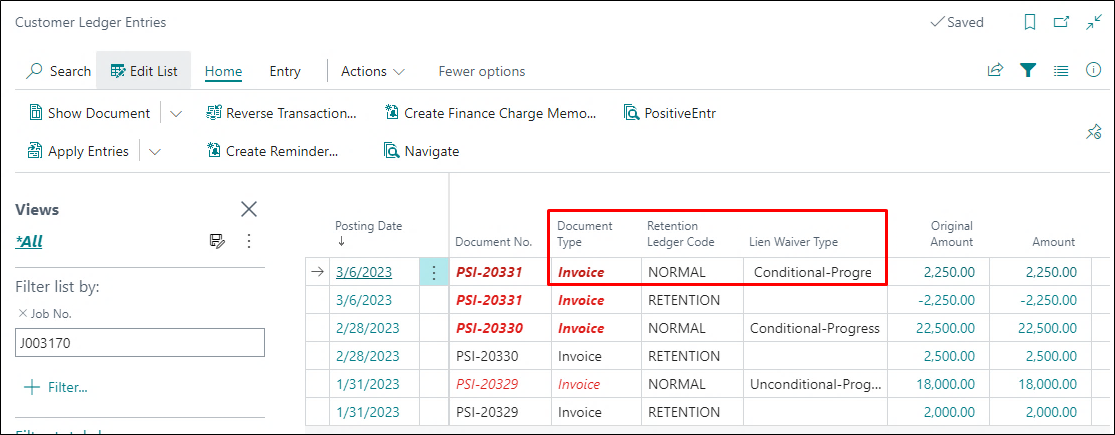
Conditional Progress Lien Waiver Report
**********Report screenshot***
Step 5- Invoice of 32% with 5% Retention
-
On our PB we are creating our 4th invoice () on date 04/30/2023 with 32% of its work amount with additional retention of 5%.
-
This will give us the Billing of $30,400.00 and Retention of $1600.00
-
In this scenario, we will run our “Conditional Progress Lien Waiver” report.
a)This report will show the reported amount of $30,400.00, which is our current invoice amount.
b)This will also show an Exception of our prior pending payment Invoices for –
c)Invoice 2 – $22,500.00
d)Invoice 4 – $2250.00
Customer Ledger Entry
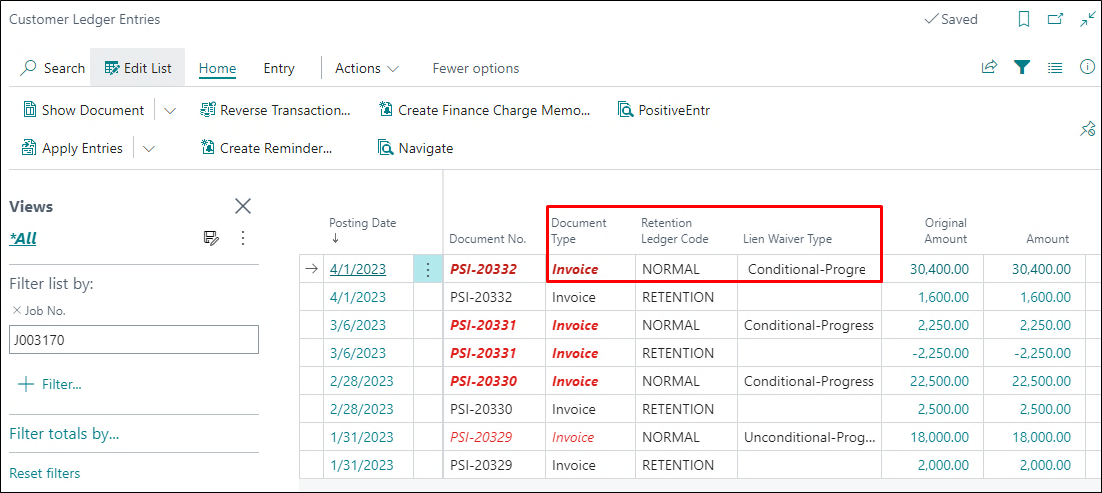
Conditional Progress Lien Waiver Report
**********Report screenshot***
Step 6 – Payment Receipt against 2nd Invoice () on date 04/30/2023 for the Amount – $22,500.00.
-
Receiving the payment against our 2nd progress billing invoice () for the amount $22,500.00.
-
In this scenario, we will run our “Unconditional Progress Lien Waiver” report.
a)This report will only show the check amount of $22,500.00, which is our payment amount.
Customer Ledger Entry
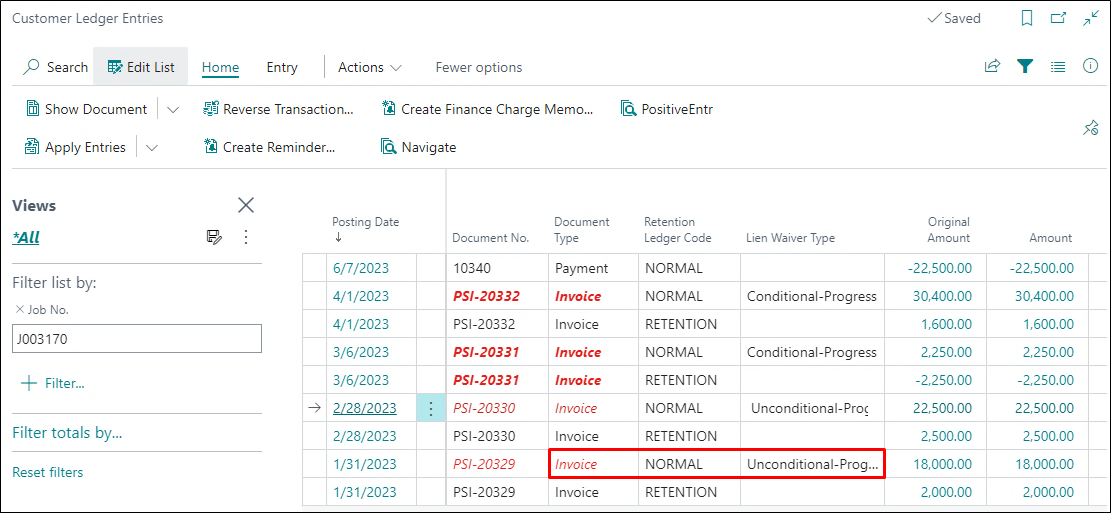
**********Report screenshot***
Step 7 – Invoice for reducing the “Retention” from 5% to 0% without billing.
-
On our Progress Billing we are creating our 5th invoice () on date 05/31/2023
i)in this invoice we are reducing the “Work Retention” % from 5% to 0% with same percentage of completion on the Progress Billing line which was in the previous billing.
ii)This will create the Retention Reduction Invoice of $3850.00.
iii)In this scenario, we will run our “Conditional Progress Lien Waiver” report.
This report will show the report amount of $3850.00, which is our current invoice amount.
o This will also show an Exception of our prior pending invoice (Step 4 & Step – 5)
Invoice – 3 – $2250.00.
Invoice – 4 – $30,400.00
Customer Ledger Entry
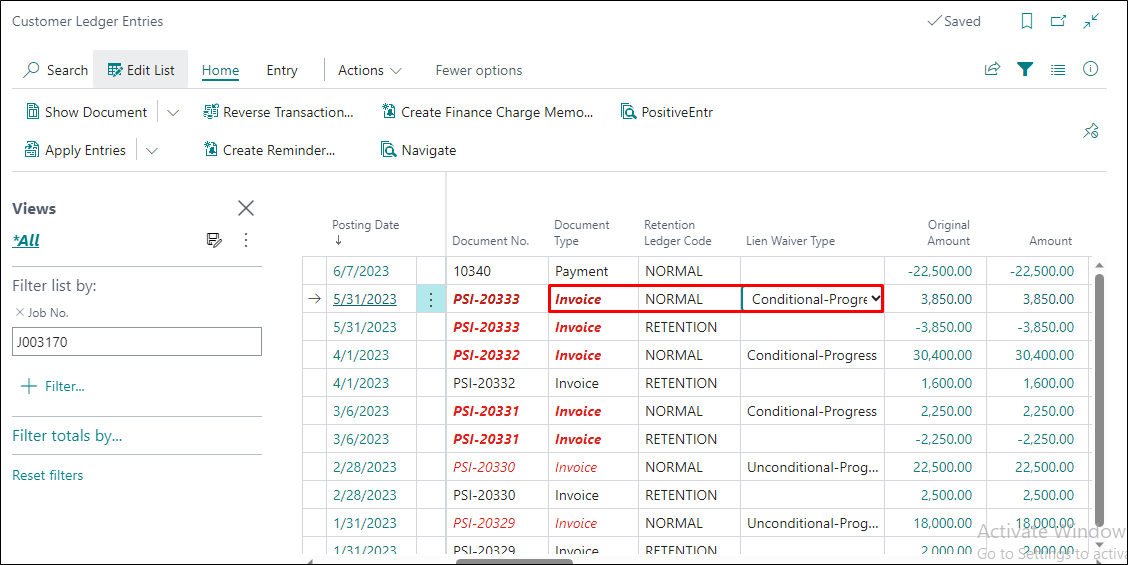
Conditional Progress Lien Waiver Report
**********Report screenshot***
Step 8 – Invoice of 23% with 0% Retention
-
On our PB we are creating our 6th invoice () on date 06/30/2023 with 23% of its work amount with Retention 0%.
-
This will give us the Billing of $23,000.00 without any Retention.
In this scenario, we will run our “Conditional Progress Lien Waiver” report.
o This report will show the report amount of $23,000.00 with no Exceptions since this is the first billing entry.
o This will also show an Exception of our prior pending invoice (Step 4 & Step – 5)
Invoice – 3 – $2250.00.
Invoice – 4 – $30,400.
Invoice – 5 – $3850.00.
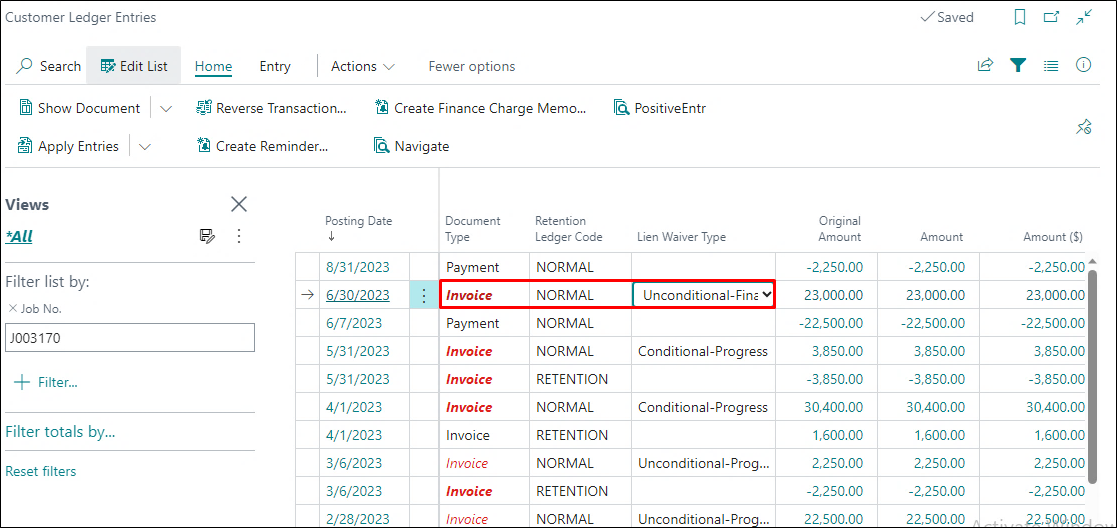
Customer Ledger Entry – We must select the Lien Waiver type as “Conditional Progress” on the 5th Invoice line having the “Retention Ledger Code” as “Normal”.
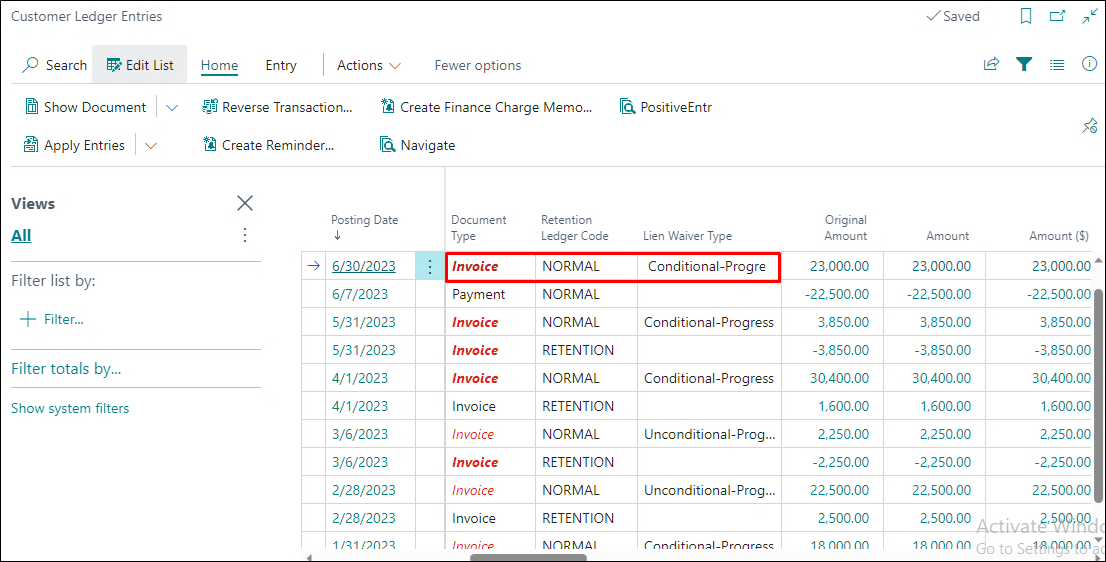
Conditional Progress Lien Waiver Report
Step 9 – Payment Receipt against 3rd Invoice ()
-
In this scenario, we will run our“Unconditional Progress Lien Waiver” report.
o This report will show the amount of the check as $2250.00, which is the received payment amount.
Customer Ledger Entry
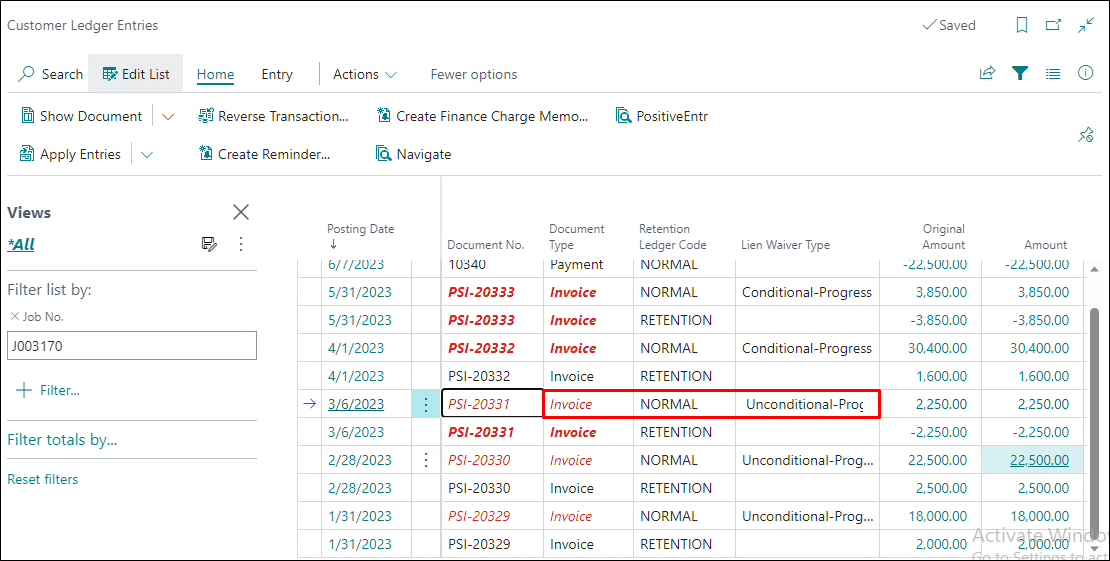
Conditional Progress Lien Waiver Report
*******Report Screen Shot*******
We have received the payments of 4th & 5th Invoices & also released the Unconditional Leane Report as well which showed the amount of the payment received.
Step 10 – Invoice of 23% with no Retention
-
On our PB we are creating our6th invoice ()” on date 06/30/2023 with 230% of its work amount with no retention
-
This will give us the Billing of $23,000.00 with 0 Retention.
-
In this scenario, we will run our“Conditional Final Lien Waiver” report.
o This report will show the reported amount of $23,000.00 with no Exceptions since this is the Final Invoice for 100% work completion.
Customer Ledger Entry – We must select the Lien Waiver type as “Conditional Final” on the Invoice line having the “Retention Ledger Code” as “Normal”.
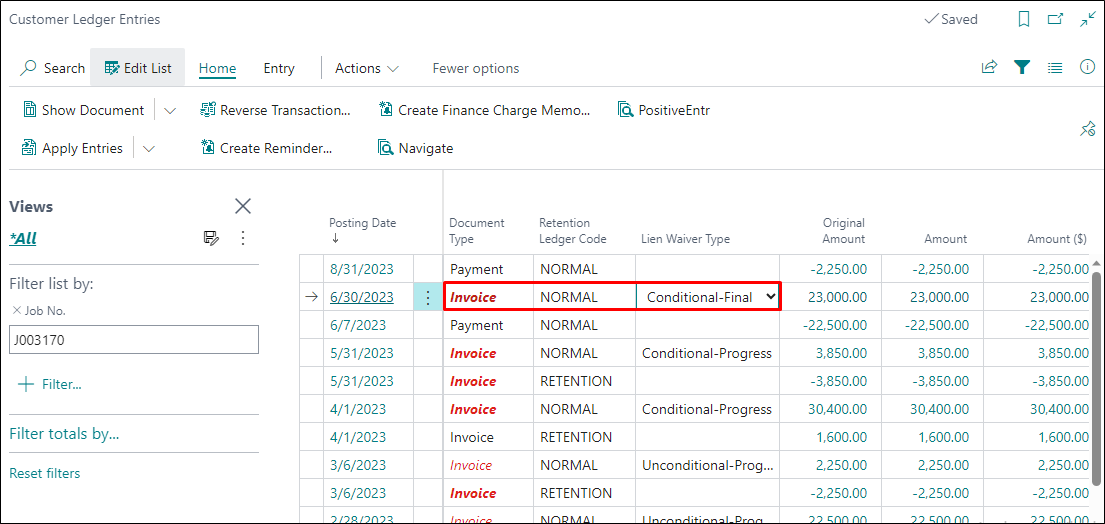
Conditional Progress Lien Waiver Report
*******Report Screen Shot*******
Step 11 – Payment Receipt against 5th Invoice () Invoice date (06/30/2023) Invoice Amount ($23,000.00)
- Receiving the payment against our 6th progress billing invoice () for $23,000.00.
- In this scenario, we will run our“Unconditional Final Lien Waiver” report.
o This report will not show any Check of the amount on the report.
Conclusion – The Unconditional Final report will not show any amount part on the report which means that this is only the acknowledgment that the contractor has received the complete payment against the billings, and nothing is pending to be billed or to receive the pending payments.
Customer Ledger Entry